Recording Studio Website Prompt: Dark Editorial Design with Turning Tape Reels for Bolt, v0 & Lovable
Recording studio website prompt for Bolt, v0 and Lovable. Near black and gold, editorial serif, turning tape reels drawn in SVG, room rates, gear index, full copy.
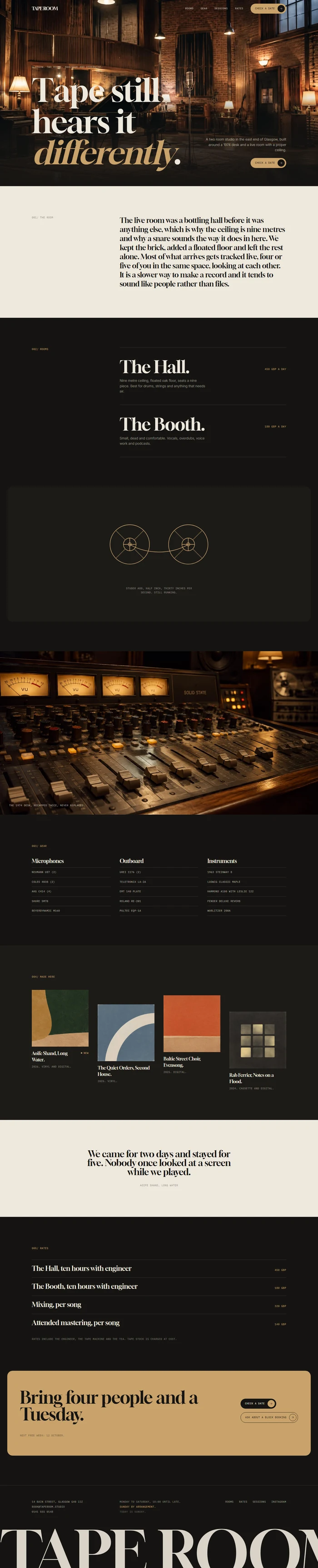
# Tape Room: Recording Studio Website Prompt ## 1. Goal Build an editorial, calm, premium website for **Tape Room**, a two room analogue recording studio in Glasgow. It should read like a well set record sleeve: near black ground, warm gold accent, huge serif headlines against small quiet text, real photographs of the live room given space. Restraint over effects. One strong idea per section. ## 2. Tech Stack ``` React + Vite + TypeScript + Tailwind CSS + Framer Motion (motion/react) ``` No component libraries. `lucide-react` only for the two arrow glyphs in buttons. No icon grids, no decorative icon sets. ## 3. Design system Tokens, and nothing outside them: ```css :root { --paper: #EEE8DD; /* light ground */ --ink: #151412; /* dark ground and text */ --accent: #C9A26B; /* gold, the only accent */ --on-accent: #151412; --surface: #1D1B18; /* tinted dark ground */ --muted: #9A928477; /* secondary text, 62% mix */ --line: rgba(238,232,221,0.15);/* hairlines */ --radius: 8px; --panel-radius: 24px; } ``` This site is dark led: `--ink` is the default ground and `--paper` is the text. Sections alternate in this rhythm: dark, dark, surface, paper, dark, accent, dark footer. Structure with 1px hairlines and tints. No drop shadows, no boxed cards, no gradients. ## 4. Typography ```html <link href="https://fonts.googleapis.com/css2?family=Gloock&family=Inter:wght@300;400;500&family=IBM+Plex+Mono:wght@400&display=swap" rel="stylesheet" /> ``` - **Display:** Gloock 400, letter-spacing -0.02em, line-height 0.98. Hero 96 to 150px, section titles 48 to 76px. - **Body:** Inter 300, 16px, line-height 1.55, muted colour for secondary text. - **Meta layer:** IBM Plex Mono 400, 11px, uppercase, letter-spacing 0.06em. Used only for real facts: room sizes, day rates, years, index labels like `002/ Rooms`. - One italic accent word per headline at most, set in gold, and only in about half the headlines. ## 5. Signature element **Two tape reels, drawn in SVG, turning slowly.** A single stroke drawing in gold on the dark ground: two circles with a spindle cross in each, joined by a thin tape path that dips between them. Both reels rotate at 6 seconds per turn, the left one clockwise, the right anticlockwise. On hover the rotation speeds up to 3 seconds and the tape path tightens very slightly. It appears once, in an inset panel, and nothing else on the page competes with it. Stroke width 1.5px, no fill, no glow, no shadow. Respect `prefers-reduced-motion` by showing it still. ## 6. Sections, each a different skeleton 1. **Navbar**: 76px, transparent over the hero. Wordmark left, four links right in mono, one gold pill button with a separate round arrow circle. Becomes solid ink after 80px of scroll. 2. **Hero, film title**: full bleed photograph of the live room with a dark scrim across the bottom third. Headline set bottom left like a film title. One sentence and the pill CTA bottom right. Min height `clamp(560px, 82vh, 860px)`, never `100vh`. *Photograph: a large live room with wood panelling, a grand piano and vintage ribbon microphones, warm lamplight, no people.* 3. **Statement**: paper ground. One long serif paragraph starting at one third of the width, with the mono label `001/ The room` in the left column. No image. 4. **Rooms, Swiss list**: dark. Label column left reading `002/ Rooms`, then two enormous stacked room names from one third of the width, each with a tiny description and a day rate on the right. Hovering a row reveals a small photograph beside the name. 5. **Signature panel**: surface ground, inset 16px from the page edges, `--panel-radius`. The tape reels (section 5) centred, with a museum style caption beneath in mono. 6. **The desk, photo led**: full bleed photograph, no headline block. Tiny caption bottom left in mono. *Photograph: a vintage analogue mixing console with faders and VU meters, shallow depth of field, warm tungsten light.* 7. **Gear, index**: dark. A ruled index in three columns: microphones, outboard, instruments. Plain text rows on hairlines, mono for model numbers. Dense on purpose. 8. **Sessions, loose grid**: surface. Four records made here at different vertical offsets, each with sleeve artwork, artist, year and format in mono. One has a small gold dot badge reading `New`. 9. **One quote**: paper ground, a single centred quote in Gloock at 40px, signature line beneath in mono. No photograph, no carousel. 10. **Rates, hairline rows**: dark. Four full width rows separated by hairlines: day rate, evening, mixing, mastering. Price right aligned in mono. 11. **Booking CTA, inset panel**: accent ground, inset panel, big serif line, two actions, and a mono line about the next free week. 12. **Footer**: ink. A giant cropped `TAPE ROOM` wordmark across the full width, address, opening hours with today highlighted, four small links. ## 7. Motion One purposeful motion per section, no more. Durations 0.6 to 1.2s, ease `cubic-bezier(.22,1,.36,1)`. - Hero headline fades up 20px once. - Photographs settle from `scale 1.03` to `1` over 1.1s when they enter view. - Room rows: the hover photograph fades in over 0.25s. - Tape reels turn continuously as described. - Hover states are quick and quiet: the arrow circle slides 4px, links underline from the left. - No marquees, no parallax, no scroll jacking, no bouncing. ## 8. Responsive - **Mobile under 768px:** hero min height drops to `clamp(460px, 70vh, 620px)` and the sentence moves under the headline. Room rows lose the hover photograph and show a small thumbnail on the left instead. The gear index becomes one column. The loose grid stacks with offsets removed. Nav keeps the wordmark and the CTA, other links move behind a text `Menu` toggle. No horizontal page scroll anywhere. The sessions row may scroll inside itself. - **Tablet:** sessions grid two columns, gear index two columns. - **Desktop:** 1200px content width, side gutters 40px, section padding 120 to 140px. ## 9. Full copy **Wordmark:** TAPE ROOM. Meta line: `GLASGOW. TWO ROOMS. ANALOGUE AND OTHERWISE.` **Nav:** Rooms, Gear, Sessions, Rates. Button: `Check a date` **Hero** - Headline: `Tape still hears it *differently*.` - Sentence: `A two room studio in the east end of Glasgow, built around a 1974 desk and a live room with a proper ceiling.` - CTA: `Check a date` **Statement** (label `001/ The room`) `The live room was a bottling hall before it was anything else, which is why the ceiling is nine metres and why a snare sounds the way it does in here. We kept the brick, added a floated floor and left the rest alone. Most of what arrives gets tracked live, four or five of you in the same space, looking at each other. It is a slower way to make a record and it tends to sound like people rather than files.` **Rooms** (label `002/ Rooms`) - **The Hall.** `Nine metre ceiling, floated oak floor, seats a nine piece. Best for drums, strings and anything that needs air.` `450 GBP a day` - **The Booth.** `Small, dead and comfortable. Vocals, overdubs, voice work and podcasts.` `180 GBP a day` **Signature caption:** `Studer A80, half inch, thirty inches per second. Still running.` **Desk caption:** `The 1974 desk, recapped twice, never replaced.` **Gear** (label `003/ Gear`) - Microphones: `Neumann U87 (2)`, `Coles 4038 (2)`, `AKG C414 (4)`, `Shure SM7B`, `Beyerdynamic M160` - Outboard: `Urei 1176 (2)`, `Teletronix LA-2A`, `EMT 140 plate`, `Roland RE-201`, `Pultec EQP-1A` - Instruments: `1963 Steinway B`, `Ludwig Classic Maple`, `Hammond A100 with Leslie 122`, `Fender Deluxe Reverb`, `Wurlitzer 200A` **Sessions** (label `004/ Made here`) - **Aoife Shand, Long Water.** `2026. Vinyl and digital.` Badge `New` - **The Quiet Orders, Second House.** `2025. Vinyl.` - **Baltic Street Choir, Evensong.** `2025. Digital.` - **Rab Ferrier, Notes on a Flood.** `2024. Cassette and digital.` *Sleeve artwork: abstract and restrained record sleeve designs, muted colours, no text.* **Quote:** `We came for two days and stayed for five. Nobody once looked at a screen while we played.` Signature: `Aoife Shand, Long Water` **Rates** (label `005/ Rates`) - `The Hall, ten hours with engineer` ... `450 GBP` - `The Booth, ten hours with engineer` ... `180 GBP` - `Mixing, per song` ... `320 GBP` - `Attended mastering, per song` ... `140 GBP` Note in mono: `Rates include the engineer, the tape machine and the tea. Tape stock is charged at cost.` **Booking panel** - Line: `Bring four people and a Tuesday.` - Actions: `Check a date`, `Ask about a block booking` - Mono line: `Next free week: 12 October.` **Footer** `TAPE ROOM`, `14 Bain Street, Glasgow G40 2JZ`, `book@taperoom.studio`, `0141 555 0148` Hours: `Monday to Saturday, 10:00 until late. Sunday by arrangement.` Today is highlighted. Links: `Rooms`, `Rates`, `Sessions`, `Instagram` ## 10. Never Glassmorphism, gradients, glow, neon on dark, drop shadowed cards, icon grids, emoji, stat soup like "500+ happy artists", lorem ipsum, dashes of any kind in the copy, more than two fonts plus the mono meta layer, `100vh` heroes, every section being the same full width stripe. ## 11. Dependencies ```json { "motion": "^12.0.0", "lucide-react": "^0.460.0", "clsx": "^2.1.0" } ```