Music Producer Website Prompt — Dark Near-Black Music Producer & Recording Studio Website Design for Lovable, Claude, Bolt and more

Music producer and recording studio website prompt for Lovable, Claude, Bolt and more — near-black with Bebas Neue bold type, animated waveform equaliser, genre ticker, beat card grid with hover play button, credits table, and full copy. Paste and publish in minutes.

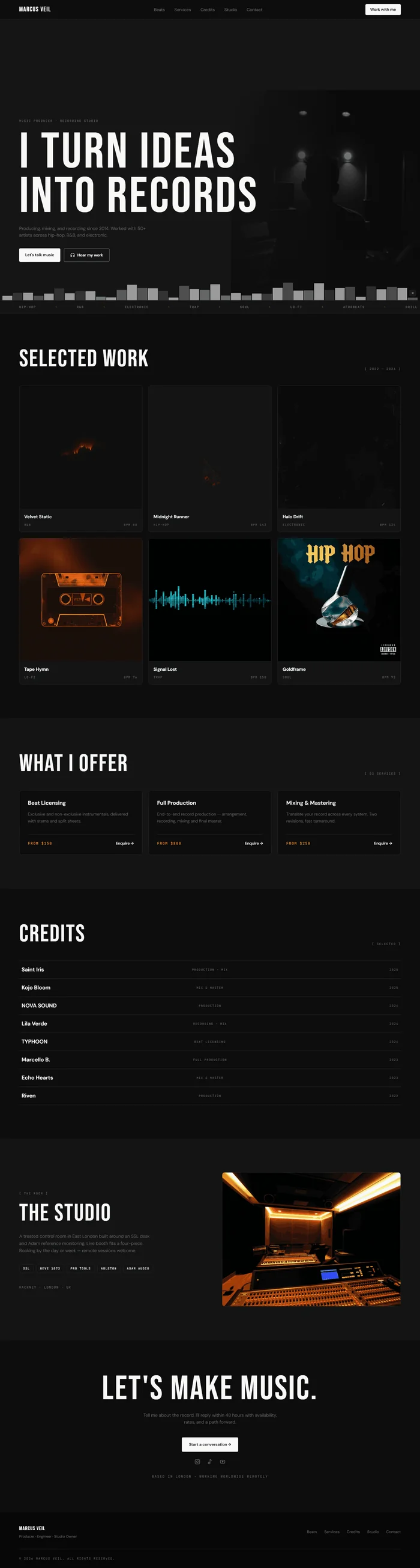
# Music Producer Website Prompt # websiteprompts.ai Build a personal website for **Marcus Veil** — an independent music producer and recording studio owner. Near-black foundation, clean white type, animated waveform visual element. Bold uppercase display typography. Minimal dark studio aesthetic — serious craft, no noise. ## Tech Stack React + Vite + TypeScript + Tailwind CSS + Framer Motion (motion/react) + shadcn/ui + lucide-react ## Design System ```css :root { --background: 0 0% 5%; /* #0d0d0d near-black */ --surface: 0 0% 8%; /* #141414 surface */ --surface-raised: 0 0% 11%; /* #1c1c1c raised */ --border: 0 0% 15%; /* #262626 border */ --foreground: 0 0% 97%; /* #f7f7f7 off-white */ --muted: 0 0% 44%; /* #707070 muted */ --subtle: 0 0% 25%; /* #404040 subtle */ --primary: 0 0% 100%; /* white as primary */ --accent: 38 96% 56%; /* #f5a623 amber — used sparingly */ --mono: 'JetBrains Mono', monospace; } ``` ## Typography Import: `https://fonts.googleapis.com/css2?family=Bebas+Neue&family=DM+Sans:wght@300;400;500;600&family=JetBrains+Mono:wght@400&display=swap` - Display / H1–H2: Bebas Neue 400, letter-spacing 0.04em — all uppercase, large - Body / UI: DM Sans 300–600 - Labels / Metadata / Times: JetBrains Mono 400 ## Visual Effects **Animated waveform** — bottom of hero, full-width, 80px tall SVG-style bar equaliser: ```jsx // 40 bars, heights randomised between 8px and 64px // Each bar: background white, opacity 0.12–0.6 (alternating) // Animate heights with Framer Motion stagger: // Each bar: animate={{ scaleY: [1, random(0.2, 1), 1] }} // transition={{ duration: random(0.8, 1.4), repeat: Infinity, ease: 'easeInOut', delay: index * 0.04 }} // transform-origin: bottom ``` Wrap in `overflow: hidden`, full-width, `position: absolute; bottom: 0; left: 0; right: 0`. **Hover track preview** — beat/track cards reveal a play button icon on hover: ``` Play button: white circle 48px, icon lucide `Play` filled, centers on card transition: opacity 0.2s ease default opacity: 0; hover opacity: 1 ``` **Stagger fade-up** — `initial={{ opacity: 0, y: 20 }}` → `animate={{ opacity: 1, y: 0 }}`, 0.5s per-section. **Text marquee** — genres/credits scrolling strip: continuous, speed 20s, gap 64px. ## Sections **1. Navbar** — fixed, `background: hsl(var(--background)/0.94)`, blur 16px, border-bottom. Left: "MARCUS VEIL" Bebas Neue 22px white, letter-spacing 0.08em. Center: Beats · Services · Credits · Studio · Contact. Right: "Work with me" — white filled, dark text, DM Sans 600 13px, border-radius 4px. **2. Hero** — full viewport, flex column, justify-content flex-end, padding 0 64px 100px, position relative, overflow hidden. Background layers: dark surface color + noise texture overlay (fixed `background: url('/texture.png')`, blend-mode overlay, opacity 0.4). Waveform at bottom (Visual Effects). Content z-10: JetBrains Mono 10px muted badge "MUSIC PRODUCER · RECORDING STUDIO". H1 Bebas Neue, clamp(80px, 12vw, 180px), line-height 0.88, white, max-width 900px: ``` I TURN IDEAS INTO RECORDS ``` Sub: DM Sans 300 15px muted, max-width 440px, margin-top 20px: "Producing, mixing, and recording since 2014. Worked with 50+ artists across hip-hop, R&B, and electronic." Two CTAs: "Let's talk music" (white filled, dark text) + "Hear my work" (ghost white border, lucide `Headphones` icon). Bottom-right: producer photo partially visible at edge: ``` {/* Image: music producer in dark recording studio, facing away or in profile, mixing console in foreground, moody deep blue and amber studio lighting */} ``` **3. Genre / Credits marquee** — full-width strip `background: hsl(var(--surface))`, border-top + bottom, 44px tall. Continuous scroll: "Hip-Hop · R&B · Electronic · Trap · Soul · Lo-Fi · Afrobeats · Hip-Hop · R&B ···" — JetBrains Mono 10px white 35%, separated by amber dots. **4. Selected Beats / Productions** — padding 96px 64px. H2 Bebas Neue clamp(52px, 6vw, 80px): "SELECTED WORK". 3-column card grid. Each card: `background: hsl(var(--surface))`, border, border-radius 8px, aspect-ratio 1/1 for cover art image + hover play button (Visual Effects). Below image: track name DM Sans 600 15px + genre JetBrains Mono 10px muted + "BPM: 142" JetBrains Mono 10px muted. 6 beats/projects total. Cover art briefs: ``` {/* Album/beat cover: abstract dark moody artwork, minimal graphic design, dark background with subtle color accent */} ``` **5. Services** — surface bg, padding 96px 64px. H2 Bebas Neue: "WHAT I OFFER". 3-column card grid. Each: border, border-radius 8px, padding 28px, DM Sans. Service name DM Sans 600 18px + description 2 lines muted + price range JetBrains Mono 12px amber + "Enquire →" white text link. Services: Beat Licensing from $150 · Full Production from $800 · Mixing & Mastering from $250. **6. Credits** — padding 96px 64px. H2 Bebas Neue: "CREDITS". Horizontal table list (not grid) — each row: `border-top: 1px solid hsl(var(--border))`, padding 16px 0, flex row: artist name DM Sans 600 left + role JetBrains Mono 10px muted center + year JetBrains Mono 10px muted right. 8 credits. Hover: background surface raised. Stagger fade-in entrance. **7. Studio** — two-column, padding 96px 64px. Left: H2 Bebas Neue: "THE STUDIO". DM Sans 15px muted body: location, gear list, booking note. Gear chips in JetBrains Mono 10px — SSL · Neve 1073 · Pro Tools · Ableton · Adam Audio. Right: studio photo: ``` {/* Image: professional recording studio interior, mixing console foreground, isolation booth visible through glass, warm amber lighting on dark moody background */} ``` **8. CTA** — near-black, padding 80px 64px, centered. H2 Bebas Neue clamp(60px, 8vw, 120px) white: "LET'S MAKE MUSIC." Sub DM Sans 15px muted. "Start a conversation →" (white filled dark text) + social links row (Instagram · SoundCloud · YouTube). JetBrains Mono 11px muted: "Based in London · Working worldwide remotely." **9. Footer** — `hsl(0 0% 3%)`, padding 40px 64px 24px. Left: "MARCUS VEIL" Bebas Neue 18px + role DM Sans 12px muted. Right: quick links + socials. Bottom: copyright JetBrains Mono 10px muted. ## Responsive Mobile: nav hamburger · hero H1 clamp(64px, 16vw, 100px) · waveform 60px tall, 24 bars · productions 2-column · credits table truncates role column · studio single column. ## Animations Summary | Element | Animation | Trigger | |---|---|---| | Waveform bars | Random scaleY loop | Always | | Marquee strip | Continuous scroll | Always | | Hero content | Stagger fade-up | On mount | | Beat cards | Stagger fade-up | Scroll | | Play button | Opacity 0→1 | Card hover | | Credits rows | Stagger fade-in | Scroll | ## Key Dependencies ```json { "motion": "^12.x", "lucide-react": "^0.400.x" } ``` > **Quick notes:** "Marcus Veil" and all credits are placeholders. Beat cards need real cover art or generated images. Pricing is indicative — update per real rates. SoundCloud/Spotify embed can replace the static beat cards if preferred.

The generated results may vary

Categories

Categories

waveform framer template cta

FAQ

What sections are included in the Music Producer Website Prompt?

The prompt includes 9 fully specified sections: fixed nav with "Work with me" CTA, full-viewport dark hero with texture overlay and animated waveform equaliser, genre/credits scrolling ticker, 6-beat production card grid with hover play button, 3-service cards with amber pricing, 8-credit horizontal table, studio info section with gear list and studio photo, ambient CTA section with social links, and minimal dark footer. Every section includes layout specs, Framer Motion animations, and complete copy.

Who is this music producer website prompt designed for?

It's designed for independent music producers, beat makers, recording studio owners, and mixing and mastering engineers who want a site that reflects the seriousness and prestige of their craft. The bold Bebas Neue type, dark studio aesthetic, and credits table communicate an established professional — well-suited for producers targeting signed artists, labels, and sync licensing opportunities.

Which AI tools can I use this prompt with?

The prompt works with Lovable, Claude, Bolt, v0, Cursor, and any other AI web builder that accepts a text prompt. The animated waveform equaliser and hover play button are Framer Motion and render best in Lovable and Bolt. The beat card grid, credits table, service cards, and ticker render cleanly in all tools.

Can I change the producer's name, credits, and services?

Yes — everything is written to be swapped. Replace "Marcus Veil" with the real name or studio name throughout, update the 6 beat cards with real cover art descriptions, update the 8 credits table with real artist collaborations and roles, replace the gear list with actual studio equipment, and update the service pricing with real rates.

Music producer website prompt full preview — near-black #0d0d0d background with white type and amber pricing accent, Bebas Neue 180px uppercase hero headline "I TURN IDEAS INTO RECORDS" over dark studio photo with noise texture overlay, animated 40-bar waveform equaliser across the bottom of the hero with staggered height loop, six beat cover art cards in a three-column grid with white circle play button appearing on hover, and eight-entry credits table with artist names and roles separated by thin border lines

FAQ

What sections are included in the Music Producer Website Prompt?

The prompt includes 9 fully specified sections: fixed nav with "Work with me" CTA, full-viewport dark hero with texture overlay and animated waveform equaliser, genre/credits scrolling ticker, 6-beat production card grid with hover play button, 3-service cards with amber pricing, 8-credit horizontal table, studio info section with gear list and studio photo, ambient CTA section with social links, and minimal dark footer. Every section includes layout specs, Framer Motion animations, and complete copy.

Who is this music producer website prompt designed for?

It's designed for independent music producers, beat makers, recording studio owners, and mixing and mastering engineers who want a site that reflects the seriousness and prestige of their craft. The bold Bebas Neue type, dark studio aesthetic, and credits table communicate an established professional — well-suited for producers targeting signed artists, labels, and sync licensing opportunities.

Which AI tools can I use this prompt with?

The prompt works with Lovable, Claude, Bolt, v0, Cursor, and any other AI web builder that accepts a text prompt. The animated waveform equaliser and hover play button are Framer Motion and render best in Lovable and Bolt. The beat card grid, credits table, service cards, and ticker render cleanly in all tools.

Can I change the producer's name, credits, and services?

Yes — everything is written to be swapped. Replace "Marcus Veil" with the real name or studio name throughout, update the 6 beat cards with real cover art descriptions, update the 8 credits table with real artist collaborations and roles, replace the gear list with actual studio equipment, and update the service pricing with real rates.

Frequently asked questions

What is websiteprompts.ai?

websiteprompts.ai is a free library of AI website prompts. Each prompt is a ready-to-use text instruction that generates a complete website design when used with an AI website builder like Lovable, Claude, Bolt, v0, or similar tools.

How do I use these prompts?

Copy any prompt from websiteprompts.ai, open your AI website builder of choice — Lovable, Bolt, v0, Claude, ChatGPT, or any other tool — paste the prompt, and let the AI generate your website. No coding or design experience needed.

Are the prompts free?

Yes — every prompt on websiteprompts.ai is completely free. Copy and use them as many times as you like, for personal or commercial projects.

Which AI tools do the prompts work with?

The prompts are designed primarily for Lovable and Bolt, but they work with any AI tool that can generate websites — including v0, Claude, ChatGPT, Cursor, Framer AI, and others.

How often are new prompts added?

New prompts are added every day. The library is constantly growing with prompts for different industries, website types, and design styles.

Do I need any technical skills to use these prompts?

No technical skills required. Copy the prompt, paste it into any AI website builder, and the AI handles the rest. websiteprompts.ai is built for anyone who wants a professional website without writing code.

Frequently asked questions

What is websiteprompts.ai?

websiteprompts.ai is a free library of AI website prompts. Each prompt is a ready-to-use text instruction that generates a complete website design when used with an AI website builder like Lovable, Claude, Bolt, v0, or similar tools.

How do I use these prompts?

Copy any prompt from websiteprompts.ai, open your AI website builder of choice — Lovable, Bolt, v0, Claude, ChatGPT, or any other tool — paste the prompt, and let the AI generate your website. No coding or design experience needed.

Are the prompts free?

Yes — every prompt on websiteprompts.ai is completely free. Copy and use them as many times as you like, for personal or commercial projects.

Which AI tools do the prompts work with?

The prompts are designed primarily for Lovable and Bolt, but they work with any AI tool that can generate websites — including v0, Claude, ChatGPT, Cursor, Framer AI, and others.

How often are new prompts added?

New prompts are added every day. The library is constantly growing with prompts for different industries, website types, and design styles.

Do I need any technical skills to use these prompts?

No technical skills required. Copy the prompt, paste it into any AI website builder, and the AI handles the rest. websiteprompts.ai is built for anyone who wants a professional website without writing code.

Frequently asked questions

What is websiteprompts.ai?

websiteprompts.ai is a free library of AI website prompts. Each prompt is a ready-to-use text instruction that generates a complete website design when used with an AI website builder like Lovable, Claude, Bolt, v0, or similar tools.

How do I use these prompts?

Copy any prompt from websiteprompts.ai, open your AI website builder of choice — Lovable, Bolt, v0, Claude, ChatGPT, or any other tool — paste the prompt, and let the AI generate your website. No coding or design experience needed.

Are the prompts free?

Yes — every prompt on websiteprompts.ai is completely free. Copy and use them as many times as you like, for personal or commercial projects.

Which AI tools do the prompts work with?

The prompts are designed primarily for Lovable and Bolt, but they work with any AI tool that can generate websites — including v0, Claude, ChatGPT, Cursor, Framer AI, and others.

How often are new prompts added?

New prompts are added every day. The library is constantly growing with prompts for different industries, website types, and design styles.

Do I need any technical skills to use these prompts?

No technical skills required. Copy the prompt, paste it into any AI website builder, and the AI handles the rest. websiteprompts.ai is built for anyone who wants a professional website without writing code.

Get new AI website prompts every week — straight to your inbox.

Every Friday we drop a fresh batch of AI website prompts and tips to help you build better websites faster.

Join 1,000+ AI enthusiasts

liquid metallic gradient

Get new AI website prompts every week — straight to your inbox.

Every Friday we drop a fresh batch of AI website prompts and tips to help you build better websites faster.

Join 1,000+ AI enthusiasts

liquid metallic gradient

Get new AI website prompts every week — straight to your inbox.

Every Friday we drop a fresh batch of AI website prompts and tips to help you build better websites faster.

Join 1,000+ AI enthusiasts