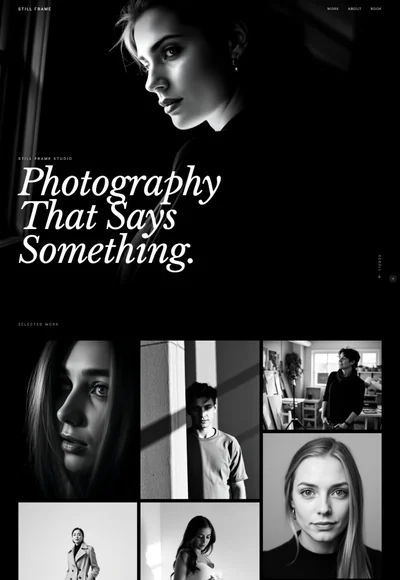
Band Website Prompt — Ultra Minimal Music Band Website Design for Lovable, Claude, Bolt and more
Music band website template prompt for Lovable, Claude, Bolt and more — pure black, massive condensed type, 9 sections, full copy, tour dates, tracklist. Paste and publish.
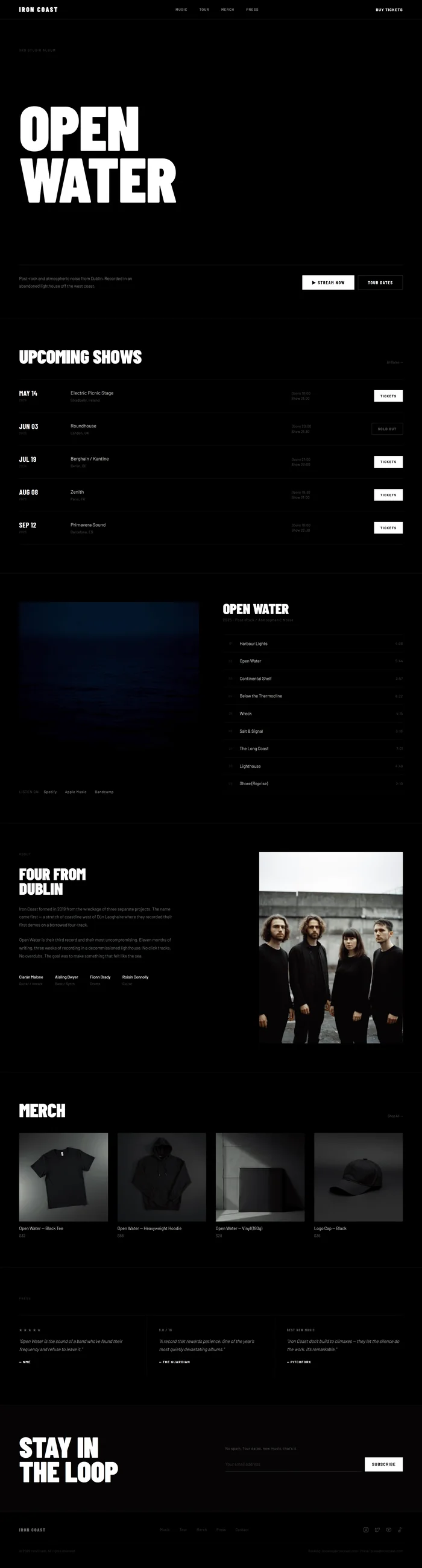
Build a complete, production-ready band website for **IRON COAST** — a post-rock band. The aesthetic is ultra-minimal black: pure `#000000` background, white text, massive Barlow Condensed headlines, and zero decoration. This is a website that communicates confidence through restraint — every element earns its place. --- ## Tech Stack ``` React + Vite + TypeScript + Tailwind CSS + Framer Motion (motion/react) + shadcn/ui + lucide-react ``` --- ## Design System — Colors ```css :root { --background: 0 0% 0%; /* #000000 — pure black */ --foreground: 0 0% 100%; /* #FFFFFF */ --muted: 0 0% 9%; /* #171717 — section alt bg */ --muted-foreground: 0 0% 45%; /* #737373 — secondary text */ --border: 0 0% 12%; /* #1F1F1F — subtle dividers */ --accent: 0 0% 100%; /* white — only accent, used sparingly */ } ``` Color rules: - Background: pure black everywhere. No gradients, no panels. - Type: `#FFFFFF` for primary, `rgba(255,255,255,0.35)` for secondary, `rgba(255,255,255,0.15)` for tertiary. - Buttons: two states only — solid white (`bg-white text-black`) and outlined (`border border-white/20 text-white`). - No accent colors. No colored elements. Pure monochrome. --- ## Typography ``` Google Fonts import URL: https://fonts.googleapis.com/css2?family=Barlow+Condensed:wght@300;400;700;900&family=Barlow:wght@300;400;500&display=swap ``` Usage: - **Display headlines (H1, section headers):** `Barlow Condensed 900`, uppercase, `letter-spacing: -0.01em`, `line-height: 0.82` - **Sub-headlines / labels:** `Barlow Condensed 700`, uppercase, `letter-spacing: 0.08em` - **Body / descriptions:** `Barlow 300`, `line-height: 1.75`, `letter-spacing: 0.01em` - **Nav / buttons / UI:** `Barlow 500`, uppercase, `letter-spacing: 0.12em`, `font-size: 0.72rem` - **Metadata / secondary info:** `Barlow 300`, `color: rgba(255,255,255,0.35)` Scale: - Hero H1: `clamp(7rem, 15vw, 16rem)` — fills most of the viewport width - Section H2: `clamp(2.5rem, 5vw, 4rem)` — Barlow Condensed 900 uppercase - Track/date labels: `1.8rem` Barlow Condensed 700 --- ## Visual Effects ### 1. Word-by-word stagger on hero headline Each word in the H1 animates independently: ```tsx const words = ["OPEN", "WATER"]; {words.map((word, i) => ( <motion.span key={i} initial={{ opacity: 0, y: 60, filter: 'blur(12px)' }} animate={{ opacity: 1, y: 0, filter: 'blur(0px)' }} transition={{ duration: 0.7, ease: [0.16, 1, 0.3, 1], delay: i * 0.12 }} style={{ display: 'block' }} > {word} </motion.span> ))} ``` Sub-elements (label, description, buttons) follow at delay `words.length * 0.12 + 0.1`. ### 2. Tour date row hover Each show row has a hover state that inverts the row: ```css .show-row { transition: background 0.2s ease; cursor: default; } .show-row:hover { background: rgba(255, 255, 255, 0.04); } ``` The ticket button flips on hover: `bg-white text-black` → `bg-transparent text-white border-white/40`. ### 3. Scroll-triggered fade-up (all sections below hero) Use `useInView` from Framer Motion: ```tsx const ref = useRef(null); const isInView = useInView(ref, { once: true, margin: '-80px' }); <motion.div ref={ref} initial={{ opacity: 0, y: 40 }} animate={isInView ? { opacity: 1, y: 0 } : {}} transition={{ duration: 0.65, ease: [0.16, 1, 0.3, 1] }} > ``` Stagger children with `delay: index * 0.08` for tour rows and track rows. ### 4. Subtle film grain texture overlay ```tsx <div className="fixed inset-0 z-50 pointer-events-none" style={{ backgroundImage: `url("data:image/svg+xml,%3Csvg viewBox='0 0 256 256' xmlns='http://www.w3.org/2000/svg'%3E%3Cfilter id='noise'%3E%3CfeTurbulence type='fractalNoise' baseFrequency='0.9' numOctaves='4' stitchTiles='stitch'/%3E%3C/filter%3E%3Crect width='100%25' height='100%25' filter='url(%23noise)' opacity='0.4'/%3E%3C/svg%3E")`, backgroundSize: '200px 200px', opacity: 0.08, mixBlendMode: 'overlay', }} /> ``` --- ## Component Breakdown ### 1. Navbar ``` Height: 64px Padding: 0 64px (desktop), 0 24px (mobile) Background: rgba(0,0,0,0) — transparent, no blur (pure black page, no need) Border-bottom: 1px solid rgba(255,255,255,0.08) Position: sticky top-0 z-50 Layout: justify-between, items-center Left: band name — Barlow Condensed 900, 1.4rem, letter-spacing 0.15em, uppercase Center: nav links (hidden on mobile) — Music | Tour | Merch | Press Right: "Buy Tickets" — Barlow 700, uppercase, letter-spacing 0.12em, no border/button styling, just text link in full white Mobile: hamburger icon (Menu from lucide-react), full-screen nav overlay slides down ``` ### 2. Hero ``` Min-height: 100vh Padding: 80px 64px 100px (desktop), 64px 24px 80px (mobile) Background: #000000 Display: flex flex-col justify-between Top section: - Label row: "3rd Studio Album" — Barlow 300, 0.65rem, rgba(255,255,255,0.3), letter-spacing 0.2em, uppercase. Animate in first (delay 0). - H1: "OPEN / WATER" — Barlow Condensed 900, clamp(7rem,15vw,16rem), uppercase, line-height 0.82, letter-spacing -0.01em, color #FFFFFF. Each word on its own line. Word-by-word stagger animation. Bottom section (below headline, flex-end): - Border-top: 1px solid rgba(255,255,255,0.1), padding-top: 32px, margin-top: 48px - Left: description text — Barlow 300, 0.85rem, rgba(255,255,255,0.5), max-width 380px, line-height 1.75 - Right: two buttons side by side: 1. "▶ Stream Now" — bg-white text-black, Barlow Condensed 700, 0.95rem uppercase, letter-spacing 0.12em, height 48px, px-8 2. "Tour Dates" — border border-white/20 text-white, same sizing Responsive mobile: bottom section stacks vertically, description 100% width, buttons stack ``` ### 3. Tour Dates Section ``` Padding: 80px 64px (desktop), 64px 24px (mobile) Border-top: 1px solid rgba(255,255,255,0.08) Background: #000000 Header row: flex justify-between items-baseline Left: "Upcoming Shows" — Barlow Condensed 900, clamp(2.5rem,5vw,4rem), uppercase, white Right: "All Dates →" — Barlow 300, 0.7rem, rgba(255,255,255,0.3), text-decoration none Shows list: flex flex-col, border-top 1px solid rgba(255,255,255,0.06) Each row: grid grid-cols-[140px_1fr_180px_160px] gap-8 items-center - Date: Barlow Condensed 700, 1.8rem, line-height 1, #FFF. Below: year in 0.6rem, rgba(255,255,255,0.25) - Venue + City: venue name in 1rem Barlow 300 white; city in 0.72rem rgba(255,255,255,0.35) - Door time: 0.72rem Barlow 300, rgba(255,255,255,0.35) - Button: "Tickets" = bg-white text-black px-5 py-2.5 Barlow 700 uppercase text-sm; "Sold Out" = border border-white/15 text-white/35 same sizing Border-bottom: 1px solid rgba(255,255,255,0.06) on each row Row hover: bg-white/[0.03] transition-colors Mobile: grid-cols-[80px_1fr_auto], hide door time column ``` ### 4. Music / Latest Album ``` Padding: 80px 64px Border-top: 1px solid rgba(255,255,255,0.08) Background: #000000 Layout: grid grid-cols-2 gap-20 items-start (desktop); stack mobile Left: Album cover - aspect-ratio: 1/1 - Background: see image brief below - No border-radius (square, hard edges) - Below: streaming row — "Listen on:" label + Spotify | Apple Music | Bandcamp text links separated by " · " Right: Tracklist - Album name: Barlow Condensed 900, clamp(2rem,3.5vw,3rem), uppercase, white, margin-bottom 8px - Year + genre: Barlow 300, 0.72rem, rgba(255,255,255,0.3), margin-bottom 40px - Track rows: border-top 1px solid rgba(255,255,255,0.06), each row: grid grid-cols-[32px_1fr_auto] gap-6 items-center, padding 18px 0, border-bottom 1px solid rgba(255,255,255,0.06) - Number: 0.62rem Barlow 300, rgba(255,255,255,0.2), text-align right - Track name: 0.9rem Barlow 300, #FFF - Duration: 0.72rem Barlow 300, rgba(255,255,255,0.3) - Scroll-triggered stagger: each track row fades in with delay: index * 0.06 ``` ### 5. About the Band ``` Padding: 80px 64px Border-top: 1px solid rgba(255,255,255,0.08) Background: #000000 Layout: grid grid-cols-[1fr_480px] gap-24 items-start (desktop); stack mobile Left: bio text block - Section label: "About" — Barlow 300, 0.62rem, rgba(255,255,255,0.25), letter-spacing 0.2em, uppercase, margin-bottom 32px - Bio headline: Barlow Condensed 900, clamp(2.5rem,4vw,3.5rem), uppercase, white, line-height 0.88, letter-spacing -0.01em, margin-bottom 32px - Body text: 2 paragraphs, Barlow 300, 0.88rem, rgba(255,255,255,0.5), line-height 1.85, max-width 520px - Members row: flex gap-8, margin-top 40px Each member: name in 0.82rem Barlow 500 white, instrument in 0.7rem Barlow 300 rgba(255,255,255,0.35), stacked vertically Right: band photo - Aspect-ratio: 3/4 - object-fit: cover, object-position: center - No border-radius - Image brief: see below Mobile: photo first (aspect-ratio 16/9), then text below ``` ### 6. Merch ``` Padding: 80px 64px Border-top: 1px solid rgba(255,255,255,0.08) Background: #000000 Header: flex justify-between items-baseline Left: "Merch" — Barlow Condensed 900, clamp(2.5rem,5vw,4rem), uppercase, white Right: "Shop All →" — Barlow 300, 0.7rem, rgba(255,255,255,0.3) Grid: grid grid-cols-4 gap-8 mt-12 (desktop); grid-cols-2 gap-6 (mobile) Each product card: - Product photo: aspect-ratio 1/1, bg-white/5 (placeholder), object-cover, object-center. No border-radius. - Below: product name — 0.9rem Barlow 400 white, margin-top 12px - Price: 0.78rem Barlow 300 rgba(255,255,255,0.45), margin-top 4px - On hover: image gets scale(1.02) transition-transform duration-300, underline appears on product name ``` ### 7. Press / Reviews ``` Padding: 80px 64px Border-top: 1px solid rgba(255,255,255,0.08) Background: #000000 Section label: "Press" — same style as About section label Layout: grid grid-cols-3 gap-0 border-top border-white/[0.06] (desktop); stack mobile Each press quote: - Border-right: 1px solid rgba(255,255,255,0.06) (except last) - Padding: 40px 40px 40px 0 (first), 40px (middle), 40px 0 40px 40px (last) - Stars or rating badge: Barlow Condensed 700, small, rgba(255,255,255,0.3), margin-bottom 16px - Quote: Barlow 300 italic, 0.95rem, rgba(255,255,255,0.7), line-height 1.8, margin-bottom 20px - Publication: Barlow 700, 0.7rem, uppercase, letter-spacing 0.1em, #FFF - No background, no card, no border-radius ``` ### 8. Newsletter / Mailing List CTA ``` Padding: 80px 64px Border-top: 1px solid rgba(255,255,255,0.08) Background: rgba(255,255,255,0.02) — very subtle off-black Layout: grid grid-cols-2 gap-24 items-center (desktop); stack mobile Left: typographic CTA block - Headline: Barlow Condensed 900, clamp(3.5rem,7vw,6rem), uppercase, #FFF, line-height 0.85, letter-spacing -0.01em Right: email input + submit - Label: "No spam. Tour dates, new music, that's it." — Barlow 300, 0.78rem, rgba(255,255,255,0.35), margin-bottom 20px - Input row: flex gap-3 - Email input: flex-1, bg-transparent, border-b border-white/20, text-white placeholder-white/20, Barlow 300, 0.9rem, py-3, px-0, focus:border-white/50 transition-colors, outline-none - Submit button: "Subscribe" — bg-white text-black Barlow 700 uppercase 0.82rem letter-spacing 0.1em px-6 py-3 shrink-0 - On submit: button text swaps to "✓ You're in" with opacity transition ``` ### 9. Footer ``` Padding: 48px 64px Border-top: 1px solid rgba(255,255,255,0.08) Background: #000000 Layout: flex justify-between items-center (desktop); flex-col gap-8 (mobile) Left: Band name — Barlow Condensed 900, 0.95rem, letter-spacing 0.15em, uppercase, rgba(255,255,255,0.4) Center: nav links — Barlow 300, 0.7rem, rgba(255,255,255,0.25), gap-8. Links: Music · Tour · Merch · Press · Contact Right: social icons (lucide-react: Instagram, Twitter/X, Youtube, Music2) — rgba(255,255,255,0.25) hover rgba(255,255,255,0.8) transition-colors, size 18px, gap-5 Below: copyright row - Border-top: 1px solid rgba(255,255,255,0.04), padding-top 20px, margin-top 32px - Text: Barlow 300, 0.65rem, rgba(255,255,255,0.2), flex justify-between - Left: "© 2025 Iron Coast. All rights reserved." - Right: "Booking: booking@ironcoast.com · Press: press@ironcoast.com" ``` --- ## Animations All triggered by scroll using `useInView` with `once: true, margin: '-80px'`. ``` Hero label: opacity 0 → 1, y 20 → 0, delay 0, duration 0.5, ease easeOut Hero H1 word 1 (OPEN): opacity 0 → 1, y 60 → 0, blur 12px → 0, delay 0.1, duration 0.7, ease [0.16,1,0.3,1] Hero H1 word 2 (WATER): same, delay 0.22 Hero bottom section: opacity 0 → 1, y 30 → 0, delay 0.4, duration 0.6 Tour rows: stagger, opacity 0 → 1, y 20 → 0, delay: index * 0.07, duration 0.5 Track rows: stagger, opacity 0 → 1, delay: index * 0.06, duration 0.45, y 0 (no movement, just fade) About section: left text block at delay 0, photo at delay 0.15 — both y 40 → 0, opacity 0 → 1 Merch cards: stagger, opacity 0 → 1, y 30 → 0, delay: index * 0.1 Press quotes: stagger, opacity 0 → 1, delay: index * 0.12 Newsletter section: left headline at delay 0, right form at delay 0.15 ``` --- ## Responsive **Breakpoints:** `md` = 768px, `lg` = 1024px, `xl` = 1280px ``` Navbar: Desktop: full nav links visible Mobile: hide nav links, show hamburger (Menu icon), overlay nav on click Hero: Desktop: H1 at clamp(7rem,15vw,16rem), bottom row side-by-side Mobile: H1 at clamp(4rem,14vw,7rem), bottom row stacked vertically, buttons full-width Tour Dates: Desktop: grid-cols-[140px_1fr_180px_160px] Mobile: grid-cols-[80px_1fr_auto], hide door time column entirely Music: Desktop: grid-cols-2 Mobile: stack — album cover (aspect-ratio 1/1) then tracklist About: Desktop: grid-cols-[1fr_480px] Mobile: photo (aspect-ratio 16/9) then text Merch: Desktop: grid-cols-4 Mobile: grid-cols-2 Press: Desktop: grid-cols-3 Mobile: stack, remove vertical dividers, add horizontal border-bottom between quotes Newsletter: Desktop: grid-cols-2 Mobile: stack — headline then form Footer: Desktop: flex row Mobile: flex-col gap-8 text-center, nav links flex-wrap justify-center ``` --- ## Full Copy ### Band name `IRON COAST` ### Album `OPEN WATER` ### Navbar links `Music · Tour · Merch · Press` CTA: `Buy Tickets` ### Hero Label: `3rd Studio Album` H1: `OPEN` / `WATER` (two lines) Description: `Post-rock and atmospheric noise from Dublin. Recorded in an abandoned lighthouse off the west coast.` CTA 1: `▶ Stream Now` CTA 2: `Tour Dates` ### Tour Dates Section title: `Upcoming Shows` | Date | Venue | City | Time | Status | |------|-------|------|------|--------| | MAY 14 / 2025 | Electric Picnic Stage | Stradbally, Ireland | Doors 19:00 / Show 21:00 | Tickets | | JUN 03 / 2025 | Roundhouse | London, UK | Doors 20:00 / Show 21:30 | Sold Out | | JUL 19 / 2025 | Berghain / Kantine | Berlin, DE | Doors 21:00 / Show 23:00 | Tickets | | AUG 08 / 2025 | Zenith | Paris, FR | Doors 19:30 / Show 21:00 | Tickets | | SEP 12 / 2025 | Primavera Sound | Barcelona, ES | Doors 18:00 / Show 22:30 | Tickets | ### Music — Latest Album Album title: `OPEN WATER` Year + genre: `2025 · Post-Rock / Atmospheric Noise` Tracks: ``` 01 Harbour Lights 4:08 02 Open Water 5:44 03 Continental Shelf 3:57 04 Below the Thermocline 6:22 05 Wreck 4:15 06 Salt & Signal 3:38 07 The Long Coast 7:01 08 Lighthouse 4:49 09 Shore (Reprise) 2:10 ``` Streaming row: `Listen on: Spotify · Apple Music · Bandcamp` Image brief: ``` [Media brief: image | abstract album cover — dark ocean, deep water blues and near-black, minimal composition, moody atmospheric | any composition works — pure mood photography, no text overlay] ``` ### About the Band Section label: `About` Headline: `FOUR FROM / DUBLIN` Bio paragraph 1: `Iron Coast formed in 2019 from the wreckage of three separate projects. The name came first — a stretch of coastline west of Dún Laoghaire where they recorded their first demos on a borrowed four-track.` Bio paragraph 2: `Open Water is their third record and their most uncompromising. Eleven months of writing, three weeks of recording in a decommissioned lighthouse. No click tracks. No overdubs. The goal was to make something that felt like the sea.` Members: ``` Ciarán Malone · Guitar / Vocals Aisling Dwyer · Bass / Synth Fionn Brady · Drums Roisín Connolly · Guitar ``` Band photo image brief: ``` [Media brief: image | four-piece indie rock band, urban setting, moody overcast light, black clothing, serious expressions, grain photography aesthetic | any composition works — gradient overlay handles text legibility] ``` ### Merch Section title: `Merch` | Product | Price | |---------|-------| | Open Water — Black Tee | $32 | | Open Water — Heavyweight Hoodie | $68 | | Open Water — Vinyl (180g) | $28 | | Logo Cap — Black | $36 | Product photo image briefs: ``` [Media brief: image 1 | black t-shirt flat lay on dark surface, minimal, studio lighting] [Media brief: image 2 | black hoodie folded, studio product photography, dark background] [Media brief: image 3 | vinyl record sleeve leaning against dark surface, moody light] [Media brief: image 4 | black baseball cap on minimal surface, clean product shot] ``` ### Press Section label: `Press` Quote 1: `"Open Water is the sound of a band who've found their frequency and refuse to leave it."` — NME Quote 2: `"A record that rewards patience. One of the year's most quietly devastating albums."` — The Guardian Quote 3: `"Iron Coast don't build to climaxes — they let the silence do the work. It's remarkable."` — Pitchfork ### Newsletter CTA Headline: `STAY IN / THE LOOP` Label: `No spam. Tour dates, new music, that's it.` Placeholder: `Your email address` Button: `Subscribe` Success state: `✓ You're in` ### Footer Copyright: `© 2025 Iron Coast. All rights reserved.` Contact: `Booking: booking@ironcoast.com · Press: press@ironcoast.com` Nav links: `Music · Tour · Merch · Press · Contact` --- ## Key Dependencies ```json { "motion": "^12.x", "lucide-react": "^0.400.0" } ``` --- ## Quick Notes - **Band name / album:** "Iron Coast" and "Open Water" are placeholder — update before deploying. All copy, track names, and contact emails follow the same placeholder logic. - **Grain texture overlay:** Uses an inline SVG data URI — no external file needed. Adjust `opacity: 0.08` up/down to taste (0.04 = subtle, 0.15 = heavy grain). - **Sold Out logic:** The tour dates section uses a `sold_out` boolean per show. When `true`, the ticket button renders in outlined/disabled style. Hook this up to a CMS or static data array.