Photography Studio Website Prompt — Editorial Portfolio Template for Bolt, v0 & Lovable
Generate a stunning black-and-white photography portfolio website in minutes. This prompt builds an editorial-style studio site with masonry gallery, pricing tiers & booking CTA. Works in Bolt, v0 & Lovable.
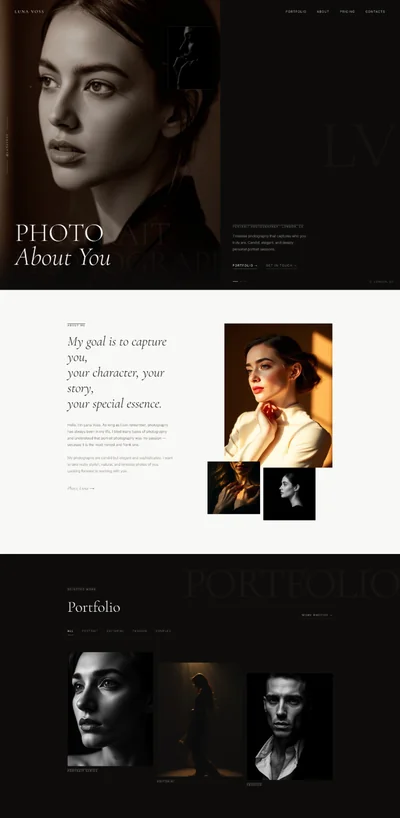
# Still Frame Studio — Portrait Photography Website Prompt ## 1. Goal Statement Build a portfolio website for Still Frame Studio, a portrait and editorial photography brand, with a pure black-and-white editorial aesthetic where photographs serve as the sole accent and visual language. ## 2. Tech Stack ``` React + Vite + TypeScript + Tailwind CSS + Framer Motion (motion/react) + shadcn/ui + lucide-react ``` ## 3. Design System — Colors ```css :root { --background: 0 0% 0%; --foreground: 0 0% 100%; --primary: 0 0% 100%; --primary-foreground: 0 0% 0%; --muted-foreground: 0 0% 55%; --border: 0 0% 15%; --card: 0 0% 5%; --accent: 0 0% 90%; } ``` ## 4. Typography ```html <link href="https://fonts.googleapis.com/css2?family=Libre+Baskerville:ital,wght@0,400;0,700;1,400&family=Inter:wght@300;400;500&display=swap" rel="stylesheet" /> ``` - **Display headings (H1):** Libre Baskerville Italic, 7–10vw, letter-spacing -0.02em, line-height 0.95 - **Section headings (H2):** Libre Baskerville Regular, 2.5–4rem, letter-spacing -0.01em - **Body / navigation / UI:** Inter 300–400, 0.875–1rem, letter-spacing 0.08em, uppercase for nav - **Pull quotes:** Libre Baskerville Italic, 1.5–2rem, color: var(--muted-foreground) ## 5. Visual Effects ### Effect 1 — Hero Full-Bleed Portrait ```jsx <section className="relative w-full h-screen overflow-hidden bg-black"> {/* Image: editorial portrait — subject facing slightly away from camera, shallow depth of field, dramatic natural window light streaming from left, high contrast black-and-white, film grain, studio/loft setting, model in dark clothing */} <img src="" alt="Editorial portrait with dramatic window light" className="w-full h-full object-cover object-center" /> {/* Gradient fade bottom */} <div className="absolute inset-0" style={{ background: 'linear-gradient(to top, rgba(0,0,0,0.95) 0%, rgba(0,0,0,0.3) 40%, transparent 70%)' }} /> {/* Gradient fade top for nav */} <div className="absolute inset-0" style={{ background: 'linear-gradient(to bottom, rgba(0,0,0,0.6) 0%, transparent 30%)' }} /> </section> ``` ### Effect 2 — Custom Cursor (mix-blend-mode: difference) ```tsx // CustomCursor.tsx import { useEffect, useRef } from 'react' export function CustomCursor() { const cursorRef = useRef<HTMLDivElement>(null) useEffect(() => { const move = (e: MouseEvent) => { if (cursorRef.current) { cursorRef.current.style.transform = `translate(${e.clientX - 20}px, ${e.clientY - 20}px)` } } window.addEventListener('mousemove', move) return () => window.removeEventListener('mousemove', move) }, []) return ( <div ref={cursorRef} className="fixed top-0 left-0 w-10 h-10 rounded-full border border-white pointer-events-none z-[9999] transition-transform duration-75" style={{ mixBlendMode: 'difference', backgroundColor: 'white' }} /> ) } ``` ### Effect 3 — Staggered Masonry Portfolio Entrance ```tsx import { motion } from 'motion/react' const portfolioImages = [/* 12 image objects */] {portfolioImages.map((img, index) => ( <motion.div key={index} initial={{ opacity: 0, y: 30, filter: 'blur(10px)' }} whileInView={{ opacity: 1, y: 0, filter: 'blur(0px)' }} viewport={{ once: true, margin: '-60px' }} transition={{ duration: 0.7, delay: index * 0.08, ease: [0.25, 0.46, 0.45, 0.94] }} whileHover={{ scale: 1.02, filter: 'brightness(1.08)' }} className="overflow-hidden cursor-pointer" > {/* Image inserted per slot below */} </motion.div> ))} ``` ### Effect 4 — Smooth Page Transition Overlay ```tsx import { motion, AnimatePresence } from 'motion/react' // Wrap route outlet: <AnimatePresence mode="wait"> <motion.div key={location.pathname} initial={{ opacity: 0 }} animate={{ opacity: 1 }} exit={{ opacity: 0 }} transition={{ duration: 0.3, ease: 'easeInOut' }} > {children} </motion.div> </AnimatePresence> ``` ### Effect 5 — Fixed Grain Texture Overlay ```tsx // GrainOverlay.tsx — place at root App level export function GrainOverlay() { return ( <div className="fixed inset-0 z-50 pointer-events-none select-none" style={{ backgroundImage: `url("data:image/svg+xml,%3Csvg viewBox='0 0 256 256' xmlns='http://www.w3.org/2000/svg'%3E%3Cfilter id='noise'%3E%3CfeTurbulence type='fractalNoise' baseFrequency='0.9' numOctaves='4' stitchTiles='stitch'/%3E%3C/filter%3E%3Crect width='100%25' height='100%25' filter='url(%23noise)'/%3E%3C/svg%3E")`, mixBlendMode: 'overlay', opacity: 0.04, }} /> ) } ``` ## 6. Component Breakdown ### 6.1 Navbar ```tsx // Sticky, top-0, z-40 // Background: transparent on hero, transitions to rgba(0,0,0,0.95) backdrop-blur-md on scroll (add class after 80px) // Layout: px-8 md:px-16, h-16, flex justify-between items-center // Left: wordmark "STILL FRAME" — Inter 300, letter-spacing 0.25em, uppercase, 0.875rem // Right: nav links ["Work", "About", "Book"] — Inter 400, uppercase, 0.75rem, letter-spacing 0.12em // gap-8, text-white/70 default, text-white hover, transition 0.2s // Mobile: hamburger (3 lines, 24px), full-screen menu overlay slides in from right ``` ### 6.2 Hero Section ```tsx // Full viewport height (h-screen), relative, overflow-hidden // Background: full-bleed portrait photograph (see image description above) // Gradient overlays: top (for nav) + bottom (for text readability) // Content positioned: absolute bottom-12 left-8 md:left-16 // H1: "Photography\nThat Says\nSomething." — Libre Baskerville Italic, 8vw md:10vw // line-height 0.92, max-w-[700px] // Subtext: "Still Frame Studio" — Inter 300, 0.875rem, letter-spacing 0.3em, uppercase, mb-3 // Scroll indicator: small arrow down, absolute bottom-6 right-8, animates up-down 1.5s ease infinite ``` ### 6.3 Portfolio Grid (Masonry) ```tsx // Section: py-24 px-8 md:px-16, bg-black // Section label: "SELECTED WORK" — Inter 300, 0.75rem, letter-spacing 0.3em, uppercase, mb-12, text-white/50 // Grid: columns-1 sm:columns-2 lg:columns-3, gap-3 // 12 images total — mix portrait and landscape orientations for organic masonry flow // Each image: break-inside-avoid, mb-3, overflow-hidden, cursor-pointer // Hover: motion.div whileHover={{ scale: 1.02, filter: 'brightness(1.08)' }} transition 0.4s // All images: grayscale or naturally B&W editorial portraits, fashion, brand shoots // Image slots (12 total): // Slot 1: {/* Image: close-up female portrait, dramatic side lighting, dark bg, B&W, film grain */} // Slot 2: {/* Image: full-body editorial fashion shot, white studio, model in structured coat, B&W */} // Slot 3: {/* Image: couple portrait, natural window light, intimate moment, B&W, shallow DOF */} // Slot 4: {/* Image: brand portrait, male subject, minimal workspace background, B&W, confident gaze */} // Slot 5: {/* Image: editorial portrait, model against textured wall, dramatic shadow play, B&W */} // Slot 6: {/* Image: maternity portrait, soft window light, minimal white bg, B&W, serene expression */} // Slot 7: {/* Image: editorial close-up, hands and face, jewelry detail, B&W, high contrast */} // Slot 8: {/* Image: outdoor portrait, urban architecture background, overcast sky, B&W, candid feel */} // Slot 9: {/* Image: environmental portrait, subject in their workspace/studio, natural light, B&W */} // Slot 10: {/* Image: headshot portrait, direct gaze into camera, neutral bg, studio light, B&W */} // Slot 11: {/* Image: fashion editorial, movement blur on fabric, dark studio, B&W, artistic */} // Slot 12: {/* Image: portrait with strong geometric shadow pattern from window blinds, B&W, dramatic */} ``` ### 6.4 Specialties ```tsx // Section: py-24 px-8 md:px-16, border-t border-white/10 // Layout: grid grid-cols-1 md:grid-cols-3, gap-12 // Each card: no border, no background — pure whitespace with icon + title + desc // Icon: lucide-react (Camera, Aperture, Briefcase) — 20px, text-white/40 // Title: Libre Baskerville, 1.5rem, mb-3 // Desc: Inter 300, 0.9rem, text-white/60, line-height 1.7, max-w-[280px] // Stagger entrance: delay index * 0.15s ``` ### 6.5 About ```tsx // Section: py-24 px-8 md:px-16, bg-black // Layout: grid grid-cols-1 lg:grid-cols-2, gap-16, items-start // Left: photographer portrait — square, full-width // Right: text content // - Label: "ABOUT" — 0.75rem, letter-spacing 0.3em, text-white/40, mb-6 // - Name: Libre Baskerville, 2rem, mb-6 // - Bio: 3 paragraphs, Inter 300, 1rem, line-height 1.85, text-white/75 // - Pull quote (italic, Libre Baskerville, 1.25rem, border-l-2 border-white/20, pl-4, my-8) // {/* Image: photographer self-portrait in studio, 35mm candid style, natural light from side, B&W, medium shot showing workspace in background */} <img src="" alt="Still Frame Studio photographer" className="w-full h-full object-cover object-center" /> ``` ### 6.6 Pricing ```tsx // Section: py-24 px-8 md:px-16, border-t border-white/10 // Heading: "Investment" — Libre Baskerville Italic, 3rem, mb-16 // Layout: grid grid-cols-1 md:grid-cols-3, gap-px, bg-white/10 (creates hairline dividers) // Each tier: bg-black, px-8 py-10 // Tier name: Inter 400, 0.75rem, letter-spacing 0.25em, uppercase, text-white/50, mb-2 // Price: Libre Baskerville, 3rem, text-white, mb-1 // Duration: Inter 300, 0.875rem, text-white/40, mb-8 // Includes list: Inter 300, 0.875rem, text-white/60, line-height 2, list-disc pl-4 // CTA link: "Book This" — inline link, underline on hover, mt-8 // Middle tier ("Signature"): border border-white/20, slightly elevated visual priority ``` ### 6.7 Testimonials ```tsx // Section: py-24 px-8 md:px-16 // Heading: "Kind Words" — Libre Baskerville Italic, 2.5rem, mb-16 // Layout: grid grid-cols-1 md:grid-cols-3, gap-12 // Each testimonial: no card, no border, no stars // Quote mark: " — Libre Baskerville, 4rem, text-white/15, leading-none, mb-4 // Quote text: Libre Baskerville Italic, 1.1rem, line-height 1.8, text-white/80, mb-6 // Attribution: Inter 300, 0.75rem, letter-spacing 0.15em, uppercase, text-white/40 ``` ### 6.8 Booking CTA ```tsx // Section: py-32 px-8 md:px-16, bg-white, text-black (full inversion) // Layout: flex flex-col items-center text-center // Eyebrow: "READY WHEN YOU ARE" — Inter 300, 0.75rem, letter-spacing 0.3em, uppercase, mb-6, text-black/50 // Heading: Libre Baskerville Italic, 4–6vw, text-black, mb-8 // CTA Button: bg-black text-white, px-10 py-4, Inter 400, 0.875rem, letter-spacing 0.15em, uppercase // hover: bg-black/90, transition 0.2s ``` ### 6.9 Footer ```tsx // py-12 px-8 md:px-16, border-t border-white/10 // Layout: flex justify-between items-center, flex-col md:flex-row, gap-4 // Left: "STILL FRAME STUDIO" wordmark — Inter 300, letter-spacing 0.25em, 0.75rem // Center: "© 2025 — All rights reserved" — Inter 300, 0.75rem, text-white/30 // Right: social links [Instagram, LinkedIn] — lucide icons, 18px, gap-4, text-white/50 hover:text-white ``` ## 7. Animations ### Navbar scroll behavior ```tsx const [scrolled, setScrolled] = useState(false) useEffect(() => { const handler = () => setScrolled(window.scrollY > 80) window.addEventListener('scroll', handler) return () => window.removeEventListener('scroll', handler) }, []) // className: transition-all duration-300 // scrolled: 'bg-black/95 backdrop-blur-md' : 'bg-transparent' ``` ### Hero headline entrance ```tsx <motion.h1 initial={{ opacity: 0, y: 40 }} animate={{ opacity: 1, y: 0 }} transition={{ duration: 1, delay: 0.4, ease: [0.25, 0.46, 0.45, 0.94] }} > ``` ### Portfolio image hover ```tsx transition={{ duration: 0.4, ease: [0.25, 0.46, 0.45, 0.94] }} whileHover={{ scale: 1.02, filter: 'brightness(1.08)' }} ``` ### Specialty cards stagger ```tsx initial={{ opacity: 0, y: 20 }} whileInView={{ opacity: 1, y: 0 }} viewport={{ once: true }} transition={{ duration: 0.6, delay: index * 0.15, ease: 'easeOut' }} ``` ### Pricing tier entrance ```tsx initial={{ opacity: 0, y: 30 }} whileInView={{ opacity: 1, y: 0 }} viewport={{ once: true }} transition={{ duration: 0.5, delay: index * 0.1 }} ``` ### Testimonial stagger ```tsx initial={{ opacity: 0 }} whileInView={{ opacity: 1 }} viewport={{ once: true }} transition={{ duration: 0.8, delay: index * 0.2 }} ``` ### Scroll indicator (hero) ```tsx <motion.div animate={{ y: [0, 8, 0] }} transition={{ duration: 1.5, repeat: Infinity, ease: 'easeInOut' }} > <ChevronDown size={20} className="text-white/50" /> </motion.div> ``` ## 8. Responsive ### Mobile (< 768px) - Navbar: wordmark only visible, hamburger menu triggers full-screen overlay nav - Hero H1: font-size clamp(3rem, 10vw, 8rem) - Portfolio: single column (columns-1), gap-2 - Specialties: single column, stacked - About: photo full-width first, text below - Pricing: stacked cards, full-width each - Testimonials: single column, full-width each - Booking CTA: H2 4rem, button full-width ### Desktop (>= 1024px) - Navbar: full link set, horizontal, no hamburger - Hero H1: 8–10vw, absolute bottom-16 left-16 - Portfolio: 3 columns masonry - Specialties: 3 columns grid - About: 2 columns grid (photo left, text right) - Pricing: 3 columns side-by-side - Testimonials: 3 columns - Booking CTA: centered, max-w-3xl ## 9. Full Copy ### Brand Name Still Frame Studio ### Navbar - Wordmark: STILL FRAME - Links: Work · About · Book ### Hero - Eyebrow: STILL FRAME STUDIO - H1: Photography That Says Something. - Scroll prompt: Scroll to explore ### Portfolio Section - Section label: SELECTED WORK - Hover CTA (on individual images): View Project → ### Specialties Section - Section label: WHAT WE DO - **Card 1 — Portrait** - Icon: Camera - Title: Portrait - Desc: Intimate, cinematic sessions that reveal the person behind the image. For individuals, families, and creatives who want depth over decoration. - **Card 2 — Editorial** - Icon: Aperture - Title: Editorial - Desc: Strong concepts. Stronger execution. Fashion and publication work built on a foundation of light, form, and intention. - **Card 3 — Brand** - Icon: Briefcase - Title: Brand - Desc: Visual identity photography for founders, studios, and businesses that understand the power of a compelling image. ### About Section - Label: ABOUT - Name: Anna Whitfield - Bio paragraph 1: I've been photographing people for over a decade. Not the polished, over-directed version of people — the actual ones. The ones who laugh wrong and hold their breath before the camera clicks. Those are the photographs that last. - Bio paragraph 2: Still Frame Studio started as a one-person operation in a rented loft in East London. It's still that, at its core — a single photographer, a deliberate eye, and a belief that a great portrait is an act of collaboration. - Bio paragraph 3: I work primarily in natural light. I don't over-direct. I don't over-edit. What you see is what was there. - Pull quote: "The version of you that already exists — that's who we're here to photograph." ### Pricing Section - Section heading: Investment - **Tier 1 — Essential** - Price: £395 - Duration: 1 Hour Session - Includes: - 30-minute consultation call - 1-hour studio or location session - 25 high-resolution digital files - Private online gallery (30-day access) - Personal-use license - CTA: Book This - **Tier 2 — Signature** (highlighted) - Price: £750 - Duration: Half Day Session - Includes: - Pre-shoot concept meeting - Up to 3 hours on location or in studio - 60 high-resolution digital files - Private online gallery (90-day access) - Full commercial license - Basic retouching included - CTA: Book This - **Tier 3 — Full Day** - Price: £1,400 - Duration: Full Day - Includes: - Full creative direction session - Up to 8 hours (multiple locations or looks) - 120+ high-resolution digital files - Private online gallery (1-year access) - Full commercial license, unlimited use - Advanced retouching on 20 selects - Print-ready files included - CTA: Book This ### Testimonials Section - Heading: Kind Words - **Quote 1** - Text: "Anna has a way of seeing you that you didn't know was possible. The portraits she made of me are the first ones I've ever genuinely loved. They feel honest." - Attribution: — Sarah M., Brand Founder - **Quote 2** - Text: "We booked Still Frame for our editorial campaign and the results exceeded the brief entirely. Anna understood our vision and then made it better. That doesn't happen often." - Attribution: — James R., Creative Director - **Quote 3** - Text: "I'm not naturally comfortable in front of a camera. Anna changed that completely. The session was calm, collaborative, and the images are genuinely stunning." - Attribution: — Priya D., Author & Speaker ### Booking CTA Section - Eyebrow: READY WHEN YOU ARE - Heading: Let's Create Something. - Supporting text: Sessions available in London and on location across the UK. Enquiries typically responded to within 48 hours. - Button: Book a Session - Secondary link: Or email us directly → ### Footer - Wordmark: STILL FRAME STUDIO - Copyright: © 2025 Still Frame Studio. All rights reserved. - Social: Instagram · LinkedIn ## 10. Key Dependencies ```json { "motion": "^12.0.0", "lucide-react": "^0.462.0", "@radix-ui/react-dialog": "^1.1.0", "clsx": "^2.1.0", "tailwind-merge": "^2.3.0" } ```