Designer Portfolio Website Prompt — Dark Near-Black Product Designer Portfolio Website Design for Lovable, Claude, Bolt and more

Product designer portfolio website prompt for Lovable, Claude, Bolt and more — near-black with purple accent, floating 3D abstract object, clip-path headline reveal, cursor glow, project grid, services cards, and full copy. Paste and publish in minutes.

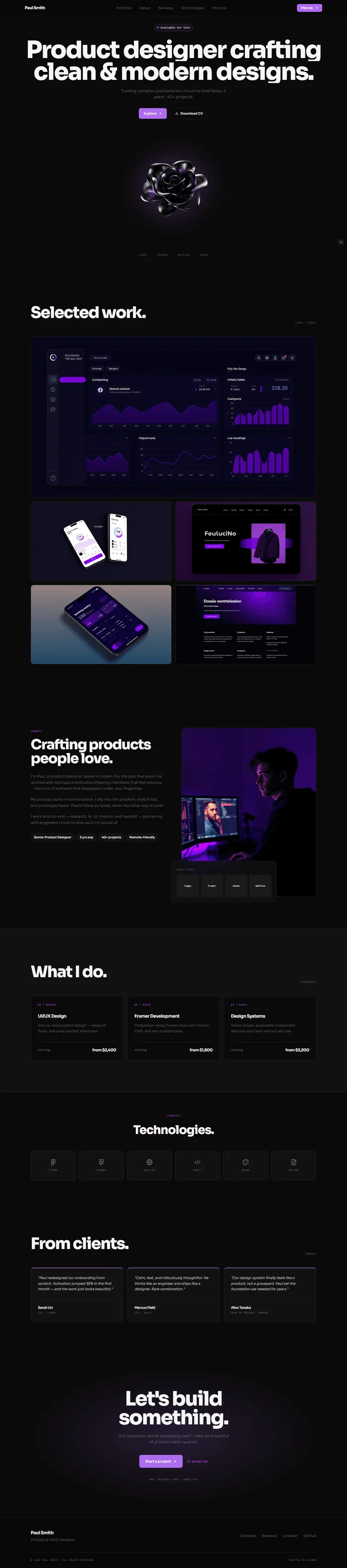
# Designer Portfolio Website Prompt # websiteprompts.ai Build a personal portfolio website for **Paul Smith** — a product and UI/UX designer crafting clean, modern digital experiences. Near-black dark foundation, white type, abstract 3D accent object in hero. Minimal, confident, typographically bold. Inspired by high-end digital product studios. ## Tech Stack React + Vite + TypeScript + Tailwind CSS + Framer Motion (motion/react) + shadcn/ui + lucide-react ## Design System ```css :root { --background: 0 0% 4%; /* #0a0a0a near-black */ --surface: 0 0% 7%; /* #121212 card surface */ --surface-raised: 0 0% 10%; /* #1a1a1a raised */ --border: 0 0% 14%; /* #242424 border */ --foreground: 0 0% 96%; /* #f5f5f5 off-white */ --muted: 0 0% 45%; /* #737373 muted */ --primary: 270 80% 68%; /* #a855f7 purple accent */ --primary-dark: 270 84% 55%; /* #8b25f0 hover */ --primary-glow: 270 80% 68% / 0.15; /* glow tint */ --mono: 'JetBrains Mono', monospace; } ``` ## Typography Import: `https://fonts.googleapis.com/css2?family=Sora:wght@300;400;600;700;800&family=JetBrains+Mono:wght@400&display=swap` - Display / H1–H2: Sora 700–800, letter-spacing -0.04em - Body / UI: Sora 300–500 - Labels / Tags: JetBrains Mono 400 ## Visual Effects **3D abstract hero object** — centered glowing 3D shape (fluid or floral abstract form): ``` {/* 3D Object: abstract fluid sculptural shape, glossy near-black metallic surface with subtle purple iridescent highlights, floating centered on pure black background, studio lighting from above */} <img src="" alt="Abstract 3D sculptural design object" className="w-full h-full object-contain" /> ``` Wrap in div with `filter: drop-shadow(0 0 60px hsl(270 80% 68% / 0.3))`. Animate: `animate={{ y: [0, -12, 0] }} transition={{ duration: 5, repeat: Infinity, ease: 'easeInOut' }}`. **Glow card hover** — portfolio and service cards on hover: ```css transition: border-color 0.18s, box-shadow 0.18s; &:hover { border-color: hsl(var(--primary)); box-shadow: 0 0 40px hsl(270 80% 68% / 0.15); } ``` **Clip-path text reveal** — H1 lines: `initial={{ clipPath: 'inset(0 100% 0 0)' }}` → `animate={{ clipPath: 'inset(0 0% 0 0)' }}`, duration 0.65s, `ease: [0.76, 0, 0.24, 1]`, stagger 0.1s per line. **Cursor glow** — 200px soft purple radial gradient follows cursor: ```css .cursor-glow { position: fixed; width: 200px; height: 200px; border-radius: 50%; background: radial-gradient(circle, hsl(270 80% 68% / 0.06), transparent 70%); pointer-events: none; transform: translate(-50%, -50%); z-index: 0; } ``` Update position with `mousemove` event listener. ## Sections **1. Navbar** — fixed, `background: hsl(var(--background) / 0.92)`, blur 12px, border-bottom 1px border. Left: "Paul Smith" Sora 700 16px white. Center: Portfolio · About · Services · Technologies · Hire me. Right: "Hire me →" — purple filled button, border-radius 6px, Sora 600 12px. **2. Hero** — full viewport, flex center column, text-align center, position relative. Badge: purple tint pill "Available for hire" with pulsing purple dot. H1 clip-path reveal, Sora 800, clamp(52px, 7vw, 96px), line-height 0.92, letter-spacing -0.04em, white: ``` Product designer crafting clean & modern designs. ``` Sub: Sora 300 16px muted, "Turning complex problems into intuitive interfaces. 5 years · 40+ projects." centered, max-width 460px, margin-top 20px. CTAs: "Explore →" (purple filled, Sora 600 13px, border-radius 8px) + "Download CV" (ghost border). Below CTAs: 3D object centered, ~500×500px, with glow. Bottom: row of 4 tech logo marks (Figma · Framer · Webflow · Adobe) in muted white 30%. **3. Selected Work** — padding 100px 64px. H2 "Selected work." Sora 800 clamp(40px, 5vw, 64px). Below: 2-column asymmetric project grid, gap 16px. Large card (col-span 2 on first): project screenshot/mockup image + overlay on hover (project name + category + "View case study →"). Small cards (2 per row): same pattern. 5 projects total. Each card `background: hsl(var(--surface))`, border, border-radius 12px, overflow hidden, aspect-ratio 16/9 for image, glow hover. ``` {/* Project image brief: clean product UI mockup on dark background, purple accent colors, modern dashboard or mobile app design */} ``` **4. About** — two-column, padding 96px 64px. Left: H2 "Crafting products people love." Sora 800. 3 paragraphs (background, process, tools). Credential chips: Sora 700 · Product Design · 5 yrs exp · 40+ projects · Remote-friendly. Right: portrait + floating stack card showing tools grid (Figma / Framer / Adobe / Webflow icons in small surface cards). ``` {/* Image: young male designer at minimal dark desk setup, dual monitors, ambient purple light, calm focused atmosphere */} ``` **5. Services** — surface bg, padding 96px 64px. H2 "What I do." 3-column card grid. Each card: JetBrains Mono 10px category tag + Sora 700 18px service name + 2-line desc + starting price. Glow hover. Services: UI/UX Design from $2,400 · Framer Development from $1,800 · Design Systems from $3,200. **6. Technologies** — centered strip, padding 60px 64px. H2 "Technologies." Icon grid 6 across — Figma · Framer · Webflow · React · Adobe · Notion. Each: icon placeholder + name in JetBrains Mono 10px. Muted default, white on hover. **7. Testimonials** — padding 96px 64px. H2 "From clients." 3 cards in row. Each: purple top border 2px + quote Sora 300 italic 14px + name Sora 600 + role JetBrains Mono 10px muted. Stagger fade-up. **8. CTA** — full-width near-black, padding 80px 64px, centered. Radial purple glow behind text (opacity 0.08). H2 Sora 900: "Let's build something." Sub muted. "Start a project →" (purple filled large) + "Or email me" (text link purple). Below: response time note JetBrains Mono muted. **9. Footer** — `hsl(0 0% 3%)`, padding 40px 64px 24px. Left: "Paul Smith" + role. Right: social links (Dribbble, Behance, LinkedIn, GitHub). Bottom: copyright JetBrains Mono 10px muted. ## Responsive Mobile: nav hamburger overlay · hero H1 clamp(40px, 12vw, 64px) · 3D object 280px · work grid single column · services stack · about single column. ## Animations Summary | Element | Animation | Trigger | |---|---|---| | Hero H1 | Clip-path reveal stagger | On mount | | 3D object | Float loop y 0→-12→0, 5s | Always | | Cursor glow | Follow cursor | Always | | Work cards | Stagger fade-up | Scroll | | Service cards | Stagger fade-up + glow hover | Scroll | | CTA | Fade-up | Scroll | ## Key Dependencies ```json { "motion": "^12.x", "lucide-react": "^0.400.x" } ``` > **Quick notes:** Purple accent swaps easily to any brand color via `--primary`. 3D object is image-described — Bolt/Lovable will generate an abstract shape. Case study links need real portfolio URLs or CMS. Swap "Paul Smith" with real name throughout.

The generated results may vary

Categories

Categories

proxio framer template cta

FAQ

What sections are included in the Designer Portfolio Website Prompt?

The prompt includes 9 fully specified sections: fixed nav with availability signal and "Hire me →" CTA, full-viewport hero with clip-path H1 reveal, floating 3D abstract object, and tech logo strip, 5-project asymmetric work grid with hover overlays, about section with portrait and credential chips, 3-service card grid with pricing, technologies icon grid, 3-testimonial row, ambient purple CTA section, and minimal dark footer. Every section includes layout specs, Framer Motion animations, and complete copy.

Who is this designer portfolio prompt designed for?

It's designed for product designers, UI/UX designers, Framer developers, and design engineers who want a portfolio that demonstrates design quality before a single case study is opened. The dark near-black aesthetic, 3D hero object, and cursor glow create an immediate impression of craft — well-suited for designers targeting premium clients, agencies, or tech companies.

Which AI tools can I use this prompt with?

The prompt works with Lovable, Claude, Bolt, v0, Cursor, and any other AI web builder that accepts a text prompt. The clip-path headline reveal, cursor glow, and float animation are Framer Motion and render best in Lovable and Bolt. The project grid, service cards, tech grid, and testimonials render cleanly in all tools.

Can I change the designer's name, projects, and services?

Yes — everything is written to be swapped. Replace "Paul Smith" with the real name throughout, update the 5 project names and descriptions with real case studies, update the service names and pricing, and replace the tech grid with actual tools used. The purple #a855f7 accent swaps via a single CSS variable change.

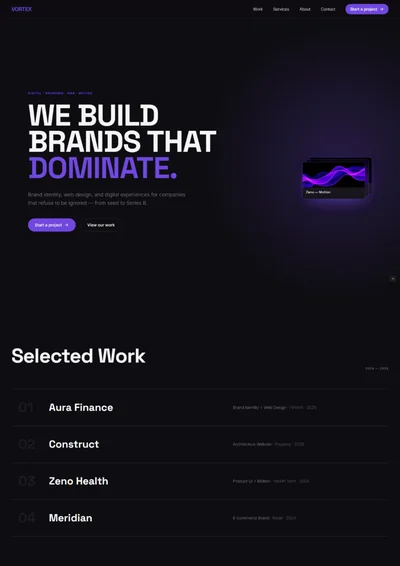
Designer portfolio website prompt full preview — near-black #0a0a0a background with purple #a855f7 accent, Sora 800 hero headline with clip-path line-by-line reveal animation, floating glossy 3D abstract sculptural object with purple glow below headline, five-project asymmetric work grid with first card spanning full width showing project screenshot and hover overlay, and three service cards with purple glow on hover and JetBrains Mono pricing

FAQ

What sections are included in the Designer Portfolio Website Prompt?

The prompt includes 9 fully specified sections: fixed nav with availability signal and "Hire me →" CTA, full-viewport hero with clip-path H1 reveal, floating 3D abstract object, and tech logo strip, 5-project asymmetric work grid with hover overlays, about section with portrait and credential chips, 3-service card grid with pricing, technologies icon grid, 3-testimonial row, ambient purple CTA section, and minimal dark footer. Every section includes layout specs, Framer Motion animations, and complete copy.

Who is this designer portfolio prompt designed for?

It's designed for product designers, UI/UX designers, Framer developers, and design engineers who want a portfolio that demonstrates design quality before a single case study is opened. The dark near-black aesthetic, 3D hero object, and cursor glow create an immediate impression of craft — well-suited for designers targeting premium clients, agencies, or tech companies.

Which AI tools can I use this prompt with?

The prompt works with Lovable, Claude, Bolt, v0, Cursor, and any other AI web builder that accepts a text prompt. The clip-path headline reveal, cursor glow, and float animation are Framer Motion and render best in Lovable and Bolt. The project grid, service cards, tech grid, and testimonials render cleanly in all tools.

Can I change the designer's name, projects, and services?

Yes — everything is written to be swapped. Replace "Paul Smith" with the real name throughout, update the 5 project names and descriptions with real case studies, update the service names and pricing, and replace the tech grid with actual tools used. The purple #a855f7 accent swaps via a single CSS variable change.

Frequently asked questions

What is websiteprompts.ai?

websiteprompts.ai is a free library of AI website prompts. Each prompt is a ready-to-use text instruction that generates a complete website design when used with an AI website builder like Lovable, Claude, Bolt, v0, or similar tools.

How do I use these prompts?

Copy any prompt from websiteprompts.ai, open your AI website builder of choice — Lovable, Bolt, v0, Claude, ChatGPT, or any other tool — paste the prompt, and let the AI generate your website. No coding or design experience needed.

Are the prompts free?

Yes — every prompt on websiteprompts.ai is completely free. Copy and use them as many times as you like, for personal or commercial projects.

Which AI tools do the prompts work with?

The prompts are designed primarily for Lovable and Bolt, but they work with any AI tool that can generate websites — including v0, Claude, ChatGPT, Cursor, Framer AI, and others.

How often are new prompts added?

New prompts are added every day. The library is constantly growing with prompts for different industries, website types, and design styles.

Do I need any technical skills to use these prompts?

No technical skills required. Copy the prompt, paste it into any AI website builder, and the AI handles the rest. websiteprompts.ai is built for anyone who wants a professional website without writing code.

Frequently asked questions

What is websiteprompts.ai?

websiteprompts.ai is a free library of AI website prompts. Each prompt is a ready-to-use text instruction that generates a complete website design when used with an AI website builder like Lovable, Claude, Bolt, v0, or similar tools.

How do I use these prompts?

Copy any prompt from websiteprompts.ai, open your AI website builder of choice — Lovable, Bolt, v0, Claude, ChatGPT, or any other tool — paste the prompt, and let the AI generate your website. No coding or design experience needed.

Are the prompts free?

Yes — every prompt on websiteprompts.ai is completely free. Copy and use them as many times as you like, for personal or commercial projects.

Which AI tools do the prompts work with?

The prompts are designed primarily for Lovable and Bolt, but they work with any AI tool that can generate websites — including v0, Claude, ChatGPT, Cursor, Framer AI, and others.

How often are new prompts added?

New prompts are added every day. The library is constantly growing with prompts for different industries, website types, and design styles.

Do I need any technical skills to use these prompts?

No technical skills required. Copy the prompt, paste it into any AI website builder, and the AI handles the rest. websiteprompts.ai is built for anyone who wants a professional website without writing code.

Frequently asked questions

What is websiteprompts.ai?

websiteprompts.ai is a free library of AI website prompts. Each prompt is a ready-to-use text instruction that generates a complete website design when used with an AI website builder like Lovable, Claude, Bolt, v0, or similar tools.

How do I use these prompts?

Copy any prompt from websiteprompts.ai, open your AI website builder of choice — Lovable, Bolt, v0, Claude, ChatGPT, or any other tool — paste the prompt, and let the AI generate your website. No coding or design experience needed.

Are the prompts free?

Yes — every prompt on websiteprompts.ai is completely free. Copy and use them as many times as you like, for personal or commercial projects.

Which AI tools do the prompts work with?

The prompts are designed primarily for Lovable and Bolt, but they work with any AI tool that can generate websites — including v0, Claude, ChatGPT, Cursor, Framer AI, and others.

How often are new prompts added?

New prompts are added every day. The library is constantly growing with prompts for different industries, website types, and design styles.

Do I need any technical skills to use these prompts?

No technical skills required. Copy the prompt, paste it into any AI website builder, and the AI handles the rest. websiteprompts.ai is built for anyone who wants a professional website without writing code.

Get new AI website prompts every week — straight to your inbox.

Every Friday we drop a fresh batch of AI website prompts and tips to help you build better websites faster.

Join 1,000+ AI enthusiasts

liquid metallic gradient

Get new AI website prompts every week — straight to your inbox.

Every Friday we drop a fresh batch of AI website prompts and tips to help you build better websites faster.

Join 1,000+ AI enthusiasts

liquid metallic gradient

Get new AI website prompts every week — straight to your inbox.

Every Friday we drop a fresh batch of AI website prompts and tips to help you build better websites faster.

Join 1,000+ AI enthusiasts