Podcast Website Prompt — Dark Near-Black and Amber Business Podcast Website Design for Lovable, Claude, Bolt and more
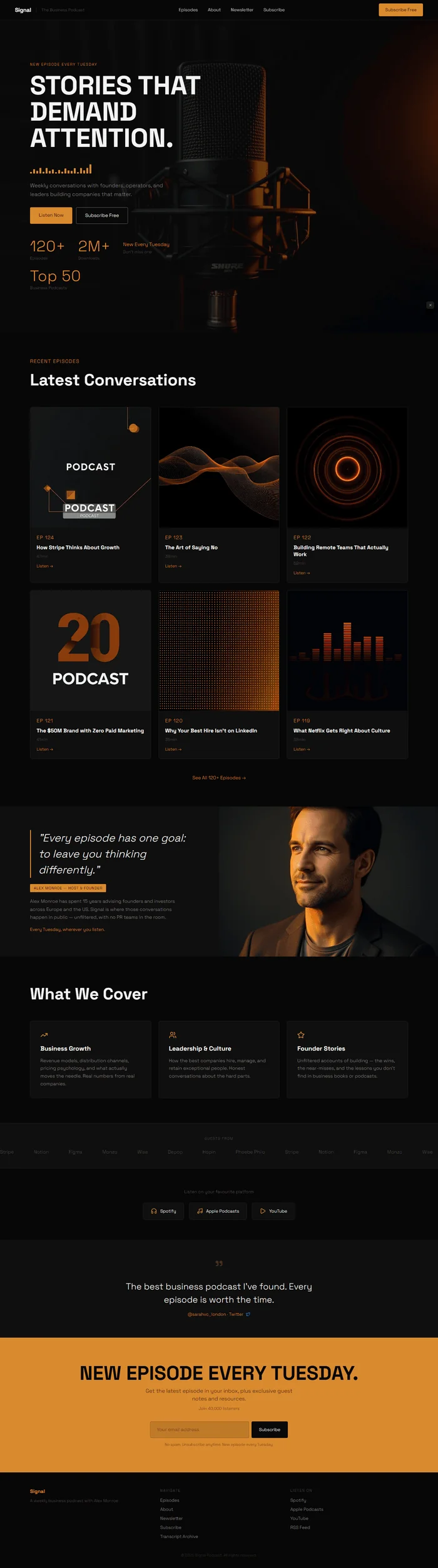
A dark, moody business podcast website prompt in near-black #0a0a0a and electric amber #d48c1a, with an animated SVG audio waveform hero component, Space Grotesk display type, episode grid, host profile, and email subscription CTA.
# Signal — The Business Podcast Website Prompt ## Goal Build a dark, moody business podcast website with an animated SVG audio waveform hero component, amber accents, Space Grotesk display type, episode grid, and email subscription CTA. ## Tech Stack React + Vite + TypeScript + Tailwind CSS + Framer Motion (motion/react) + shadcn/ui + lucide-react ## Design System ### Colors ```css :root { --background: 0 0% 4%; --foreground: 0 0% 96%; --primary: 33 75% 48%; --primary-foreground: 0 0% 4%; --muted-foreground: 0 0% 55%; --border: 0 0% 18%; /* Raw hex reference */ /* near-black: #0a0a0a */ /* electric-amber: #d48c1a */ /* warm-white: #f5f5f5 */ /* dark-grey: #1a1a1a */ } ``` ### Typography Google Fonts import: `https://fonts.googleapis.com/css2?family=Space+Grotesk:wght@300;700&family=Bebas+Neue&family=Inter:wght@400&display=swap` - Headlines: Space Grotesk 700 - Body: Space Grotesk 300 - Episode numbers / stats: Bebas Neue 400 - UI labels: Inter 400 ## Visual Effects 1. **Animated SVG Audio Waveform** — 20 vertical bars in amber (#d48c1a), heights preset [8,24,16,36,12,40,20,32,10,28,14,38,22,18,34,8,30,16,26,40]px, each bar has Framer Motion continuous animation: keyframes on scaleY [0.4, 1.0, 0.4], duration: 2s, repeat: Infinity, ease: "easeInOut", stagger 0.05s between each bar (bar[i] delay: i * 0.05s), total waveform: 200px wide, 48px tall container, bars have width 6px, gap 4px, origin bottom 2. **Episode Card Amber Border on Hover** — whileHover border: 1px solid #d48c1a, scale 1.02, 0.2s ease-out 3. **Scrolling Guest Logo Marquee** — 8 company names, Inter 400, translateX loop at 45s linear infinite, monochrome on dark bg 4. **Amber Email Input Focus** — focus state: border-color: #d48c1a, box-shadow: 0 0 0 2px rgba(212,140,26,0.25), 0.2s transition ## Component Breakdown ### 1. Navbar ```tsx // Sticky, bg: #0a0a0a, border-bottom: 1px solid #1f1f1f, height: 64px // Left: "Signal" — Space Grotesk 700, 18px, letter-spacing: -0.02em, #f5f5f5 // Divider: 1px solid #333, height 16px, vertical // Plus Jakarta note: Inter 400, 13px, #6a6a6a: "The Business Podcast" // Center: Episodes / About / Newsletter / Subscribe — Inter 400, 14px, #c0c0c0 // Right: "Subscribe Free" — bg: #d48c1a, color: #0a0a0a, Inter 400, 14px, px-5 py-2.5, border-radius: 4px // Framer Motion: y -64→0, opacity 0→1, 0.5s ease-out ``` ### 2. Hero ```tsx // Full-viewport, min-height: 100vh, position: relative, overflow: hidden, bg: #0a0a0a {/* Image: Dramatic close-up of a professional podcast microphone — Shure SM7B or Neumann U87 style, warm amber rim light from the right, acoustic foam panels visible in soft background bokeh, moody studio atmosphere, deep shadows, professional broadcast quality */} <img src="" alt="Professional broadcast microphone in podcast studio with amber lighting" style={{ position: 'absolute', inset: 0, width: '100%', height: '100%', objectFit: 'cover', objectPosition: 'center' }} /> // Gradient overlay — composition independent: // linear-gradient(to right, rgba(10,10,10,0.92) 0%, rgba(10,10,10,0.65) 55%, transparent 100%) // position: absolute; inset: 0; z-index: 1 // Content panel: position absolute, left 0, top 0, height 100%, width 55%, z-index 10 // padding-left: clamp(24px,6vw,96px), display flex flex-col justify-center // Kicker: Inter 400, 12px, letter-spacing 0.16em, uppercase, color: #d48c1a, margin-bottom 16px // "NEW EPISODE EVERY TUESDAY" // Main headline: "STORIES THAT DEMAND ATTENTION." // Space Grotesk 700, clamp(44px,6vw,108px), line-height: 1.0, color: #f5f5f5 // Framer Motion: opacity 0→1, y 30→0, 0.7s ease-out, delay: 0.1s // Animated Waveform component — margin-top: 24px, margin-bottom: 24px: // SVG or div container: width 200px, height 48px, display flex, align-items flex-end, gap 4px const waveHeights = [8,24,16,36,12,40,20,32,10,28,14,38,22,18,34,8,30,16,26,40]; // Each bar: width 6px, background #d48c1a, transform-origin: bottom // Framer Motion animate: scaleY: [0.4, 1.0, 0.4], transition: { duration: 2, repeat: Infinity, ease: "easeInOut", delay: index * 0.05 } // So bar 0: delay 0s, bar 1: delay 0.05s ... bar 19: delay 0.95s // Total animation creates a rolling wave effect across the bars // Sub: Space Grotesk 300, 17px, color: #8c8c8c, line-height 1.65, max-width 440px // "Weekly conversations with founders, operators, and leaders building companies that matter." // Framer Motion: opacity 0→1, y 20→0, 0.6s, delay 0.45s // CTAs (flex row, gap 12px, margin-top 28px): // "Listen Now" — bg: #d48c1a, color: #0a0a0a, Inter 400, 15px, px-7 py-3.5, border-radius: 4px // "Subscribe Free" — bg: transparent, border: 1px solid rgba(245,245,245,0.4), color: #f5f5f5, Inter 400, 15px, px-7 py-3.5, border-radius: 4px // Framer Motion: opacity 0→1, y 20→0, 0.6s, delay 0.6s // Count-up stats (flex row, gap 40px, margin-top 48px): // Each: Space Grotesk 700 or Bebas Neue 48px color: #d48c1a + Inter 400 13px #6a6a6a label // Stat 1: "120+" / "Episodes" // Stat 2: "2M+" / "Downloads" // Stat 3: "New Every Tuesday" (Inter 400, 16px, amber) — no count-up, just display // Stat 4: "Top 50" / "Business Podcasts" ``` ### 3. Episode Grid ```tsx // Section bg: #0a0a0a, padding: 80px clamp(24px,6vw,96px) // Section label: Bebas Neue, 16px, letter-spacing 0.1em, #d48c1a, margin-bottom 8px: "RECENT EPISODES" // Headline: Space Grotesk 700, clamp(28px,4vw,52px), #f5f5f5, margin-bottom 48px: "Latest Conversations" // 3×2 grid, gap 24px // Each episode card: bg: #111, border: 1px solid #222, border-radius: 8px, overflow hidden, cursor pointer // Hover: Framer Motion border-color #d48c1a, scale 1.02, 0.2s {/* Image: Square podcast episode cover art — abstract geometric design, dark background, amber or gold accent color, professional graphic design feel, square 1:1 format */} <img src="" alt="[Episode title] — Signal Business Podcast cover art" style={{ width: '100%', aspectRatio: '1/1', objectFit: 'cover', objectPosition: 'center' }} /> // Card body, padding 20px // Bebas Neue, 16px, letter-spacing 0.08em, color: #d48c1a: "EP 124" // Space Grotesk 700, 17px, #f5f5f5, margin-top 8px, line-height 1.3: episode title // Inter 400, 13px, #6a6a6a, margin-top 8px: runtime // Amber link, Inter 400, 13px, margin-top 12px: "Listen →" // 6 episodes: // EP 124: "How Stripe Thinks About Growth" / 47min / "Listen →" // EP 123: "The Art of Saying No" / 38min / "Listen →" // EP 122: "Building Remote Teams That Actually Work" / 52min / "Listen →" // EP 121: "The $50M Brand with Zero Paid Marketing" / 41min / "Listen →" // EP 120: "Why Your Best Hire Isn't on LinkedIn" / 35min / "Listen →" // EP 119: "What Netflix Gets Right About Culture" / 58min / "Listen →" // Below grid: "See All 120+ Episodes →" centered, Inter 400, 15px, #d48c1a ``` ### 4. Host Profile ```tsx // Section bg: #111, padding: 0 (full-bleed split), min-height: 480px // Left 50%: content, bg: #111, padding: 64px clamp(24px,6vw,96px), display flex flex-col justify-center // Pull quote: Space Grotesk 300 italic, clamp(20px,2.8vw,34px), #f5f5f5, line-height 1.5, border-left 3px solid #d48c1a, padding-left 24px // "Every episode has one goal: to leave you thinking differently." // Name chip: bg: #d48c1a, color: #0a0a0a, Inter 400, 12px, letter-spacing 0.08em, px-3 py-1, border-radius 2px, margin-top 20px, inline-block // "ALEX MONROE — HOST & FOUNDER" // Bio: Inter 400, 15px, #8c8c8c, margin-top 16px, line-height 1.7 // "Alex Monroe has spent 15 years advising founders and investors across Europe and the US. Signal is where those conversations happen in public — unfiltered, with no PR teams in the room." // Sub: Inter 400, 14px, #d48c1a, margin-top 16px: "Every Tuesday, wherever you listen." // Right 50%: full-bleed host photography {/* Image: Professional podcast host headshot in a studio setting — neutral dark background, warm key lighting from left, confident and thoughtful expression, high-quality portrait photography, blazer or smart casual */} <img src="" alt="Alex Monroe, host of Signal Business Podcast" style={{ width: '100%', height: '100%', objectFit: 'cover', objectPosition: 'center' }} /> ``` ### 5. Content Pillars ```tsx // Section bg: #0a0a0a, padding: 80px clamp(24px,6vw,96px) // Headline: Space Grotesk 700, clamp(28px,4vw,52px), #f5f5f5, margin-bottom 48px: "What We Cover" // 3-column flex, gap 24px // Each pillar card: bg: #111, border: 1px solid #1f1f1f, border-radius: 8px, padding 32px // Amber Lucide icon (TrendingUp / Users / Star), 24px, margin-bottom 16px // Space Grotesk 700, 20px, #f5f5f5: pillar name // Space Grotesk 300, 15px, #8c8c8c, margin-top 12px, line-height 1.65: description // Pillar 1: TrendingUp icon / "Business Growth" // "Revenue models, distribution channels, pricing psychology, and what actually moves the needle. Real numbers from real companies." // Pillar 2: Users icon / "Leadership & Culture" // "How the best companies hire, manage, and retain exceptional people. Honest conversations about the hard parts." // Pillar 3: Star icon / "Founder Stories" // "Unfiltered accounts of building — the wins, the near-misses, and the lessons you don't find in business books or podcasts." // Framer Motion: whileInView opacity 0→1, y 24→0, stagger 0.15s ``` ### 6. Guest/Company Marquee ```tsx // Section bg: #111, padding: 40px 0, border-top: 1px solid #1f1f1f, border-bottom: 1px solid #1f1f1f // Label center: Inter 400, 11px, letter-spacing 0.16em, uppercase, #4a4a4a, margin-bottom 24px // "GUESTS FROM" // Marquee track: flex, gap 64px, translateX loop 45s linear infinite // 8 company names: "Stripe" / "Notion" / "Figma" / "Monzo" / "Wise" / "Depop" / "Hopin" / "Phoebe Philo" // Each: Inter 400, 15px, #4a4a4a, white-space nowrap // Hover on the marquee container: animation-play-state: paused ``` ### 7. Platform Buttons ```tsx // Section bg: #0a0a0a, padding: 64px clamp(24px,6vw,96px), text-align center // Label: Inter 400, 14px, #6a6a6a, margin-bottom 24px: "Listen on your favourite platform" // 3 platform buttons, inline flex, gap 16px, justify-center: // Each button: bg: #1a1a1a, border: 1px solid #2a2a2a, border-radius: 8px, px-6 py-4 // flex align-center gap 10px // Lucide icon or SVG (Headphones for Spotify, Music for Apple, Play for YouTube), 20px, #d48c1a // Inter 400, 14px, #f5f5f5: platform name // Button 1: Headphones / "Spotify" // Button 2: Music / "Apple Podcasts" // Button 3: Play / "YouTube" // Hover: Framer Motion scale 1.05, border-color #d48c1a, 0.2s ``` ### 8. Twitter Social Proof ```tsx // Section bg: #111, padding: 60px clamp(24px,6vw,96px), text-align center // Amber quotation mark: Bebas Neue, 80px, #d48c1a, opacity 0.3, line-height 0.8 // Quote: Space Grotesk 300, clamp(18px,2.5vw,28px), #f5f5f5, line-height 1.5, max-width 640px, margin auto // "The best business podcast I've found. Every episode is worth the time." // Attribution: Inter 400, 14px, #d48c1a, margin-top 16px: "@sarahvc_london · Twitter" // Small blue bird badge beside the attribution (simple Twitter/X brand icon, 14px) ``` ### 9. Amber Email CTA ```tsx // Section bg: #d48c1a, padding: 80px clamp(24px,6vw,96px), text-align center // Space Grotesk 700, clamp(32px,4.5vw,72px), #0a0a0a: "NEW EPISODE EVERY TUESDAY." // Space Grotesk 300, 17px, #0a0a0a, opacity 0.75, margin-top 12px, max-width 480px, margin-x auto // "Get the latest episode in your inbox, plus exclusive guest notes and resources." // Inter 400, 13px, #0a0a0a, opacity 0.6, margin-top 8px: "Join 40,000 listeners" // Email form (flex, gap 8px, justify-center, max-width 440px, margin 32px auto 0): // Input: bg: rgba(0,0,0,0.12), border: 1px solid rgba(0,0,0,0.2), border-radius: 4px, px-5 py-3.5, Inter 400, 15px, color #0a0a0a, placeholder #6a4a00, width 100% // Focus: border-color #0a0a0a, box-shadow 0 0 0 2px rgba(0,0,0,0.2) // Input placeholder: "Your email address" // Submit button: bg #0a0a0a, color #f5f5f5, Inter 400, 14px, px-6 py-3.5, border-radius 4px, white-space nowrap // "Subscribe" // Hover: bg #1a1a1a, 0.2s // Small: Inter 400, 12px, #6a4a00, margin-top 12px: "No spam. Unsubscribe anytime. New episode every Tuesday." ``` ### 10. Footer ```tsx // bg: #0a0a0a, border-top: 1px solid #1f1f1f, padding: 48px clamp(24px,6vw,96px) 32px // 3 columns: Brand / Navigate / Listen On // Brand: "Signal" Space Grotesk 700, 16px, amber / Inter 400 13px #4a4a4a "A weekly business podcast with Alex Monroe" // Navigate: Inter 400, 14px, #6a6a6a — Episodes / About / Newsletter / Subscribe / Transcript Archive // Listen On: Inter 400, 14px, #6a6a6a — Spotify / Apple Podcasts / YouTube / RSS Feed // Copyright: "© 2025 Signal Podcast. All rights reserved." Inter 400, 12px, #333 ``` ## Animations | Element | Animation | Duration | Delay | Easing | |---|---|---|---|---| | Navbar | y: -64→0, opacity 0→1 | 0.5s | 0s | ease-out | | Hero headline | opacity 0→1, y 30→0 | 0.7s | 0.1s | ease-out | | Waveform bars | scaleY [0.4,1.0,0.4], stagger 0.05s/bar | 2s each | i * 0.05s | easeInOut, Infinity | | Hero sub | opacity 0→1, y 20→0 | 0.6s | 0.45s | ease-out | | Hero CTAs | opacity 0→1, y 20→0 | 0.6s | 0.6s | ease-out | | Episode cards | whileHover scale 1.02, amber border | 0.2s | 0s | ease-out | | Content pillars | whileInView opacity 0→1, y 24→0, stagger 0.15s | 0.6s | scroll | ease-out | | Marquee | translateX loop | 45s | 0s | linear, infinite | | Platform buttons | whileHover scale 1.05, amber border | 0.2s | 0s | ease-out | | Email input focus | border amber, amber glow | 0.2s | 0s | ease-out | ## Responsive - **Mobile (<768px)**: Hero single column, waveform remains but scaled, episode grid 1-col, host split stacks (photo above, text below), pillars stack, platform buttons stack - **Tablet (768–1024px)**: Episode grid 2-col, host split keeps 50/50 - **Desktop**: Full 3×2 episode grid, all sections full-width as described ## Full Copy **Brand**: Signal — The Business Podcast **Navbar**: Signal / Episodes / About / Newsletter / Subscribe **Hero**: - Kicker: "NEW EPISODE EVERY TUESDAY" - Headline: "STORIES THAT DEMAND ATTENTION." - Sub: "Weekly conversations with founders, operators, and leaders building companies that matter." - CTA 1: "Listen Now" - CTA 2: "Subscribe Free" **Stats**: 120+ Episodes / 2M+ Downloads / New Every Tuesday / Top 50 Business **Episodes**: - EP 124: "How Stripe Thinks About Growth" / 47min - EP 123: "The Art of Saying No" / 38min - EP 122: "Building Remote Teams That Actually Work" / 52min - EP 121: "The $50M Brand with Zero Paid Marketing" / 41min - EP 120: "Why Your Best Hire Isn't on LinkedIn" / 35min - EP 119: "What Netflix Gets Right About Culture" / 58min - "See All 120+ Episodes →" **Host**: - Pull quote: "Every episode has one goal: to leave you thinking differently." - Name: "ALEX MONROE — HOST & FOUNDER" - Bio: "Alex Monroe has spent 15 years advising founders and investors across Europe and the US. Signal is where those conversations happen in public — unfiltered, with no PR teams in the room." - "Every Tuesday, wherever you listen." **Content Pillars**: - Business Growth: "Revenue models, distribution channels, pricing psychology, and what actually moves the needle. Real numbers from real companies." - Leadership & Culture: "How the best companies hire, manage, and retain exceptional people. Honest conversations about the hard parts." - Founder Stories: "Unfiltered accounts of building — the wins, the near-misses, and the lessons you don't find in business books or podcasts." **Guests from**: Stripe / Notion / Figma / Monzo / Wise / Depop / Hopin / Phoebe Philo **Platforms**: Spotify / Apple Podcasts / YouTube **Social proof**: "The best business podcast I've found. Every episode is worth the time." — @sarahvc_london · Twitter **Email CTA**: "NEW EPISODE EVERY TUESDAY." / "Get the latest episode in your inbox, plus exclusive guest notes and resources." / "Join 40,000 listeners" / "No spam. Unsubscribe anytime. New episode every Tuesday." **Email form placeholder**: "Your email address" / "Subscribe" ## Key Dependencies ```json { "dependencies": { "react": "^18", "framer-motion": "^11", "lucide-react": "latest", "@shadcn/ui": "latest", "tailwindcss": "^3" } } ```