Music Venue Website Prompt — Dark, Dramatic Design with Show Listings and Ticket CTAs

A dark, atmospheric music venue website prompt with upcoming show listings table, featured artist countdown, venue specs, bar menu, and private events section. Works in Lovable, Bolt, and v0.

Build a dark, atmospheric live music venue website called "The Signal" in Nashville, TN — a 500-capacity independent venue. Tech stack: React + Vite + TypeScript + Tailwind CSS + Framer Motion. Design: pure black background (#000000), electric amber primary (#F59E0B), warm red secondary (#DC2626), neon teal accent (#14B8A6), white text. Typography: heavy condensed display sans headings uppercase massive scale, show titles clean medium sans, tabular mono for dates. Sections: true black navbar (THE SIGNAL wordmark, links: Shows/Artists/Venue/Bar/Private Events, amber "Buy Tickets" CTA), full-height dark hero (dramatic concert crowd photo looking toward stage with bright backlights; centered: "LIVE MUSIC EVERY NIGHT" in massive condensed type; "Nashville's Premier Independent Music Venue" subline; amber pulsing "See All Shows" CTA; bottom-edge upcoming shows scrolling ticker), shows section ("UPCOMING SHOWS" — 5 show listings in table format: DATE | ARTIST | SUPPORT | DOORS/SHOW | TICKETS, rows have amber horizontal hover reveal, "View Full Calendar" button), featured artist section (full-bleed dark: large artist name, show date, real-time countdown timer days/hours/min, artist photo overlay, Get Tickets or SOLD OUT button), about section (dark left: amber stats — 12 Years Open, 500 Capacity, 850+ Artists Hosted, All-Ages Shows; right: 2-paragraph venue story + past headliners list: Chvrches, Sigur Ros, Turnstile, Wet Leg), horizontal scroll row of 8 past artist name cards with genre tags, venue specs section (4 photo tiles: stage from floor, balcony, bar, green room; specs: 500 standing / 200 seated, 3 bars, 24-channel PA, LED rig, full backline), bar section "SIGNAL POURS" (craft cocktails, local drafts, non-alcoholic, signature "The Signal Sour" highlighted), private events section (corporate buyouts, private concerts, album releases + inquiry link), email newsletter signup with amber CTA, 6-photo moody gallery grid, true black footer. Animations: hero crowd photo subtle scale zoom 12s loop, show rows stagger on entry, countdown counts down live, amber button pulse glow on hover. Mobile: hamburger dark nav, vertical show listings, sticky amber "Buy Tickets" bottom bar, scrollable artist row.

The generated results may vary

Categories

Categories

FAQ

Can I connect this to a real ticketing platform?

Ticket buttons are standard links by default. Connect live inventory with Eventbrite, DICE, Seated, or Tixr via a follow-up Lovable prompt. For a music artist site rather than a venue, see the music band prompt.

Does this work for a smaller or larger venue?

Yes — update capacity, venue story, and specs. For very small venues, simplify the specs section. For larger venues, expand PA and production specs to include stage dimensions, load-in access, and hospitality rider details that booking agents need.

Can I use this for a music festival or outdoor event series?

With modifications, yes. Replace venue specs with a festival lineup grid, swap the bar menu for food vendors, and update the hero headline (e.g. '3 Days. 40 Artists.'). The countdown timer, show listings table, gallery, and dark aesthetic transfer directly.

Can I add a podcast or music streaming embed?

Use a follow-up Lovable prompt to embed a Spotify artist playlist, SoundCloud set, or live recording player. For video, embed a YouTube or Vimeo show recording in the gallery section.

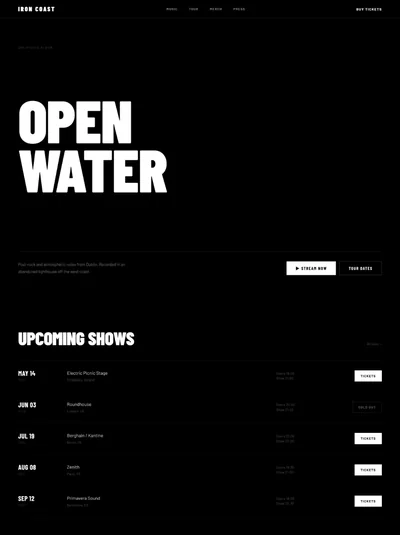
Full music venue website design: amber hero, show listings table, countdown timer, private events

FAQ

Can I connect this to a real ticketing platform?

Ticket buttons are standard links by default. Connect live inventory with Eventbrite, DICE, Seated, or Tixr via a follow-up Lovable prompt. For a music artist site rather than a venue, see the music band prompt.

Does this work for a smaller or larger venue?

Yes — update capacity, venue story, and specs. For very small venues, simplify the specs section. For larger venues, expand PA and production specs to include stage dimensions, load-in access, and hospitality rider details that booking agents need.

Can I use this for a music festival or outdoor event series?

With modifications, yes. Replace venue specs with a festival lineup grid, swap the bar menu for food vendors, and update the hero headline (e.g. '3 Days. 40 Artists.'). The countdown timer, show listings table, gallery, and dark aesthetic transfer directly.

Can I add a podcast or music streaming embed?

Use a follow-up Lovable prompt to embed a Spotify artist playlist, SoundCloud set, or live recording player. For video, embed a YouTube or Vimeo show recording in the gallery section.

Similar prompts

Frequently asked questions

What is websiteprompts.ai?

websiteprompts.ai is a free library of AI website prompts. Each prompt is a ready-to-use text instruction that generates a complete website design when used with an AI website builder like Lovable, Claude, Bolt, v0, or similar tools.

How do I use these prompts?

Copy any prompt from websiteprompts.ai, open your AI website builder of choice — Lovable, Bolt, v0, Claude, ChatGPT, or any other tool — paste the prompt, and let the AI generate your website. No coding or design experience needed.

Are the prompts free?

Yes — every prompt on websiteprompts.ai is completely free. Copy and use them as many times as you like, for personal or commercial projects.

Which AI tools do the prompts work with?

The prompts are designed primarily for Lovable and Bolt, but they work with any AI tool that can generate websites — including v0, Claude, ChatGPT, Cursor, Framer AI, and others.

How often are new prompts added?

New prompts are added every day. The library is constantly growing with prompts for different industries, website types, and design styles.

Do I need any technical skills to use these prompts?

No technical skills required. Copy the prompt, paste it into any AI website builder, and the AI handles the rest. websiteprompts.ai is built for anyone who wants a professional website without writing code.

Frequently asked questions

What is websiteprompts.ai?

websiteprompts.ai is a free library of AI website prompts. Each prompt is a ready-to-use text instruction that generates a complete website design when used with an AI website builder like Lovable, Claude, Bolt, v0, or similar tools.

How do I use these prompts?

Copy any prompt from websiteprompts.ai, open your AI website builder of choice — Lovable, Bolt, v0, Claude, ChatGPT, or any other tool — paste the prompt, and let the AI generate your website. No coding or design experience needed.

Are the prompts free?

Yes — every prompt on websiteprompts.ai is completely free. Copy and use them as many times as you like, for personal or commercial projects.

Which AI tools do the prompts work with?

The prompts are designed primarily for Lovable and Bolt, but they work with any AI tool that can generate websites — including v0, Claude, ChatGPT, Cursor, Framer AI, and others.

How often are new prompts added?

New prompts are added every day. The library is constantly growing with prompts for different industries, website types, and design styles.

Do I need any technical skills to use these prompts?

No technical skills required. Copy the prompt, paste it into any AI website builder, and the AI handles the rest. websiteprompts.ai is built for anyone who wants a professional website without writing code.

Frequently asked questions

What is websiteprompts.ai?

websiteprompts.ai is a free library of AI website prompts. Each prompt is a ready-to-use text instruction that generates a complete website design when used with an AI website builder like Lovable, Claude, Bolt, v0, or similar tools.

How do I use these prompts?

Copy any prompt from websiteprompts.ai, open your AI website builder of choice — Lovable, Bolt, v0, Claude, ChatGPT, or any other tool — paste the prompt, and let the AI generate your website. No coding or design experience needed.

Are the prompts free?

Yes — every prompt on websiteprompts.ai is completely free. Copy and use them as many times as you like, for personal or commercial projects.

Which AI tools do the prompts work with?

The prompts are designed primarily for Lovable and Bolt, but they work with any AI tool that can generate websites — including v0, Claude, ChatGPT, Cursor, Framer AI, and others.

How often are new prompts added?

New prompts are added every day. The library is constantly growing with prompts for different industries, website types, and design styles.

Do I need any technical skills to use these prompts?

No technical skills required. Copy the prompt, paste it into any AI website builder, and the AI handles the rest. websiteprompts.ai is built for anyone who wants a professional website without writing code.

Get new AI website prompts every week — straight to your inbox.

Every Friday we drop a fresh batch of AI website prompts and tips to help you build better websites faster.

Join 1,000+ AI enthusiasts

liquid metallic gradient

Get new AI website prompts every week — straight to your inbox.

Every Friday we drop a fresh batch of AI website prompts and tips to help you build better websites faster.

Join 1,000+ AI enthusiasts

liquid metallic gradient

Get new AI website prompts every week — straight to your inbox.

Every Friday we drop a fresh batch of AI website prompts and tips to help you build better websites faster.

Join 1,000+ AI enthusiasts