Theater Website Prompt — Velvet & Gold Curtain-Up Design for Bolt, v0 & Lovable
Theater website prompt for Bolt, v0 and Lovable — black and velvet red with antique gold, curtain opening on load, giant show titles, season, full copy.
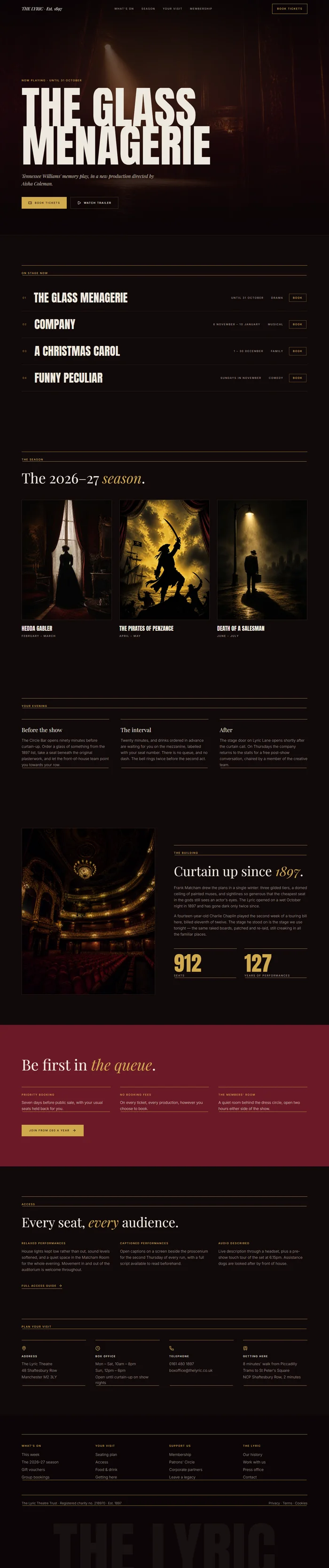
# The Lyric — Theater Website Prompt ## 1. Goal Statement Build a dramatic, dark website for **The Lyric Theatre**, a 900-seat historic playhouse — deep velvet red and black, antique gold details, huge condensed show titles, a soft spotlight pooling on the hero, and the anticipation of the moment before the curtain rises. ## 2. Tech Stack ``` React + Vite + TypeScript + Tailwind CSS + Framer Motion (motion/react) + lucide-react ``` No component libraries, no seat map, no booking engine. `Book tickets` buttons are plain links. ## 3. Design System — Colors ```css :root { --background: hsl(350, 30%, 5%); /* black with a red undertone */ --foreground: hsl(40, 30%, 90%); /* programme cream */ --primary: hsl(42, 58%, 56%); /* antique gold */ --primary-foreground: hsl(350, 30%, 5%); --velvet: hsl(350, 62%, 26%); /* deep velvet red */ --muted-foreground: hsl(30, 10%, 60%); --border: hsl(42, 30%, 22%); /* dim gold rule */ } ``` ## 4. Typography ```html <link href="https://fonts.googleapis.com/css2?family=Anton&family=Playfair+Display:ital,wght@0,400;1,400&family=Inter:wght@300;400;500&display=swap" rel="stylesheet" /> ``` - **Show titles:** Anton 400, uppercase, clamp(64px, 13vw, 220px), line-height 0.85, letter-spacing -0.01em - **H2:** Playfair Display 400, clamp(36px, 4vw, 56px) - **Italic flourishes:** Playfair Display italic, gold - **Body:** Inter 300, 16px, line-height 1.7 - **Labels, dates:** Inter 500, 12px, uppercase, letter-spacing 0.2em, gold ## 5. Visual Effects **Effect 1 — Spotlight.** Over the hero, a soft elliptical spotlight: `radial-gradient(ellipse 50% 60% at 50% 30%, hsla(42, 60%, 70%, 0.18), transparent 70%)`, which slowly breathes in opacity between 0.8 and 1 over 6 seconds. Below it, a heavy velvet-red to black bottom gradient. **Effect 2 — Curtain opening on load.** On first load, two full-height velvet-red panels cover the screen, each half the width. After 0.3s they slide apart (`x: 0 → -100%` and `x: 0 → 100%`) over 1.4s with ease `[0.76, 0, 0.24, 1]`, then unmount. Only once per session (store a flag in sessionStorage). Add a subtle vertical fold texture to the panels with `repeating-linear-gradient(90deg, rgba(0,0,0,0.25) 0 2px, transparent 2px 60px)`. **Effect 3 — Gold double rules.** Section headers sit between two thin gold lines 4px apart, like a theatre programme. ## 6. Component Breakdown 1. **Navbar** — 80px, transparent, wordmark centred in Playfair italic, links left, `Book tickets` gold outline button right. Solid black with blur after scrolling. 2. **Hero** — full viewport, the current headline production. Show title in giant Anton across two lines, dates and a gold label above, two buttons below. Spotlight (Effect 1). *Image: actor alone on a dark stage in a single warm spotlight, theatrical haze, red velvet curtain edges, cinematic.* 3. **On stage now** — a numbered list of four productions, each a full-width row: number, show title in Anton at 64px, dates, genre, and `Book` link. On hover the row background turns velvet red and a small image of the show follows the cursor. 4. **The season** — a 3-column grid of season productions with poster-style 3:4 images, title, month range. 5. **Your evening** — three columns with thin gold top rules: `Before the show`, `The interval`, `After`. Short copy under each. 6. **The building** — split: tall image left, story right with two key facts in large Playfair numerals. *Image: ornate historic theatre auditorium with red velvet seats, gilded balconies and chandelier, warm light.* 7. **Membership** — velvet red band with H2, three benefits, button. 8. **Access** — a quiet section listing relaxed, captioned and audio-described performances. 9. **Plan your visit** — address, box office hours, nearest station, parking. 10. **Footer** — black, gold double rules, four columns, giant `THE LYRIC` in Anton at 20vw at 8% opacity. ## 7. Animations - Curtain opening: Effect 2 on first visit - Hero title: each line rises `y: 60 → 0`, `opacity 0 → 1`, 1s, stagger 0.15s, starting after the curtain finishes - On stage rows: fade in with 0.08s stagger; hover image follows cursor with spring (stiffness 150, damping 20), scale 0.8 → 1, rotate -4deg - Season posters: fade up 30px, stagger 0.1s; image scales 1.06 on hover over 0.8s - Spotlight breathing: Effect 1, infinite ## 8. Responsive - **Mobile (<768px):** curtain effect still runs but faster (0.9s); show title at 64px; on stage rows drop the cursor image and show a small thumbnail on the left of each row instead; season grid becomes a horizontal snap-scroll row; the building stacks image first; navbar becomes wordmark left, `Tickets` button and menu icon right. - **Tablet:** season grid 2 columns. - **Desktop:** max-width 1400px, `px-10`, section spacing `py-28`. ## 9. Full Copy **Brand:** THE LYRIC · Est. 1897 **Navbar:** What's on · Season · Your visit · Membership — Book tickets **Hero** - Label: `NOW PLAYING · UNTIL 31 OCTOBER` - Title: `THE GLASS / MENAGERIE` - Line: `*Tennessee Williams' memory play, in a new production directed by Aisha Coleman.*` - Buttons: `Book tickets` · `Watch trailer` **On stage now** — header `ON STAGE NOW` 1. **THE GLASS MENAGERIE** — `Until 31 October` — Drama — `Book` 2. **COMPANY** — `6 November – 10 January` — Musical — `Book` 3. **A CHRISTMAS CAROL** — `1 – 30 December` — Family — `Book` 4. **FUNNY PECULIAR** — `Sundays in November` — Comedy — `Book` **The season** — H2 `The 2026–27 *season*.` - **Hedda Gabler** — February – March - **The Pirates of Penzance** — April – May - **Death of a Salesman** — June – July *Poster image briefs: dramatic theatrical key art with a single figure, strong shadows, rich colour, no text on the image.* **Your evening** — header `YOUR EVENING` - **Before the show** — `The Circle Bar opens ninety minutes before curtain up. Pre-theatre suppers in the Balcony Room from 5:30pm.` - **The interval** — `Order interval drinks before the show and they'll be waiting at your table.` - **After** — `Selected Thursday performances are followed by a free conversation with the cast.` **The building** — H2 `Curtain up since *1897*.` `Designed by Frank Matcham and restored in 2019, The Lyric is one of the finest surviving Victorian playhouses in the country. Charlie Chaplin played here at fourteen.` Facts: `912` seats · `127` years of performances **Membership** — H2 `Be first in *the queue*.` `Priority booking for every production` · `No booking fees, ever` · `Two free interval drinks each season` — Button `Join from £60 a year` **Access** — H2 `Every seat, *every* audience.` `Relaxed, captioned, audio-described and BSL-interpreted performances run for every production. Level access to the stalls, with an accessible lift to the circle.` Link `See access performances` **Plan your visit** — `The Lyric Theatre, 48 Shaftesbury Row, Manchester M2 3LY` · `Box office: Monday – Saturday 10am until curtain up` · `0161 480 1897` · `Five minutes' walk from Manchester Piccadilly` **Footer** — THE LYRIC · What's on · Season · Access · Membership · Hire the theatre · Support us · Careers · `The Lyric Theatre Trust is a registered charity no. 1054321` · © 2026 ## 10. Key Dependencies ```json { "motion": "^12.0.0", "lucide-react": "^0.460.0", "clsx": "^2.1.0" } ```