Real Estate Agent Website Prompt — Luxury Realtor Design for Bolt, v0 & Lovable
Build a luxury real estate agent website with this AI prompt. Midnight navy palette, split hero, glassmorphism listing cards, animated stat counters — works out of the box in Bolt, v0 & Lovable.
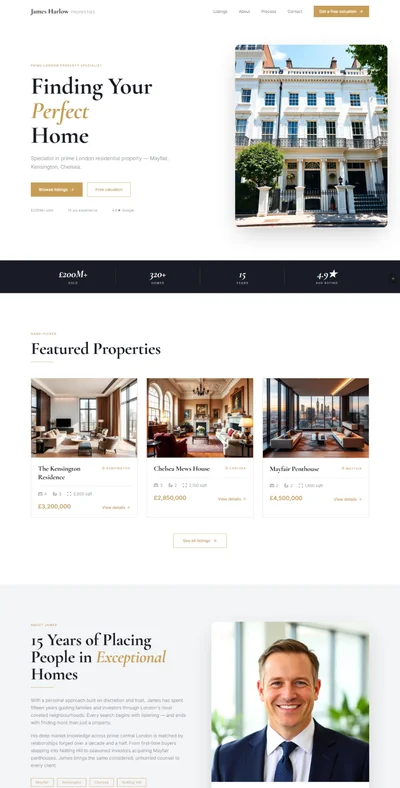
# Harlow Properties — Luxury Real Estate Agent Website Prompt ## 1. Goal Statement Build an understated luxury real estate agent website for **Harlow Properties**, defined by a midnight navy and warm cream palette that communicates trust, discretion, and premium expertise in residential property. --- ## 2. Tech Stack ``` React + Vite + TypeScript + Tailwind CSS + Framer Motion (motion/react) + shadcn/ui + lucide-react ``` --- ## 3. Design System — Colors ```css :root { --background: hsl(220, 43%, 9%); /* #0b1222 midnight navy */ --foreground: hsl(34, 33%, 92%); /* #f4ede0 warm cream */ --primary: hsl(38, 48%, 60%); /* #c9a96e antique gold */ --primary-foreground: hsl(220, 43%, 9%); /* navy — text on gold buttons */ --muted-foreground: hsl(34, 20%, 65%); /* muted warm grey */ --border: hsl(38, 30%, 22%); /* dark gold border */ --card: hsl(220, 40%, 12%); /* slightly lighter card bg */ --card-glass: rgba(244, 237, 224, 0.06); /* glassmorphism card base */ --accent: hsl(38, 48%, 60%); /* antique gold accent */ } ``` --- ## 4. Typography ```html <link href="https://fonts.googleapis.com/css2?family=Libre+Baskerville:ital,wght@0,400;0,700;1,400&family=Inter:wght@300;400;500;600&display=swap" rel="stylesheet" /> ``` - **H1 / H2 headings:** `font-family: 'Libre Baskerville', Georgia, serif;` weight 400 (normal), letter-spacing: -0.01em - **H3 / card titles:** `font-family: 'Libre Baskerville', serif;` italic, weight 400 - **Body / paragraphs:** `font-family: 'Inter', sans-serif;` weight 300–400, line-height: 1.75, letter-spacing: 0.01em - **Navigation / UI labels / stats:** `font-family: 'Inter', sans-serif;` weight 500–600, letter-spacing: 0.06em, size: 12–13px - **Prices / gold accent text:** Inter 500, color: `--primary` - **Section eyebrows:** Inter 400, uppercase, letter-spacing: 0.2em, size: 11px, color: `--primary` --- ## 5. Visual Effects ### Effect 1 — Split-Panel Hero with Parallax ```jsx <section className="relative h-screen flex overflow-hidden"> {/* Left panel: navy dark text area */} <div className="relative z-20 w-full md:w-[55%] flex items-center px-8 md:px-16 lg:px-24 bg-[--background]"> {/* Text content */} </div> {/* Right panel: property photo with parallax */} <div className="hidden md:block absolute right-0 top-0 w-[50%] h-full overflow-hidden z-10"> {/* Image: luxury residential exterior — modern white stone facade, large floor-to-ceiling windows, manicured garden, golden hour lighting, architectural photography, ultra-clean composition */} <img src="" alt="Luxury property exterior at golden hour" className="w-full h-full object-cover object-center scale-[1.15]" style={{ willChange: 'transform' }} /> <div className="absolute inset-0" style={{ background: 'linear-gradient(to right, rgba(11,18,34,1) 0%, rgba(11,18,34,0.2) 30%, transparent 60%)' }} /> </div> </section> ``` ### Effect 2 — Animated Stat Counters ```tsx import { useEffect, useRef, useState } from 'react'; import { useInView } from 'motion/react'; function AnimatedCounter({ target, suffix = '', prefix = '' }: { target: number; suffix?: string; prefix?: string }) { const ref = useRef<HTMLSpanElement>(null); const inView = useInView(ref, { once: true }); const [count, setCount] = useState(0); useEffect(() => { if (!inView) return; let start = 0; const duration = 2000; const step = target / (duration / 16); const timer = setInterval(() => { start += step; if (start >= target) { setCount(target); clearInterval(timer); } else setCount(Math.floor(start)); }, 16); return () => clearInterval(timer); }, [inView, target]); return <span ref={ref}>{prefix}{count.toLocaleString()}{suffix}</span>; } ``` ### Effect 3 — Glassmorphism Property Listing Cards ```tsx <div className="relative rounded-lg overflow-hidden group cursor-pointer" style={{ background: 'rgba(244,237,224,0.06)', backdropFilter: 'blur(16px)', WebkitBackdropFilter: 'blur(16px)', border: '1px solid rgba(201,169,110,0.18)', transition: 'transform 0.35s ease, box-shadow 0.35s ease', }} onMouseEnter={e => { (e.currentTarget as HTMLElement).style.transform = 'translateY(-6px)'; (e.currentTarget as HTMLElement).style.boxShadow = '0 20px 60px rgba(0,0,0,0.4), 0 0 0 1px rgba(201,169,110,0.3)'; }} onMouseLeave={e => { (e.currentTarget as HTMLElement).style.transform = 'translateY(0)'; (e.currentTarget as HTMLElement).style.boxShadow = 'none'; }} > {/* Card content */} </div> ``` ### Effect 4 — Staggered Testimonial Card Entrance ```tsx const testimonials = [...]; function TestimonialsSection() { const ref = useRef(null); const inView = useInView(ref, { once: true, margin: '-80px' }); return ( <div ref={ref} className="grid grid-cols-1 md:grid-cols-3 gap-6"> {testimonials.map((t, i) => ( <motion.div key={t.author} initial={{ opacity: 0, y: 30, filter: 'blur(10px)' }} animate={inView ? { opacity: 1, y: 0, filter: 'blur(0px)' } : {}} transition={{ duration: 0.65, delay: i * 0.12, ease: [0.22, 1, 0.36, 1] }} > {/* testimonial card */} </motion.div> ))} </div> ); } ``` ### Effect 5 — Neighborhood Image Grid with Hover Name Overlay ```tsx <div className="grid grid-cols-2 md:grid-cols-3 gap-2"> {neighborhoods.map(n => ( <div key={n.name} className="relative overflow-hidden aspect-[4/3] group cursor-pointer"> {/* Image per neighborhood — see copy section */} <img src="" alt={n.name} className="w-full h-full object-cover object-center transition-transform duration-700 group-hover:scale-110" /> <div className="absolute inset-0 bg-black/40 group-hover:bg-black/60 transition-colors duration-300" /> <div className="absolute bottom-0 left-0 right-0 p-4 translate-y-2 group-hover:translate-y-0 transition-transform duration-300"> <p className="text-cream font-serif text-lg">{n.name}</p> <p className="text-gold text-xs uppercase tracking-widest mt-1 opacity-0 group-hover:opacity-100 transition-opacity duration-300">{n.type}</p> </div> </div> ))} </div> ``` --- ## 6. Component Breakdown ### Section 1 — Navbar - **Height:** 76px desktop / 64px mobile - **Position:** `fixed top-0 left-0 right-0 z-40` - **Background:** transparent → `rgba(11,18,34,0.96) blur(16px)` on scroll - **Left:** Monogram "H·P" in small serif + "HARLOW PROPERTIES" small-caps, gold - **Center (desktop):** Properties / About / Neighborhoods / Process / Contact - **Right:** Phone number always visible: `+1 310 555 0147` in Inter 500 gold, then "Schedule a Call" outlined button - **Mobile:** hamburger → full overlay with phone number prominent at bottom ### Section 2 — Hero (Split Panel) - **Left panel (55% desktop, 100% mobile):** navy background - Eyebrow: `BEVERLY HILLS · BEL AIR · PACIFIC PALISADES` - H1: `Where Home\nBegins` (Libre Baskerville, 64px–96px, cream) - Subline: `Harlow Properties — boutique representation for buyers and sellers who expect more than a transaction.` - CTA row: "View Current Listings" (gold filled) + "Schedule a Consultation" (ghost cream border) - **Right panel (50% desktop, hidden mobile):** full-bleed property photo with parallax - **Mobile background:** same property photo with dark overlay, hero content centered ### Section 3 — Stats Bar - **Background:** slightly lighter navy `--card` - **Border top/bottom:** 1px `--border` - **Layout:** flex row, 3 stats centered, `py-12 px-8` - **Each stat:** AnimatedCounter (large number, gold, Libre Baskerville 48px) + label below (Inter small-caps cream) - **Dividers:** vertical 1px `--border` lines between stats (hidden mobile) ### Section 4 — Featured Listings - **Padding:** `py-24 px-6 md:px-16` - **Heading:** "Featured Properties" with eyebrow "CURRENTLY AVAILABLE" - **Grid:** 3 glassmorphism cards, `grid grid-cols-1 md:grid-cols-3 gap-6` - **Each card:** - Top: property photo (aspect-[16/9]) - Status badge: "FOR SALE" or "JUST LISTED" (small, gold, top-right overlay) - Body: address (serif bold), neighborhood (small-caps gold), price (Inter 600 gold large), bed/bath/sqft row (icons + numbers) - Footer: "View Property →" link in gold ### Section 5 — About Agent - **Layout:** 2-col, image left / text right, `gap-16` - **Image:** ```jsx {/* Image: professional female real estate agent, approachable smile, dark blazer, warm natural studio lighting, clean white/cream background, headshot/portrait style, trust-building photography */} <img src="" alt="Elena Harlow, founder of Harlow Properties" className="w-full h-full object-cover object-center" /> ``` - **Text side:** eyebrow "ABOUT ELENA HARLOW", H2 "15 Years of\nMaking It Personal", bio paragraphs, credentials badges (NAR Member · CLHMS · Forbes 30u30) ### Section 6 — Process - **Layout:** 4 numbered steps in a horizontal timeline (desktop), stacked (mobile) - **Each step:** large number (gold, Libre Baskerville, 80px, very light) behind card, step title (bold serif), short description - **Steps:** 01 Consultation · 02 Strategy · 03 Negotiation · 04 Closing - **Connecting line:** thin gold horizontal line between step numbers (desktop only) ### Section 7 — Testimonials - **3-col grid** (desktop), stacked (mobile) - **Each card:** glassmorphism card, star rating (5 gold stars, lucide-react Star icon), quote text (serif italic), author name + case type below - **Staggered entrance animation** ### Section 8 — Neighborhoods - **Heading:** "Neighborhoods We Know" with eyebrow "LOCAL EXPERTISE" - **6-image grid** with hover overlay (2x3 desktop, 2x3 mobile stacked) ### Section 9 — Contact - **2-col layout:** form left, contact info right - **Form:** Name, Email, Phone, Message, "I'm looking to:" (Buy / Sell / Both — radio buttons styled as toggle pills) - **Right col:** "Let's connect" heading, phone, email, office address, small map embed placeholder - **Submit button:** full-width gold "Send Message" ### Section 10 — Footer - **4-col layout** (desktop), stacked (mobile) - **Gold top border 1px** - Wordmark / Nav links / Office info / Social (Instagram, LinkedIn, Facebook) - Bottom: © + DRE License number + equal housing logo --- ## 7. Animations ### Hero Parallax ```tsx const { scrollY } = useScroll(); const rightPanelY = useTransform(scrollY, [0, 600], [0, -80]); // Apply to right panel via motion.div style={{ y: rightPanelY }} ``` ### Navbar Transition - `window.scrollY > 60` triggers class, `transition: all 0.5s cubic-bezier(0.22, 1, 0.36, 1)` ### Counter Animation - Triggered by `useInView`, 2000ms duration, steps every 16ms (60fps) ### Card Hover - `transition: transform 0.35s cubic-bezier(0.22,1,0.36,1), box-shadow 0.35s ease` - Lift: `translateY(-6px)`, gold glow shadow ### Process Steps Entrance ```tsx // Each step reveals in sequence initial={{ opacity: 0, x: -20 }} animate={inView ? { opacity: 1, x: 0 } : {}} transition={{ delay: index * 0.15, duration: 0.6, ease: [0.22, 1, 0.36, 1] }} ``` ### Section reveals - `initial={{ opacity: 0, y: 40 }}` → `animate={{ opacity: 1, y: 0 }}` - triggered `useInView` once, duration 0.7s --- ## 8. Responsive ### Mobile (< 768px) - Hero: full-screen with property photo bg, dark overlay, all text centered - Stats bar: 3 stats stacked vertically (or 2+1 on wider mobile) - Listings: single column cards - Agent section: photo full-width top, text below - Process: 4 steps stacked vertically - Neighborhoods grid: 2x3 maintained at smaller size - Contact: stacked (form top, info below) - Navbar: hamburger icon ### Desktop (> 1024px) - Hero: split 55/50 panel - All grids at full width - Horizontal process timeline --- ## 9. Full Copy ### Brand **HARLOW PROPERTIES** ### Tagline "Where Home Begins" ### Navbar - Properties - About - Neighborhoods - Process - Contact - `+1 310 555 0147` - [Button] Schedule a Call ### Hero - Eyebrow: `BEVERLY HILLS · BEL AIR · PACIFIC PALISADES` - H1: `Where Home\nBegins` - Subline: `Harlow Properties — boutique representation for buyers and sellers who expect more than a transaction.` - CTA Primary: `View Current Listings` - CTA Secondary: `Schedule a Consultation` ### Stats Bar - **247** — Homes Sold - **$4.2M** — Average Sale Price - **18 Days** — Average Time on Market ### Featured Listings **Listing 1:** - Address: 2847 Mulholland Drive - Neighborhood: Bel Air - Price: $6,850,000 - Beds: 5 · Baths: 6 · Sq Ft: 6,200 - Status: FOR SALE **Listing 2:** - Address: 412 N Roxbury Drive - Neighborhood: Beverly Hills - Price: $4,250,000 - Beds: 4 · Baths: 4.5 · Sq Ft: 4,100 - Status: JUST LISTED **Listing 3:** - Address: 1705 Amalfi Drive - Neighborhood: Pacific Palisades - Price: $8,100,000 - Beds: 6 · Baths: 7 · Sq Ft: 7,800 - Status: FOR SALE Card CTA: `View Property →` ### About Section - Eyebrow: `ABOUT ELENA HARLOW` - H2: `15 Years of Making It Personal` - Para 1: `Real estate is, at its core, about people — the transitions they're navigating, the lives they're building. Elena Harlow founded Harlow Properties on a simple premise: every client deserves an advisor, not just an agent.` - Para 2: `With over $1.2 billion in career sales across Bel Air, Beverly Hills, and the Palisades, Elena brings a depth of market knowledge that only comes from years of being genuinely present in every deal.` - Para 3: `Her approach is measured, transparent, and deeply personal. She returns every call. She knows every neighborhood block by block. And she stays with you long after the keys change hands.` - Credentials: NAR Member · CLHMS Certified · Forbes 30 Under 30 · LA Business Journal Top Agent ### Process Section - Eyebrow: `HOW WE WORK` - Heading: `From First Call to Closing Day` Steps: 1. **01 — Consultation** — We start by listening. A no-pressure conversation to understand your goals, timeline, and what home truly means to you. 2. **02 — Strategy** — Every property is unique. We develop a tailored plan — pricing, positioning, and marketing — built specifically for your situation. 3. **03 — Negotiation** — When the offers come in, you want an advocate, not a facilitator. Elena has negotiated hundreds of high-stakes deals. She protects your interests. 4. **04 — Closing** — We manage every detail through escrow so the finish line is smooth, certain, and exactly what you expected. ### Testimonials **Quote 1:** > "Elena found us our dream home in Bel Air in three weeks. What impressed us most wasn't the speed — it was how well she listened to what we actually wanted." > — *David & Sarah M., Buyers, Bel Air* ★★★★★ **Quote 2:** > "We listed with Elena after a disappointing experience with another agent. She repositioned our property, staged it beautifully, and got us $400K over asking in 12 days." > — *James K., Seller, Pacific Palisades* ★★★★★ **Quote 3:** > "Working with Harlow Properties felt nothing like I expected from a real estate transaction. Personal, professional, and incredibly effective." > — *Tanya R., Buyer, Beverly Hills* ★★★★★ ### Neighborhoods Section - Eyebrow: `LOCAL EXPERTISE` - Heading: `Neighborhoods We Know` Grid items: 1. **Bel Air** — *Residential Estates* ```jsx {/* Image: sweeping aerial view of Bel Air residential hillside, lush canyon greenery, large luxury homes visible through tree canopy, golden afternoon light, Los Angeles in background */} <img src="" alt="Bel Air luxury residential hillside" className="w-full h-full object-cover object-center" /> ``` 2. **Beverly Hills** — *City Prestige* ```jsx {/* Image: Rodeo Drive streetscape from above, palm tree-lined boulevard, architectural luxury homes in background, bright California sunshine, clean affluent atmosphere */} <img src="" alt="Beverly Hills palm-lined boulevard" className="w-full h-full object-cover object-center" /> ``` 3. **Pacific Palisades** — *Coastal Living* ```jsx {/* Image: Pacific Palisades coastal bluff home overlooking Pacific Ocean, infinity pool, warm California sunset, modern architecture with ocean panorama */} <img src="" alt="Pacific Palisades coastal bluff home" className="w-full h-full object-cover object-center" /> ``` 4. **Holmby Hills** — *Private Estates* 5. **Malibu** — *Beach & Canyon* 6. **Hancock Park** — *Historic Elegance* ### Contact Section - Eyebrow: `GET IN TOUCH` - H2: `Let's Find What You've Been Looking For` - Form labels: Full Name / Email Address / Phone Number / Message - Toggle options: I'm looking to: Buy · Sell · Both · Invest - CTA: `Send Message` - Right col: "Or reach us directly" / +1 310 555 0147 / elena@harlowproperties.com / 9465 Wilshire Blvd, Suite 300, Beverly Hills CA 90212 ### Footer - Tagline: "Your next chapter starts here." - Nav: Properties · About · Process · Neighborhoods · Contact · Privacy Policy - DRE #01234567 · Equal Housing Opportunity - © 2024 Harlow Properties. All rights reserved. --- ## 10. Key Dependencies ```json { "motion": "^12.0.0", "lucide-react": "^0.460.0", "@radix-ui/react-radio-group": "^1.2.0", "@radix-ui/react-tabs": "^1.1.0", "clsx": "^2.1.0", "tailwind-merge": "^2.5.0" } ``` **Tailwind config additions:** ```js module.exports = { theme: { extend: { fontFamily: { serif: ['Libre Baskerville', 'Georgia', 'serif'], sans: ['Inter', 'system-ui', 'sans-serif'], }, colors: { 'harlow-navy': '#0b1222', 'harlow-cream': '#f4ede0', 'harlow-gold': '#c9a96e', }, }, }, }; ```