Lawyer Website Prompt — Clean White Lawyer & Law Firm Website Design for Lovable, Claude, Bolt and more

Lawyer and law firm website prompt for Lovable, Claude, Bolt and more — clean white and navy with warm gold accents, split hero with floating availability card, 6 practice area cards, process steps, blog/insights section, and full copy. Paste and publish in minutes.

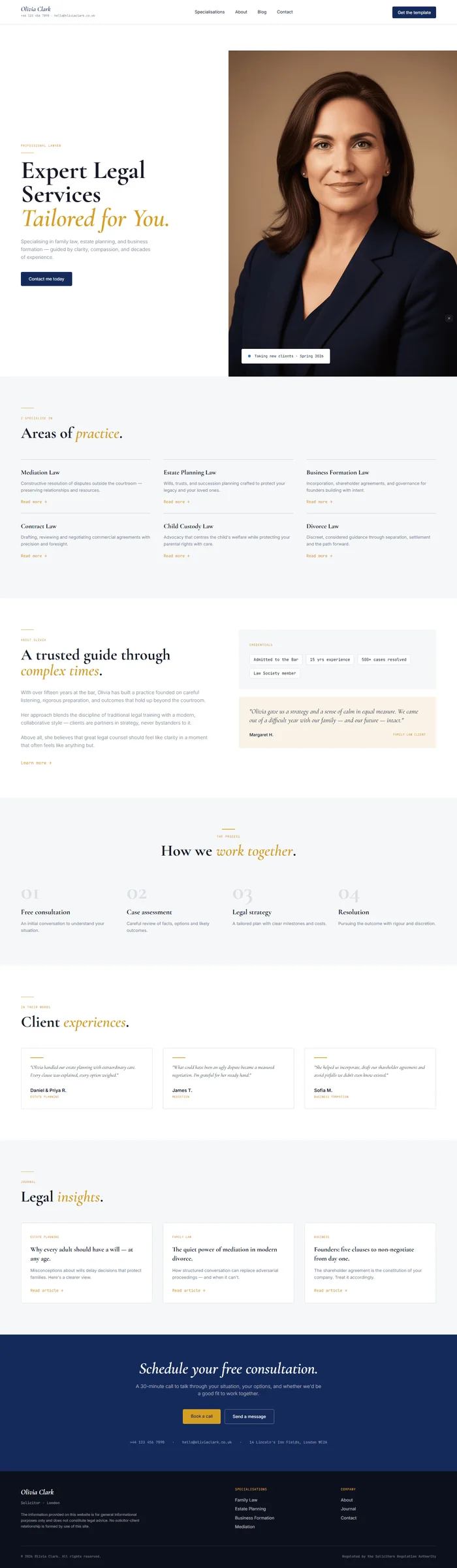
# Lawyer Website Prompt # websiteprompts.ai Build a professional lawyer / law firm website for **Olivia Clark** — a boutique solicitor specialising in family law, estate planning, and business formation. Clean, trustworthy, premium. White foundation with navy and warm gold accents. Editorial serif meets modern clean layout. ## Tech Stack React + Vite + TypeScript + Tailwind CSS + Framer Motion (motion/react) + shadcn/ui + lucide-react ## Design System ```css :root { --background: 0 0% 100%; /* #ffffff white */ --surface: 220 20% 97%; /* #f5f7fa light grey */ --border: 220 16% 88%; /* #d8dde8 border */ --ink: 222 40% 12%; /* #111e38 deep navy ink */ --muted: 222 14% 52%; /* #6d7fa3 muted navy */ --primary: 222 62% 22%; /* #0e1f40 deep navy */ --primary-foreground: 0 0% 100%; --gold: 42 72% 48%; /* #c49a18 warm gold */ --gold-light: 42 60% 94%; /* #fdf8e8 gold tint */ --foreground: 222 40% 12%; } ``` ## Typography Import: `https://fonts.googleapis.com/css2?family=Cormorant+Garamond:ital,wght@0,400;0,600;0,700;1,400;1,600&family=Inter:wght@300;400;500;600&family=JetBrains+Mono:wght@400&display=swap` - Display / H1–H2: Cormorant Garamond 600–700, italic accents in gold - Body / UI / Nav: Inter 300–600 - Labels / Tags / Prices: JetBrains Mono 400 ## Visual Effects **Gold rule** — animated 1px horizontal gold line scales in from left before each H2: ``` initial={{ scaleX: 0, transformOrigin: 'left center' }} animate={{ scaleX: 1 }} transition={{ duration: 0.5, ease: 'easeOut' }} ``` Width: 40px, height: 1.5px, `background: hsl(var(--gold))`, display block, margin-bottom 16px. **Stagger fade-up** — `initial={{ opacity: 0, y: 20 }}` → `animate={{ opacity: 1, y: 0 }}`, 0.5s, IntersectionObserver. **Card hover** — practice area and service cards: `transition: border-color 0.15s, box-shadow 0.15s`. Hover: `border-color: hsl(var(--gold))`, `box-shadow: 0 8px 32px rgba(196,154,24,0.10)`. ## Sections **1. Navbar** — sticky, white bg, `border-bottom: 1px solid hsl(var(--border))`, padding 18px 64px. Left: "Olivia Clark" in Cormorant Garamond italic 600 20px, color `hsl(var(--primary))`. Center: Specialisations · About · Blog · Contact. Right: "Get the template" — navy filled button, Inter 13px, border-radius 4px. Below brand: "+44 123 456 7890 · hello@oliviaclark.co.uk" in JetBrains Mono 9px muted — separated by dot. **2. Hero** — two-column split, min-height 100vh, padding-top 80px. Left (padding 80px 64px): tag line "PROFESSIONAL LAWYER" JetBrains Mono 9px uppercase gold + gold rule. H1 in Cormorant Garamond 700, clamp(52px, 5.5vw, 80px), line-height 0.95: ``` Expert Legal Services Tailored for You. ``` "Tailored for You." in italic gold. Sub: "Specialising in family law, estate planning, and business formation — guided by clarity, compassion, and decades of experience." Inter 15px muted, max-width 400px. CTA: "Contact me today" — navy filled, border-radius 4px. Right: professional portrait photo + floating availability card (bottom-left, white bg, shadow, "Taking new clients · Spring 2026" with green dot pulse): ``` {/* Image: professional female lawyer in dark blazer, confident composed expression, neutral studio background, editorial headshot, warm neutral light */} ``` **3. Specialisations** — full-width surface bg, padding 96px 64px. Gold rule + "I specialise in" tag. 6-card grid (3×2), each `border-top: 2px solid hsl(var(--border))`, padding 24px 0, hover gold border. Each card: area name in Cormorant Garamond 700 20px + 2-line description in Inter 13px muted + "Read more →" gold link. Areas: Mediation Law · Estate Planning Law · Business Formation Law · Contract Law · Child Custody Law · Divorce Law. **4. About** — two-column, padding 96px 64px. Left: H2 "A trusted guide through complex times." + 3 paragraphs (background, approach, values). Gold rule before H2. "Learn more →" link. Right: credentials panel — 4 chips in navy surface (Admitted to the Bar · 15 yrs experience · 500+ cases resolved · Law Society member) + 1 testimonial quote card in gold tint bg. **5. Process** — centered, surface bg, padding 96px 64px. H2 "How we work together." 4 horizontal steps: 01 Free consultation → 02 Case assessment → 03 Legal strategy → 04 Resolution. Each step: Cormorant Garamond 700 number in faded navy (opacity 0.12) + step name + 1-line description. **6. Testimonials** — white bg, padding 96px 64px. H2 "Client experiences." 3-column grid. Each card: gold rule + quote in Cormorant italic 15px + client name in Inter 600 + case type in JetBrains Mono 9px gold. Stagger entrance. **7. Blog / Insights** — surface bg, padding 96px 64px. H2 "Legal insights." 3 article cards, each: category tag JetBrains Mono 9px gold + article title Cormorant 700 20px + 1-line excerpt + "Read article →" link. Cards with border and hover gold border. **8. Contact CTA** — navy background `hsl(var(--primary))`, padding 80px 64px centered. H2 in Cormorant italic 700 white: "Schedule your free consultation." Sub white 65%. Two CTAs: "Book a call" (gold bg, navy text) + "Send a message" (ghost white border). Below: contact details row in JetBrains Mono 11px white 50% — phone · email · address. **9. Footer** — near-black `hsl(222 40% 8%)`, padding 48px 64px 28px. Left: "Olivia Clark" + "Solicitor · London" + disclaimer text in 11px muted. Right: nav columns (Specialisations / Company). Bottom: copyright + "Regulated by the Solicitors Regulation Authority" in JetBrains Mono 10px muted. ## Responsive Mobile: nav → hamburger overlay · hero single column, photo below · specialisations 1-column · process 2×2 grid · testimonials scroll snap. ## Animations Summary | Element | Animation | Trigger | |---|---|---| | Hero content | Fade-up stagger | On mount | | Gold rules | scaleX 0→1 | Scroll | | Specialisation cards | Stagger fade-up | Scroll | | Testimonial cards | Stagger fade-up | Scroll | | Floating avail card | Fade-up delay 0.6s | On mount | ## Key Dependencies ```json { "motion": "^12.x", "lucide-react": "^0.400.x" } ``` > **Quick notes:** "Olivia Clark" and all copy are placeholders — swap name, specialisations, bar admission details, and contact info. Blog articles need real content or CMS connection. SRA disclaimer in footer should reflect real regulatory body.

The generated results may vary

lawfolio framer template cta

FAQ

What sections are included in the Lawyer Website Prompt?

The prompt includes 9 fully specified sections: sticky nav with contact micro-bar, split hero with portrait and floating availability card, 6-specialisation card grid, about section with credential chips and testimonial pull-quote card, 4-step process row, 3-testimonial grid, 3-article blog/insights section, navy full-width contact CTA banner, and dark footer with regulatory disclaimer. Every section includes layout specs, Framer Motion animations, and complete copy.

Who is this lawyer website prompt designed for?

It's designed for individual solicitors, barristers, and boutique law firms who want a website that communicates authority and trust while remaining approachable. The split hero with portrait, floating "taking new clients" card, and credential chips make it especially well-suited for sole practitioners and small firms where the lawyer themselves is the brand.

Which AI tools can I use this prompt with?

The prompt works with Lovable, Claude, Bolt, v0, Cursor, and any other AI web builder that accepts a text prompt. The animated gold rules, floating availability card, and hover effects are Framer Motion and render best in Lovable and Bolt. The split hero, specialisation grid, blog cards, and testimonial grid render cleanly in all tools.

Can I change the lawyer's name, specialisations, and contact details?

Yes — everything is written to be swapped. Replace "Olivia Clark" with the real name throughout, update the 6 specialisation areas to match real practice areas, replace the address, phone, and email in the nav micro-bar, footer, and CTA section, and update the credential chips with real qualifications. The SRA regulatory disclaimer in the footer should reflect the real regulatory body for the jurisdiction.

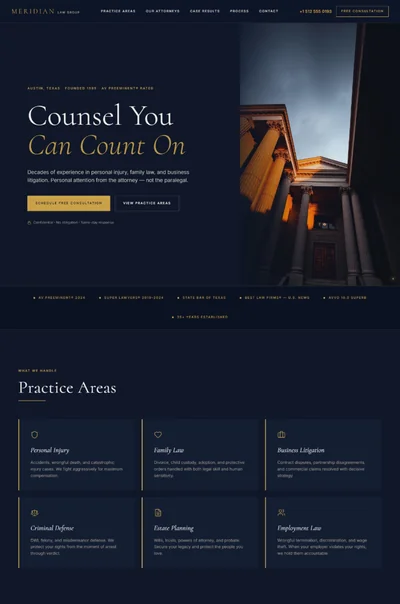
Lawyer website prompt full preview — clean white background with deep navy and warm gold accents, Cormorant Garamond 700 split hero headline on left with professional portrait and floating "taking new clients" availability card on right, animated 40px gold horizontal rule before section headings, six-card practice area grid with gold hover borders, and navy full-width CTA banner with italic serif white headline

FAQ

What sections are included in the Lawyer Website Prompt?

The prompt includes 9 fully specified sections: sticky nav with contact micro-bar, split hero with portrait and floating availability card, 6-specialisation card grid, about section with credential chips and testimonial pull-quote card, 4-step process row, 3-testimonial grid, 3-article blog/insights section, navy full-width contact CTA banner, and dark footer with regulatory disclaimer. Every section includes layout specs, Framer Motion animations, and complete copy.

Who is this lawyer website prompt designed for?

It's designed for individual solicitors, barristers, and boutique law firms who want a website that communicates authority and trust while remaining approachable. The split hero with portrait, floating "taking new clients" card, and credential chips make it especially well-suited for sole practitioners and small firms where the lawyer themselves is the brand.

Which AI tools can I use this prompt with?

The prompt works with Lovable, Claude, Bolt, v0, Cursor, and any other AI web builder that accepts a text prompt. The animated gold rules, floating availability card, and hover effects are Framer Motion and render best in Lovable and Bolt. The split hero, specialisation grid, blog cards, and testimonial grid render cleanly in all tools.

Can I change the lawyer's name, specialisations, and contact details?

Yes — everything is written to be swapped. Replace "Olivia Clark" with the real name throughout, update the 6 specialisation areas to match real practice areas, replace the address, phone, and email in the nav micro-bar, footer, and CTA section, and update the credential chips with real qualifications. The SRA regulatory disclaimer in the footer should reflect the real regulatory body for the jurisdiction.

Frequently asked questions

What is websiteprompts.ai?

websiteprompts.ai is a free library of AI website prompts. Each prompt is a ready-to-use text instruction that generates a complete website design when used with an AI website builder like Lovable, Claude, Bolt, v0, or similar tools.

How do I use these prompts?

Copy any prompt from websiteprompts.ai, open your AI website builder of choice — Lovable, Bolt, v0, Claude, ChatGPT, or any other tool — paste the prompt, and let the AI generate your website. No coding or design experience needed.

Are the prompts free?

Yes — every prompt on websiteprompts.ai is completely free. Copy and use them as many times as you like, for personal or commercial projects.

Which AI tools do the prompts work with?

The prompts are designed primarily for Lovable and Bolt, but they work with any AI tool that can generate websites — including v0, Claude, ChatGPT, Cursor, Framer AI, and others.

How often are new prompts added?

New prompts are added every day. The library is constantly growing with prompts for different industries, website types, and design styles.

Do I need any technical skills to use these prompts?

No technical skills required. Copy the prompt, paste it into any AI website builder, and the AI handles the rest. websiteprompts.ai is built for anyone who wants a professional website without writing code.

Frequently asked questions

What is websiteprompts.ai?

websiteprompts.ai is a free library of AI website prompts. Each prompt is a ready-to-use text instruction that generates a complete website design when used with an AI website builder like Lovable, Claude, Bolt, v0, or similar tools.

How do I use these prompts?

Copy any prompt from websiteprompts.ai, open your AI website builder of choice — Lovable, Bolt, v0, Claude, ChatGPT, or any other tool — paste the prompt, and let the AI generate your website. No coding or design experience needed.

Are the prompts free?

Yes — every prompt on websiteprompts.ai is completely free. Copy and use them as many times as you like, for personal or commercial projects.

Which AI tools do the prompts work with?

The prompts are designed primarily for Lovable and Bolt, but they work with any AI tool that can generate websites — including v0, Claude, ChatGPT, Cursor, Framer AI, and others.

How often are new prompts added?

New prompts are added every day. The library is constantly growing with prompts for different industries, website types, and design styles.

Do I need any technical skills to use these prompts?

No technical skills required. Copy the prompt, paste it into any AI website builder, and the AI handles the rest. websiteprompts.ai is built for anyone who wants a professional website without writing code.

Frequently asked questions

What is websiteprompts.ai?

websiteprompts.ai is a free library of AI website prompts. Each prompt is a ready-to-use text instruction that generates a complete website design when used with an AI website builder like Lovable, Claude, Bolt, v0, or similar tools.

How do I use these prompts?

Copy any prompt from websiteprompts.ai, open your AI website builder of choice — Lovable, Bolt, v0, Claude, ChatGPT, or any other tool — paste the prompt, and let the AI generate your website. No coding or design experience needed.

Are the prompts free?

Yes — every prompt on websiteprompts.ai is completely free. Copy and use them as many times as you like, for personal or commercial projects.

Which AI tools do the prompts work with?

The prompts are designed primarily for Lovable and Bolt, but they work with any AI tool that can generate websites — including v0, Claude, ChatGPT, Cursor, Framer AI, and others.

How often are new prompts added?

New prompts are added every day. The library is constantly growing with prompts for different industries, website types, and design styles.

Do I need any technical skills to use these prompts?

No technical skills required. Copy the prompt, paste it into any AI website builder, and the AI handles the rest. websiteprompts.ai is built for anyone who wants a professional website without writing code.

Get new AI website prompts every week — straight to your inbox.

Every Friday we drop a fresh batch of AI website prompts and tips to help you build better websites faster.

Join 1,000+ AI enthusiasts

liquid metallic gradient

Get new AI website prompts every week — straight to your inbox.

Every Friday we drop a fresh batch of AI website prompts and tips to help you build better websites faster.

Join 1,000+ AI enthusiasts

liquid metallic gradient

Get new AI website prompts every week — straight to your inbox.

Every Friday we drop a fresh batch of AI website prompts and tips to help you build better websites faster.

Join 1,000+ AI enthusiasts