SaaS Landing Page Website Prompt — Swiss Grid & Tilted Product Shot Design for Bolt, v0 & Lovable
SaaS landing page prompt for Bolt, v0 and Lovable — Swiss grid layout, monospaced labels, 3D-tilted product screenshot, pricing, FAQ and full copy.
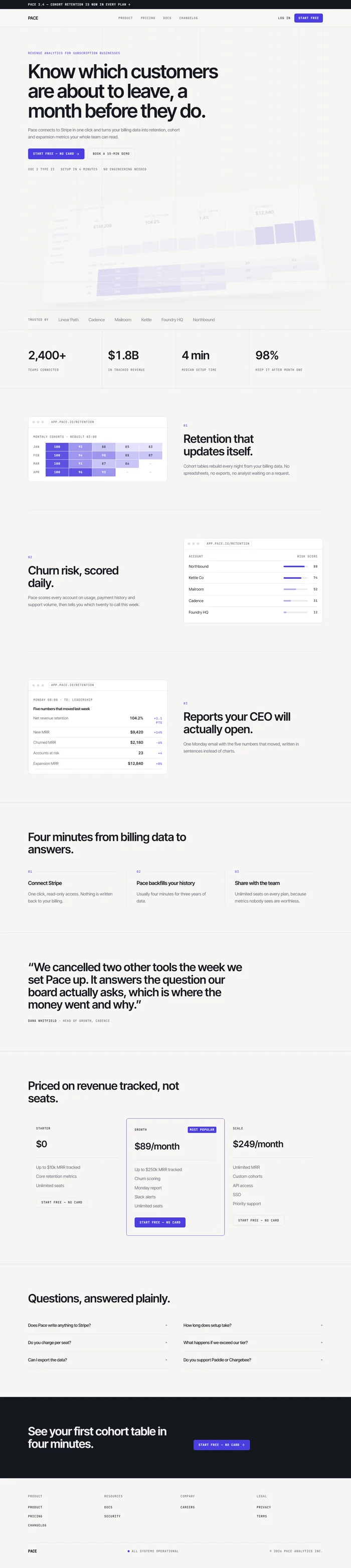
# Pace — SaaS Landing Page Website Prompt ## 1. Goal Statement Build a precise, Swiss-grid SaaS landing page for **Pace**, an analytics tool for subscription businesses — off-white paper, ink black, one indigo accent, monospaced labels, visible grid lines, and a product screenshot tilted in 3D space so the interface itself is the hero image. ## 2. Tech Stack ``` React + Vite + TypeScript + Tailwind CSS + Framer Motion (motion/react) + lucide-react ``` No component libraries, no charts library, no auth, no pricing calculator. The product screenshot is an image, not a live dashboard. ## 3. Design System — Colors ```css :root { --background: hsl(40, 14%, 96%); /* warm paper */ --foreground: hsl(220, 20%, 10%); /* ink */ --primary: hsl(245, 72%, 56%); /* indigo */ --primary-foreground: hsl(0, 0%, 100%); --muted-foreground: hsl(220, 8%, 44%); --border: hsl(220, 12%, 88%); --card: hsl(0, 0%, 100%); --grid: hsl(220, 12%, 90%); /* visible layout grid */ } ``` ## 4. Typography ```html <link href="https://fonts.googleapis.com/css2?family=Inter+Tight:wght@400;500;600&family=JetBrains+Mono:wght@400;500&display=swap" rel="stylesheet" /> ``` - **H1:** Inter Tight 600, clamp(44px, 5.5vw, 82px), line-height 1.02, letter-spacing -0.035em - **H2:** Inter Tight 600, clamp(30px, 3.4vw, 46px), letter-spacing -0.02em - **Body:** Inter Tight 400, 17px, line-height 1.65 - **Labels, metrics, nav:** JetBrains Mono 500, 12px, uppercase, letter-spacing 0.08em ## 5. Visual Effects **Effect 1 — Tilted product shot.** The hero screenshot sits in a thin browser frame and is rotated in 3D so it reads as an object rather than a flat image. As the user scrolls the first 400px, it straightens out to flat. ```jsx <div style={{ perspective: "1800px" }}> <motion.div initial={{ rotateX: 22, rotateY: -12, scale: 0.94 }} whileInView={{ rotateX: 6, rotateY: -3, scale: 1 }} transition={{ duration: 1.2, ease: [0.22, 1, 0.36, 1] }} className="rounded-xl border border-[var(--border)] bg-white shadow-[0_40px_80px_-20px_rgba(20,25,45,0.25)]" > {/* Image: clean SaaS analytics dashboard UI, light theme, revenue chart and metric cards, indigo accents, crisp screenshot */} <img src="" alt="Pace revenue dashboard" className="w-full rounded-b-xl object-cover" /> </motion.div> </div> ``` **Effect 2 — Visible grid.** A fixed background of vertical hairlines at the 12-column positions, `--grid` at 60% opacity, behind all content. Section boundaries are 1px `--border` rules that run edge to edge. The page should look like a design file. **Effect 3 — Mono metric ticks.** Metrics animate by cycling digits for 0.6s before settling, using monospaced tabular figures so nothing shifts width. ## 6. Component Breakdown 1. **Announcement strip** — 36px, ink background, paper text, one line about the latest release, mono. 2. **Navbar** — 72px, paper, bottom rule, sticky. Wordmark left, four mono links centre, `Log in` text link and indigo `Start free` button right. 3. **Hero** — two-thirds width text block: mono eyebrow, H1, subline, two buttons, and a mono line of trust facts. Below it the tilted screenshot (Effect 1), overlapping the next section by 80px. 4. **Logo row** — one rule-bordered strip of six customer wordmarks in muted grey, mono caption on the left reading `TRUSTED BY`. 5. **Metrics** — four cells split by vertical rules: big number in Inter Tight 600, mono label beneath (Effect 3). 6. **Features** — three rows, alternating image side, each with a mono index (`01`), a heading, two sentences, and a UI detail image in a thin frame. 7. **How it works** — three numbered steps in a row with hairline connectors. 8. **Quote** — one customer quote set large, with name, role and company, no avatar carousel. 9. **Pricing** — three plain columns divided by rules, middle one outlined in indigo with a mono `MOST POPULAR` tag. Price in Inter Tight 600, feature list in body text. 10. **FAQ** — six questions as native `<details>` elements in two columns. 11. **Final CTA** — ink background, paper text, H2 and one indigo button. 12. **Footer** — paper, four columns of mono links, wordmark and status dot reading `All systems operational`. ## 7. Animations - Hero text: fade up 20px, stagger 0.08s, 0.7s - Product shot: Effect 1 - Logo row: fade in as a group, no marquee - Metrics: Effect 3, triggered once in view - Feature rows: image fades and scales 0.97 → 1 over 0.9s, text fades up 16px - Buttons: indigo darkens 6% on hover, no lift - Nothing bounces. The motion is quiet and mechanical. ## 8. Responsive - **Mobile (<768px):** H1 at 44px; product shot loses the 3D tilt entirely and sits flat with 16px side margins; metrics become a 2×2 grid; feature rows stack image above text; pricing stacks with the popular plan first; grid lines hidden; navbar becomes wordmark plus `Start free` button and a menu icon. - **Tablet:** features stay side by side at 50/50; pricing 3 columns at tighter padding. - **Desktop:** max-width 1240px, `px-8`, section spacing `py-28`. ## 9. Full Copy **Announcement:** `Pace 2.4 — cohort retention is now in every plan →` **Navbar:** Product · Pricing · Docs · Changelog — Log in · Start free **Hero** - Eyebrow: `REVENUE ANALYTICS FOR SUBSCRIPTION BUSINESSES` - H1: `Know which customers are about to leave, a month before they do.` - Subline: `Pace connects to Stripe in one click and turns your billing data into retention, cohort and expansion metrics your whole team can read.` - Buttons: `Start free — no card` · `Book a 15-min demo` - Trust facts: `SOC 2 TYPE II` · `SETUP IN 4 MINUTES` · `NO ENGINEERING NEEDED` **Logo row:** `TRUSTED BY` — Linear Path · Cadence · Mailroom · Kettle · Foundry HQ · Northbound **Metrics** - `2,400+` teams connected - `$1.8B` in tracked revenue - `4 min` median setup time - `98%` of users keep it after month one **Features** 1. **01 — Retention that updates itself.** `Cohort tables rebuild every night from your billing data. No spreadsheets, no exports, no analyst waiting on a request.` 2. **02 — Churn risk, scored daily.** `Pace scores every account on usage, payment history and support volume, then tells you which twenty to call this week.` 3. **03 — Reports your CEO will actually open.** `One Monday email with the five numbers that moved, written in sentences instead of charts.` *Image briefs: clean light-theme SaaS interface details — a cohort retention table, an account list with risk scores, an email summary layout.* **How it works** 1. **Connect Stripe** — `One click, read-only access. Nothing is written back to your billing.` 2. **Pace backfills your history** — `Usually four minutes for three years of data.` 3. **Share with the team** — `Unlimited seats on every plan, because metrics nobody sees are worthless.` **Quote:** `"We cancelled two other tools the week we set Pace up. It answers the question our board actually asks, which is where the money went and why."` — **Dana Whitfield**, Head of Growth, Cadence **Pricing** — H2 `Priced on revenue tracked, not seats.` - **Starter** — `$0` — `Up to $10k MRR tracked · core retention metrics · unlimited seats` - **Growth** — `$89/month` — `MOST POPULAR` — `Up to $250k MRR tracked · churn scoring · Monday report · Slack alerts · unlimited seats` - **Scale** — `$249/month` — `Unlimited MRR · custom cohorts · API access · SSO · priority support` **FAQ** - **Does Pace write anything to Stripe?** `No. Access is read-only and you can revoke it from your Stripe dashboard at any time.` - **How long does setup take?** `Four minutes is the median, including the historical backfill.` - **Do you charge per seat?** `Never. Pricing is based on tracked revenue only.` - **What happens if we exceed our tier?** `We email you. Nothing breaks and nothing is charged automatically.` - **Can I export the data?** `Yes, every table exports to CSV, and the Scale plan includes a REST API.` - **Do you support Paddle or Chargebee?** `Paddle is live. Chargebee is in beta — email us and we will turn it on.` **Final CTA** — H2 `See your first cohort table in four minutes.` Button `Start free — no card` **Footer** — PACE · Product · Pricing · Docs · Changelog · Security · Careers · Privacy · Terms · `All systems operational` · © 2026 Pace Analytics Inc. ## 10. Key Dependencies ```json { "motion": "^12.0.0", "lucide-react": "^0.460.0", "clsx": "^2.1.0" } ```