Retail Store Management SaaS Website Prompt — Warm Minimal Retail Operations Platform Website Design for Lovable, Claude, Bolt and more
Retail SaaS website prompt — warm sand + teal, coded dashboard mockup hero, 13 sections, full pricing, FAQ, and retail-specific copy. Works in Lovable, Claude, Bolt and more. Paste and generate.
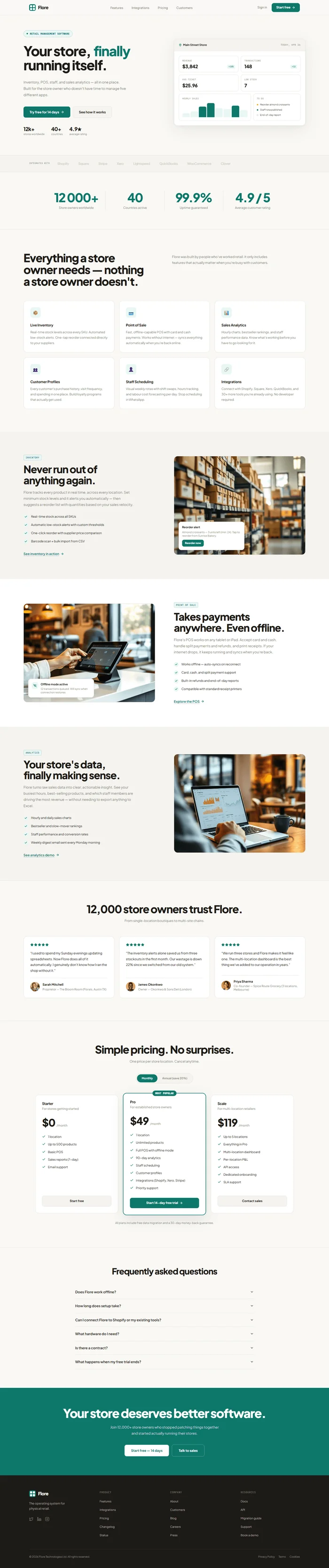
# Retail Store Management SaaS — Website Prompt --- Build a complete SaaS marketing website for **Flore** — a retail store management platform for physical store owners. Warm sand foundation, deep teal accent, approachable and professional. The design should feel like a tool built by people who understand retail, not a generic enterprise product. Think Notion meets a bakery owner's best friend. --- ## Tech Stack ``` React + Vite + TypeScript + Tailwind CSS + Framer Motion (motion/react) + shadcn/ui + lucide-react ``` --- ## Design System ```css :root { --background: 36 25% 97%; /* #faf8f5 warm off-white */ --surface: 0 0% 100%; /* #ffffff pure white */ --surface-raised: 36 20% 95%; /* #f2ede5 warm sand */ --border: 36 18% 88%; /* #e5dfd5 warm border */ --border-soft: 36 15% 82%; /* #d9d0c3 secondary border */ --foreground: 36 12% 10%; /* #1a1610 near-black warm */ --muted-foreground: 36 8% 47%; /* #7a7268 warm grey */ --subtle: 36 10% 68%; /* #b0a898 placeholder */ --primary: 172 80% 26%; /* #0d7a6e deep teal */ --primary-foreground: 0 0% 100%; --primary-light: 172 45% 94%; /* #e6f4f2 teal tint bg */ --primary-muted: 172 38% 78%; /* #b3deda teal border */ --warning: 38 90% 52%; /* #f59e0b amber */ --danger: 0 72% 51%; /* #dc2626 red */ --success: 142 72% 29%; /* #16a34a green */ } ``` --- ## Typography Import: `https://fonts.googleapis.com/css2?family=Plus+Jakarta+Sans:wght@300;400;500;600;700;800&family=JetBrains+Mono:wght@400;500&display=swap` - **Display / H1–H2**: Plus Jakarta Sans 800, tracking -0.04em, line-height 1.1 - **UI / Body**: Plus Jakarta Sans 400–600 - **Data labels / badges / mono elements**: JetBrains Mono 400 --- ## Visual Effects ### 1. Staggered entrance animations Every section fades in on scroll with staggered children: ``` Each child: initial={{ opacity: 0, y: 24 }} animate={{ opacity: 1, y: 0 }} transition={{ duration: 0.5, ease: 'easeOut', delay: index * 0.08 }} Trigger: useInView with once: true, margin: '-80px' ``` ### 2. Dashboard card entrance The hero dashboard card animates in from below with a subtle float: ``` initial={{ opacity: 0, y: 40, scale: 0.98 }} animate={{ opacity: 1, y: 0, scale: 1 }} transition={{ duration: 0.7, ease: [0.16, 1, 0.3, 1], delay: 0.3 }} ``` After entering, it gently bobs: ```css @keyframes float { 0%, 100% { transform: translateY(0px); } 50% { transform: translateY(-6px); } } animation: float 5s ease-in-out infinite; ``` ### 3. Count-up stat animation Stats bar counters animate with Framer Motion useSpring on scroll: ``` useSpring({ from: 0, to: target, config: { duration: 1400 } }) Triggered by IntersectionObserver at 60% threshold ``` ### 4. Subtle card hover lift Feature cards on hover: ```css transition: transform 0.18s ease, box-shadow 0.18s ease; &:hover { transform: translateY(-3px); box-shadow: 0 12px 32px rgba(26,22,16,0.09); } ``` --- ## Section Breakdown ### Section 1 — Navbar (sticky) Fixed top, `background: hsl(var(--background) / 0.96)`, `backdrop-filter: blur(12px)`, `border-bottom: 1px solid hsl(var(--border))`. **Left**: Brand mark (2×2 grid icon in teal, 28×28px, border-radius 7px) + wordmark "Flore" Plus Jakarta Sans 800 tracking -0.03em. **Center nav links**: Features · Integrations · Pricing · Customers — font-size 13px, weight 500, color muted-foreground. On hover: color foreground. **Right**: "Sign in" text button (muted) + "Start free →" filled teal button, border-radius 8px, padding 9px 20px, font-weight 700, font-size 13px. Mobile: Hamburger → full-screen overlay with all nav items stacked, teal CTA at bottom. --- ### Section 2 — Hero Two-column grid (`1fr 1fr`), gap 80px, max-width 1200px centered. Padding 128px top, 80px bottom. Background hsl(var(--background)). **Left column:** - Small pill badge (inline-flex, teal-light bg, teal border, border-radius 100px): green dot + "Retail management software" — JetBrains Mono 10px weight 600, color primary, letter-spacing 0.02em. Margin-bottom 28px. - H1: "Your store, **finally** running itself." — Plus Jakarta Sans 800, clamp(40px, 4.5vw, 58px), tracking -0.04em, line-height 1.1. "finally" in `color: hsl(var(--primary))`. - Sub: "Inventory, POS, staff, and sales analytics — all in one place. Built for the store owner who doesn't have time to manage five different apps." — 15px, color muted-foreground, line-height 1.8, max-width 440px. Margin-bottom 36px. - Two CTA buttons side by side, gap 10px: - Primary: "Try free for 14 days" — filled teal, padding 13px 26px, border-radius 9px, font-size 14px, font-weight 700 - Secondary: "See how it works" — `background: hsl(var(--surface-raised))`, `border: 1px solid hsl(var(--border))`, color foreground, same padding - Social proof row below buttons (margin-top 36px), three stat items side by side, gap 28px: - "12k+" / "stores worldwide" - "40+" / "countries" - "4.9★" / "average rating" - Each: number in Plus Jakarta Sans 800 22px tracking -0.04em, label in 11px muted-foreground **Right column — Dashboard card:** White card, `border: 1.5px solid hsl(var(--border))`, border-radius 16px, `box-shadow: 0 20px 60px rgba(26,22,16,0.07), 0 4px 12px rgba(26,22,16,0.04)`. Animate in with float effect (see Visual Effects). Card structure: ``` [Card header] — background: hsl(var(--surface-raised)), padding 16px 20px, border-bottom Left: "📍 Main Street Store" — 12px weight 700 Right: "TODAY, APR 26" — JetBrains Mono 10px color muted [Card body] — padding 20px [2×2 KPI grid, gap 10px] KPI 1: "Revenue" / "$3,842" / "+18% badge in teal" KPI 2: "Transactions" / "148" / "+12 badge in teal" KPI 3: "Avg ticket" / "$25.96" / no badge KPI 4: "Low stock" / "7" in amber (#f59e0b) / no badge Each KPI: surface bg, border, border-radius 10px, padding 14px [Bottom row: 3fr 2fr grid, gap 10px] Left — Hourly chart card: Title: "Hourly sales" — JetBrains Mono 9px uppercase muted Bar chart: 8 bars, height: 28% 42% 75% 100% 65% 58% 82% 50% Bars default: hsl(var(--primary-light)) Highlight bars (index 2,3,6): hsl(var(--primary)) Height 60px total, bars flex align-items flex-end, gap 3px, border-radius 2px 2px 0 0 Right — To-do card: Title: "To do" — JetBrains Mono 9px uppercase muted 3 task rows, each with colored dot + label: ● amber dot · "Reorder almond croissants" ● teal dot · "Staff rota published" ○ grey dot · "End-of-day report" Dot: 6×6px circle, margin-top 4px Text: 10px, color foreground, line-height 1.4 ``` --- ### Section 3 — Social proof / logo bar Full-width strip, `padding: 28px 60px`, `border-top: 1px solid hsl(var(--border))`, `border-bottom: 1px solid hsl(var(--border))`. Background: surface-raised. Left: "Integrates with" — JetBrains Mono 9px uppercase muted, no-wrap. Right: horizontal flex, gap 40px, overflow hidden: ``` Shopify · Square · Stripe · Xero · Lightspeed · QuickBooks · WooCommerce · Clover ``` Each in Plus Jakarta Sans 700 14px, color border-soft (desaturated), letter-spacing -0.01em. --- ### Section 4 — Stats bar Centered, max-width 1000px, padding 80px 60px. Four stat columns in a `grid-template-columns: repeat(4,1fr)`, dividers between. Stats (count-up on scroll): - **12,000+** — Store owners worldwide - **40** — Countries active - **99.9%** — Uptime guaranteed - **4.9 / 5** — Average customer rating Each stat: number in Plus Jakarta Sans 800 clamp(36px,4vw,52px), tracking -0.05em, color primary. Label below in 13px muted-foreground. Dividers: `border-right: 1px solid hsl(var(--border))` on all but last. --- ### Section 5 — Feature overview (3-column) Max-width 1200px, padding 96px 60px. `border-top: 1px solid hsl(var(--border))`. **Header**: Two-column grid, gap 64px, margin-bottom 56px. - Left: H2 "Everything a store owner needs — nothing a store owner doesn't." — Plus Jakarta Sans 800, clamp(36px, 4vw, 48px), tracking -0.04em. - Right: "Flore was built by people who've worked retail. It only includes features that actually matter when you're busy with customers." — 14px muted, line-height 1.8. **Cards grid**: `grid-template-columns: repeat(3,1fr)`, gap 20px. Each card: - White surface, `border: 1.5px solid hsl(var(--border))`, border-radius 14px, padding 28px - Icon container: 44×44px, `background: hsl(var(--primary-light))`, border-radius 10px, emoji centered, font-size 20px, margin-bottom 20px - H3: 15px weight 700 tracking -0.02em, margin-bottom 8px - p: 13px muted line-height 1.75 - Hover: lift animation (see Visual Effects) Card content: 1. 📦 **Live Inventory** — "Real-time stock levels across every SKU. Automated low-stock alerts. One-tap reorder connected directly to your suppliers." 2. 💳 **Point of Sale** — "Fast, offline-capable POS with card and cash payments. Works without internet — syncs everything automatically when you're back online." 3. 📊 **Sales Analytics** — "Hourly charts, bestseller rankings, and staff performance data. Know what's working before you have to go looking for it." 4. 👥 **Customer Profiles** — "Every customer's purchase history, visit frequency, and spending in one place. Build loyalty programs that actually get used." 5. 👤 **Staff Scheduling** — "Visual weekly rotas with shift swaps, hours tracking, and labour cost forecasting per day. Stop scheduling in WhatsApp." 6. 🔗 **Integrations** — "Connect with Shopify, Square, Xero, QuickBooks, and 30+ more tools you're already using. No developer required." --- ### Section 6 — Deep feature row: Inventory Two-column layout, `grid-template-columns: 1fr 1fr`, gap 80px, align-items center. Max-width 1200px, padding 96px 60px. Background: hsl(var(--surface-raised)). **Left — content side:** - Small teal tag: "INVENTORY" — JetBrains Mono 10px uppercase, teal-light bg, teal border, border-radius 4px, padding 3px 8px - H2: "Never run out of anything again." — 800, clamp(32px, 3.5vw, 44px), tracking -0.04em, margin 14px 0 - p: "Flore tracks every product in real time, across every location. Set minimum stock levels and it alerts you automatically — then suggests a reorder list with quantities based on your sales velocity." - Feature list (4 items), each: teal checkmark icon + text in 13px: - Real-time stock across all SKUs - Automatic low-stock alerts with custom thresholds - One-click reorder with supplier price comparison - Barcode scan + bulk import from CSV - CTA link: "See inventory in action →" — teal, font-weight 600, text-decoration underline offset 3px **Right — visual side:** {/* Image: organized retail stockroom shelf, neatly labeled inventory boxes, warm lighting, clean professional environment, slightly blurred background */} ``` <img src="" alt="Organized retail stockroom with labeled inventory" className="w-full h-full object-cover object-center rounded-2xl" /> ``` White card overlay positioned bottom-left of image: - Header: "Reorder alert" in 12px weight 700 - Body: "Almond croissants — 3 units left (min: 24). Tap to reorder from Sunrise Bakery." - Teal "Reorder now" button, small, border-radius 6px - Card: white bg, 1px border, border-radius 12px, padding 14px, box-shadow 0 8px 24px rgba(26,22,16,0.1) --- ### Section 7 — Deep feature row: POS Same two-column layout, reversed (visual left, content right). Padding 96px 60px. Background: white. **Left — visual side:** {/* Image: cafe counter with modern tablet POS setup, barista processing a payment, warm natural light from windows, clean minimal counter setup */} ``` <img src="" alt="Modern tablet POS at cafe counter" className="w-full h-full object-cover object-center rounded-2xl" /> ``` Overlay card: "Offline mode active — 12 transactions queued. Will sync when connection restores." with wifi-off icon. **Right — content side:** - Tag: "POINT OF SALE" - H2: "Takes payments anywhere. Even offline." - p: "Flore's POS works on any tablet or iPad. Accept card and cash, handle split payments and refunds, and print receipts. If your internet drops, it keeps running and syncs when you're back." - Feature list: - Works offline — auto-syncs on reconnect - Card, cash, and split payment support - Built-in refunds and end-of-day reports - Compatible with standard receipt printers - CTA link: "Explore the POS →" --- ### Section 8 — Deep feature row: Analytics Two-column layout, content left, visual right. Background: surface-raised. Padding 96px 60px. **Left — content side:** - Tag: "ANALYTICS" - H2: "Your store's data, finally making sense." - p: "Flore turns raw sales data into clear, actionable insight. See your busiest hours, best-selling products, and which staff members are driving the most revenue — without needing to export anything to Excel." - Feature list: - Hourly and daily sales charts - Bestseller and slow-mover rankings - Staff performance and conversion rates - Weekly digest email sent every Monday morning - CTA link: "See analytics demo →" **Right — visual side:** {/* Image: person reviewing analytics dashboard on laptop, modern home office or cafe setting, relaxed but professional atmosphere, warm ambient light */} ``` <img src="" alt="Store owner reviewing analytics on laptop" className="w-full h-full object-cover object-center rounded-2xl" /> ``` --- ### Section 9 — Testimonials Centered header + 3-column card grid. Max-width 1200px, padding 96px 60px. `border-top: 1px solid hsl(var(--border))`. Header: - H2: "12,000 store owners trust Flore." — 800, clamp(34px, 3.5vw, 46px), tracking -0.04em, center - p: "From single-location boutiques to multi-site chains." — 14px muted, center Three testimonial cards, each: white surface, 1.5px border, border-radius 14px, padding 28px. Staggered entrance animation. 1. **Sarah Mitchell, Proprietor — The Bloom Room (Florals, Austin TX)** > "I used to spend my Sunday evenings updating spreadsheets. Now Flore does all of it automatically. I genuinely don't know how I ran the shop without it." — 5 teal stars 2. **James Okonkwo, Owner — Okonkwo & Sons Deli (London)** > "The inventory alerts alone saved us from three stockouts in the first month. Our wastage is down 22% since we switched from our old system." — 5 teal stars 3. **Priya Sharma, Co-founder — Spice Route Grocery (3 locations, Melbourne)** > "We run three stores and Flore makes it feel like one. The multi-location dashboard is the best thing we've added to our operation in years." — 5 teal stars Each card: - Stars: 5 teal star icons at top, font-size 14px, gap 2px, margin-bottom 16px - Quote: 14px line-height 1.75 color foreground, margin-bottom 20px - Author: avatar placeholder (40×40px warm circle) + name (13px weight 700) + role/location (12px muted) --- ### Section 10 — Pricing Max-width 1100px, centered, padding 96px 60px. `border-top: 1px solid hsl(var(--border))`. Header: - H2: "Simple pricing. No surprises." — 800 center - p: "One price per store location. Cancel anytime." — 14px muted center - Toggle: "Monthly / Annual (save 20%)" — pill toggle, default monthly, clicking annual adjusts prices Three pricing tiers in `grid-template-columns: 1fr 1.1fr 1fr`, the middle card slightly larger and elevated. **Starter — $0/month** - "For stores getting started" - Features: 1 location · Up to 500 products · Basic POS · Sales reports (7-day) · Email support - CTA: "Start free" — ghost button **Pro — $49/month** (FEATURED — `border: 2px solid hsl(var(--primary))`, badge "Most popular", white bg, box-shadow elevated) - "For established store owners" - Features: 1 location · Unlimited products · Full POS with offline mode · 90-day analytics · Staff scheduling · Customer profiles · Integrations (Shopify, Xero, Stripe) · Priority support - CTA: "Start 14-day free trial" — filled teal button, full width **Scale — $119/month** - "For multi-location retailers" - Features: Up to 5 locations · Everything in Pro · Multi-location dashboard · Per-location P&L · API access · Dedicated onboarding · SLA support - CTA: "Contact sales" — ghost button Under pricing grid: "All plans include free data migration and a 30-day money-back guarantee." — 12px muted centered, margin-top 24px. --- ### Section 11 — FAQ Max-width 760px, centered, padding 80px 60px. `border-top: 1px solid hsl(var(--border))`. Header: "Frequently asked questions" — 800 32px centered, margin-bottom 40px. Accordion-style (shadcn/ui Accordion), 6 questions. Each: full-width trigger with "+" / "−" icon right-aligned, padding 18px 0, border-bottom 1px. Answer slides open with Framer Motion height animation. 1. **Does Flore work offline?** — Yes. Flore's POS continues to work without internet. Transactions are stored locally and sync automatically when your connection is restored. No data is lost. 2. **How long does setup take?** — Most stores are live within a day. We provide a free migration service — our team imports your existing product catalog, customer data, and sales history so you don't start from scratch. 3. **Can I connect Flore to Shopify or my existing tools?** — Yes. Flore integrates with Shopify, Square, Stripe, Xero, QuickBooks, WooCommerce, Lightspeed, and 30+ other tools. Connections take under 5 minutes. 4. **What hardware do I need?** — Flore runs on any iPad or Android tablet for POS, and any modern browser for the management dashboard. It works with standard Bluetooth receipt printers and barcode scanners. 5. **Is there a contract?** — No. All plans are month-to-month. You can cancel from your account settings at any time. Annual billing is available at a 20% discount. 6. **What happens when my free trial ends?** — You'll be asked to choose a plan. If you don't, your account moves to the free Starter tier — you never lose your data. --- ### Section 12 — CTA Banner Full-width, `background: hsl(var(--primary))`, padding 80px 60px. No max-width limit. Centered content: - H2: "Your store deserves better software." — Plus Jakarta Sans 800, clamp(36px, 4vw, 52px), tracking -0.04em, color white - p: "Join 12,000+ store owners who stopped patching things together and started actually running their stores." — 15px, `color: rgba(255,255,255,0.75)`, max-width 480px, margin 0 auto 36px - Two buttons side by side, centered, gap 12px: - "Start free — 14 days" — white bg, teal text, weight 700, padding 14px 28px, border-radius 9px - "Talk to sales" — `border: 1.5px solid rgba(255,255,255,0.35)`, white text, transparent bg, same padding --- ### Section 13 — Footer Background: foreground (`#1a1610`). Padding 64px 60px 40px. **Top row**: 4-column grid, gap 48px. Column 1 (Brand): - Brand mark + "Flore" in white - "The operating system for physical retail." — 13px `rgba(255,255,255,0.55)`, line-height 1.7, max-width 200px - Social icons row: X · LinkedIn · Instagram — each 20px, `rgba(255,255,255,0.4)` Column 2 (Product): - Header: "Product" — 11px uppercase JetBrains Mono `rgba(255,255,255,0.35)` - Links (12px `rgba(255,255,255,0.6)`): Features · Integrations · Pricing · Changelog · Status Column 3 (Company): - Header: "Company" - Links: About · Customers · Blog · Careers · Press Column 4 (Resources): - Header: "Resources" - Links: Docs · API · Migration guide · Support · Book a demo **Bottom row** (margin-top 48px, padding-top 24px, `border-top: 1px solid rgba(255,255,255,0.1)`): - Left: "© 2026 Flore Technologies Ltd. All rights reserved." - Right: "Privacy Policy · Terms · Cookies" — 11px `rgba(255,255,255,0.4)` Both in 11px `rgba(255,255,255,0.4)`. --- ## Animations (summary) | Element | Animation | Trigger | |---|---|---| | Hero text lines | stagger fade-up y:24 | on mount | | Hero dashboard card | y:40 scale:0.98 → idle float | on mount, 0.3s delay | | Stats counters | count-up useSpring | IntersectionObserver | | Feature cards | stagger fade-up y:16 | scroll inView | | Deep feature rows | slide-in from side y:24 | scroll inView | | Testimonial cards | stagger fade-up | scroll inView | | Pricing cards | stagger fade-up | scroll inView | | FAQ accordion | height 0 → auto | click | | CTA banner headline | fade-up | scroll inView | --- ## Responsive **Mobile (< 768px):** - Nav: hamburger → full-screen slide-down overlay, teal CTA full-width at bottom - Hero: single column, dashboard card below text, card at full width - Stats bar: 2×2 grid - Feature cards: single column - Deep feature rows: single column, image above content, aspect-ratio 4/3 - Testimonials: horizontal scroll snap, one card visible at a time - Pricing: vertical stack, Pro card first - Footer: single column, 2-column link grid **Tablet (768px–1024px):** - Hero: 1fr 1fr but tighter padding - Feature cards: 2-column grid - Deep feature rows: keep 2-column, reduce gap to 40px --- ## Key Dependencies ```json { "motion": "^12.x", "lucide-react": "^0.400.x", "@radix-ui/react-accordion": "^1.2.x", "@radix-ui/react-toggle": "^1.1.x" } ``` --- ## Quick notes - Brand name is **Flore** — the visual identity uses a 2×2 square grid icon as the logomark (4 small squares in a grid, teal filled, 28px container). - Pricing numbers are suggestions — update to match any real product. The annual discount toggle is wired to show `monthly × 0.8` rounded. - The three deep-feature-row images are described as photography briefs — any retail/coffee/grocery photo that fits the mood will work, no specific crop required.