Notary Website Prompt — Ivory Document & Rotating Seal Design for Bolt, v0 & Lovable
Notary website prompt for Bolt, v0 and Lovable — ivory and navy, slowly rotating embossed seal, ruled document paper, fixed fees table, full copy.
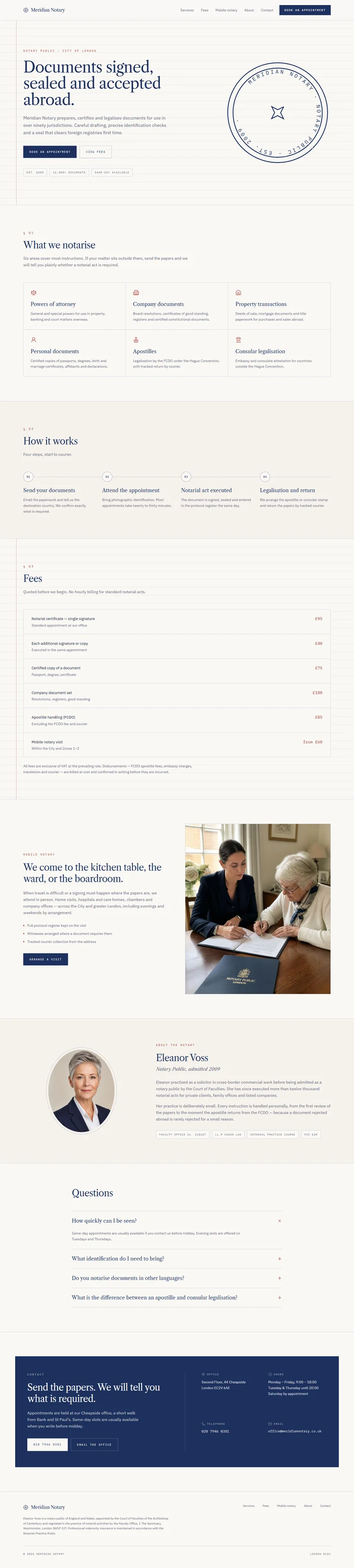
# Meridian Notary — Notary Website Prompt ## 1. Goal Statement Build a crisp, trustworthy website for **Meridian Notary**, an independent notary public — clean ivory and deep navy, a slowly rotating embossed seal as the signature visual, precise serif headings, and a layout that feels like a well-made official document: calm, exact, and easy to act on. ## 2. Tech Stack ``` React + Vite + TypeScript + Tailwind CSS + Framer Motion (motion/react) + lucide-react ``` No component libraries and no booking system. Appointment buttons link to a phone number or email. ## 3. Design System — Colors ```css :root { --background: hsl(42, 33%, 97%); /* ivory document */ --foreground: hsl(222, 44%, 14%); /* deep navy ink */ --primary: hsl(222, 52%, 24%); /* navy */ --primary-foreground: hsl(42, 33%, 97%); --seal: hsl(4, 58%, 42%); /* sealing-wax red, used sparingly */ --muted-foreground: hsl(222, 12%, 42%); --border: hsl(222, 20%, 84%); --card: hsl(42, 30%, 93%); } ``` ## 4. Typography ```html <link href="https://fonts.googleapis.com/css2?family=Libre+Caslon+Text:ital,wght@0,400;0,700;1,400&family=IBM+Plex+Sans:wght@300;400;500&family=IBM+Plex+Mono:wght@400&display=swap" rel="stylesheet" /> ``` - **H1:** Libre Caslon Text 400, clamp(42px, 5.5vw, 80px), line-height 1.05, letter-spacing -0.015em - **H2:** Libre Caslon Text 400, clamp(30px, 3.5vw, 48px) - **Body:** IBM Plex Sans 300, 17px, line-height 1.75 - **Reference numbers, fees, labels:** IBM Plex Mono 400, 12–13px, uppercase, letter-spacing 0.08em ## 5. Visual Effects **Effect 1 — Rotating seal.** A large circular seal drawn in inline SVG: two concentric circles, the text `MERIDIAN NOTARY · NOTARY PUBLIC · EST. 2009 ·` set on a circular `<textPath>`, and a small star in the centre. The ring of text rotates very slowly (one turn per 40 seconds, linear, infinite). Navy stroke, 1.5px, no fill. On the hero it sits at 420px wide, partly overlapping the right edge of the text block. **Effect 2 — Document lines.** The background of the hero and the fees section has faint horizontal ruled lines like legal paper: `repeating-linear-gradient(to bottom, transparent 0 31px, hsla(222, 20%, 84%, 0.5) 31px 32px)`. A single thin red margin line runs vertically 64px from the left edge on desktop. **Effect 3 — Stamp in.** Section numbers (`§ 01`, `§ 02`) stamp in: `scale 1.6 → 1`, `opacity 0 → 1`, `rotate -8 → -3deg`, spring (stiffness 400, damping 22), in sealing-wax red. ## 6. Component Breakdown 1. **Navbar** — 80px, ivory, bottom border. Wordmark left in Caslon with a tiny seal icon. Links right. Navy `Book an appointment` button. 2. **Hero** — ruled paper background (Effect 2). Left 60%: mono label, H1, subline, two buttons, and a row of three small trust facts in mono. Right 40%: the rotating seal (Effect 1). 3. **What we notarise** — `§ 01` stamp. A 3-column grid of six document types, each in a thin-bordered cell with a lucide icon, name, and one line of explanation. No hover effects beyond a border darkening. 4. **How it works** — `§ 02`. Four numbered steps in a horizontal row joined by a thin dotted line. 5. **Fees** — `§ 03`. Ruled paper background. A clean table with mono fees on the right: service, what is included, fee. Six rows. A note beneath about VAT and disbursements. 6. **Mobile notary** — split: image left, text right. *Image: professional person signing a document at a home kitchen table, natural daylight, calm and reassuring, shallow depth of field.* 7. **About the notary** — portrait in an oval frame with a thin navy border, bio paragraph, and qualifications in a mono list. *Image: portrait of a friendly professional woman in her forties in a navy blazer, soft office light, approachable.* 8. **Questions** — four questions using native `<details>` elements, with a plus that rotates to a cross. 9. **Contact** — navy panel, ivory text: address, phone, email, hours, and a line about same-day appointments. 10. **Footer** — ivory, thin border, regulatory small print in mono, links. ## 7. Animations - Hero text: fade up 20px, 0.8s, stagger 0.1s - Seal: draws in on load (`pathLength 0 → 1`, 1.6s) then starts rotating - Section numbers: Effect 3 when in view - Document type cells: fade in with 0.06s stagger - How it works dotted line: `scaleX 0 → 1` from the left, 1.2s, as the section enters - Fees rows: fade in with 0.05s stagger - Details elements: plus icon rotates 45deg over 0.2s ## 8. Responsive - **Mobile (<768px):** seal moves above the H1 at 220px wide; red margin line hidden; document types go to 1 column; steps stack vertically with the dotted line vertical; fees table becomes stacked rows with the fee right-aligned on the same line as the service name; navbar shows wordmark and a `Call` button plus menu icon. - **Tablet:** document types 2 columns; steps 2×2. - **Desktop:** max-width 1200px, `px-10`, section spacing `py-24`. ## 9. Full Copy **Brand:** MERIDIAN NOTARY · Notary Public · London **Navbar:** Services · Fees · Mobile notary · About · Contact — Book an appointment **Hero** - Label: `NOTARY PUBLIC · CITY OF LONDON` - H1: `Documents signed, sealed and *accepted* abroad.` - Subline: `Independent notarial services for individuals and businesses, including apostilles and legalisation. Most appointments within 48 hours, and fixed fees quoted before we start.` - Buttons: `Book an appointment` · `See our fees` - Trust facts: `EST. 2009` · `12,000+ DOCUMENTS` · `SAME-DAY AVAILABLE` **What we notarise** — `§ 01` H2 `What we *notarise*.` - **Powers of attorney** — `For property, business or family matters overseas.` - **Company documents** — `Certificates of incorporation, board resolutions and signatory verification.` - **Property transactions** — `Sale and purchase documents for property abroad.` - **Personal documents** — `Passports, degrees and birth certificates certified for foreign authorities.` - **Apostilles** — `We arrange Foreign Office apostilles for you, including express service.` - **Consular legalisation** — `For countries outside the Hague Convention, handled end to end.` **How it works** — `§ 02` 1. **Send the document** — `Email a copy and tell us which country it is for.` 2. **Get a fixed quote** — `We reply within two working hours with the full cost.` 3. **Sign in person** — `At our office, or at your home or workplace with our mobile service.` 4. **Receive it back** — `Collected, posted or couriered, with an apostille if needed.` **Fees** — `§ 03` H2 `Fixed fees, *no* surprises.` | Service | Includes | Fee | |---|---|---| | Single signature | One document, one signatory | £95 | | Each additional signatory | Same document, same appointment | £40 | | Certified copy | Passport, degree or certificate | £75 | | Company document | Verification of signatory authority | £180 | | Apostille (standard) | Foreign Office fee and handling | £85 | | Mobile appointment | Within Zones 1–3 | from £60 | Note: `Fees exclude VAT. Foreign Office and embassy fees are passed on at cost and listed in your quote.` **Mobile notary** — H2 `We can come to *you*.` `For clients in hospital, in care, or simply unable to leave a busy office, we attend in person anywhere in Greater London, including evenings and weekends.` Button `Arrange a visit` **About the notary** — H2 `Eleanor Voss, *Notary Public*.` `Eleanor qualified as a notary in 2009 after a decade as a commercial solicitor. She speaks French and German and works regularly with clients buying property in France, Spain and Switzerland.` Qualifications: `NOTARY PUBLIC, 2009` · `MEMBER, NOTARIES SOCIETY` · `REGULATED BY THE FACULTY OFFICE` · `FULLY INSURED` **Questions** - **What should I bring?** — `Your original document, unsigned, and a valid passport or photo driving licence plus a recent proof of address.` - **How long does an apostille take?** — `Standard apostilles take around five working days. Our express service can return one in one to two days.` - **Can you notarise documents in other languages?** — `Yes, though we may need a certified translation depending on the language and the receiving country.` - **Do I need an appointment?** — `Yes. Same-day appointments are often available if you call before noon.` **Contact** — H2 `Book an appointment.` `Meridian Notary, 3rd Floor, 41 Cheapside, London EC2V 6AA` · `020 7946 0381` · `office@meridiannotary.co.uk` · `Monday to Friday 9am – 6pm. Evening and weekend appointments by arrangement.` **Footer** — Services · Fees · Mobile notary · About · Privacy · Complaints · `Eleanor Voss is a Notary Public regulated by the Faculty Office of the Archbishop of Canterbury.` · © 2026 Meridian Notary ## 10. Key Dependencies ```json { "motion": "^12.0.0", "lucide-react": "^0.460.0", "clsx": "^2.1.0" } ```