IT Support Website Prompt — Managed Services Dark B2B Design for Bolt, v0 & Lovable
IT support website prompt for Bolt, v0 and Lovable — deep slate and electric lime, published SLA table with actual versus target, per-user pricing, full copy.
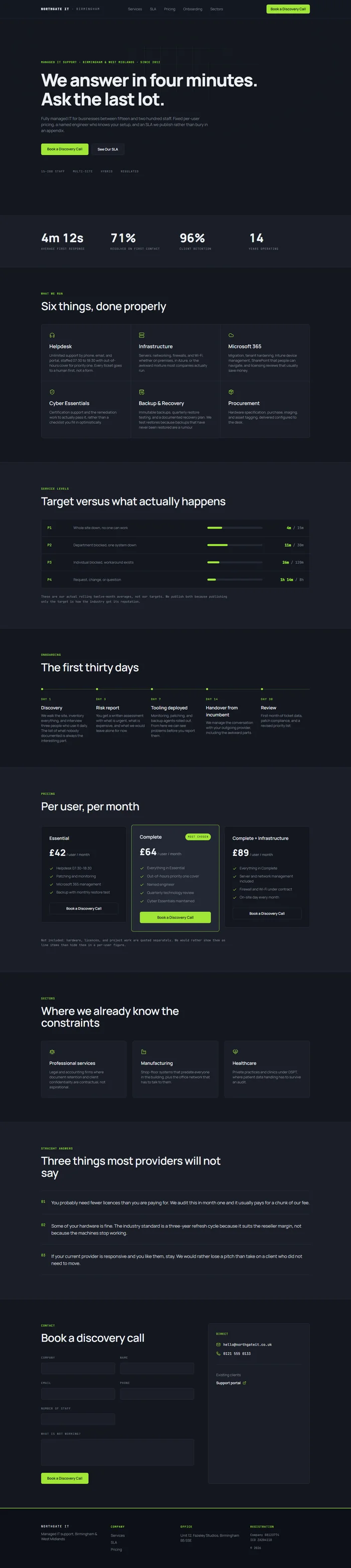
# Northgate IT — Managed IT Support Website Prompt ## 1. Goal Statement Build a calm, proof-led managed IT support website for **Northgate IT**, defined by deep slate, a single electric lime accent, and monospace metrics — a B2B site that sells response times and honesty about what breaks, not stock photos of people pointing at monitors. ## 2. Tech Stack ``` React + Vite + TypeScript + Tailwind CSS + Framer Motion (motion/react) + shadcn/ui + lucide-react ``` ## 3. Design System — Colors ```css :root { --background: hsl(222, 24%, 10%); /* #131722 deep slate */ --foreground: hsl(210, 18%, 94%); /* #eceff3 */ --primary: hsl(84, 78%, 56%); /* #b3e93a electric lime */ --primary-foreground: hsl(222, 26%, 8%); --muted-foreground: hsl(215, 10%, 56%); --border: hsl(222, 18%, 20%); --card: hsl(222, 22%, 13%); --card-elevated: hsl(222, 20%, 17%); --warn: hsl(38, 92%, 58%); } ``` ## 4. Typography ```html <link href="https://fonts.googleapis.com/css2?family=Manrope:wght@400;500;600;800&family=JetBrains+Mono:wght@400;500&display=swap" rel="stylesheet" /> ``` - **H1:** Manrope 800, clamp(38px, 5vw, 72px), letter-spacing -0.035em - **H2:** Manrope 600, 30–44px - **H3:** Manrope 600, 18–20px - **Body:** Manrope 400, 16px, line-height 1.72 - **Eyebrows / labels:** JetBrains Mono 500, uppercase, letter-spacing 0.12em, 11px, lime - **Metrics / SLA figures:** Manrope 800, tabular-nums ## 5. Visual Effects **Effect 1 — SLA response table with live-looking status.** Ticket priority rows with a lime pill showing the guaranteed response, and a small animated bar showing actual average against target. Actual bars are shorter than target, which is the entire sales argument. ```tsx {tiers.map((t, i) => ( <div key={t.level} className="grid grid-cols-12 items-center gap-4 border-b border-[var(--border)] py-5"> <span className="col-span-2 font-mono text-xs uppercase tracking-wider text-[var(--primary)]">{t.level}</span> <span className="col-span-4 text-sm">{t.example}</span> <div className="col-span-4 h-2 rounded-full bg-[var(--card-elevated)]"> <motion.div className="h-full rounded-full bg-[var(--primary)]" initial={{ width: 0 }} whileInView={{ width: `${(t.actual / t.target) * 100}%` }} viewport={{ once: true }} transition={{ duration: 1, delay: i * 0.1 }} /> </div> <span className="col-span-2 text-right font-bold tabular-nums">{t.actual}m<span className="text-[var(--muted-foreground)]"> / {t.target}m</span></span> </div> ))} ``` **Effect 2 — Lime cursor-follow glow on cards.** A radial lime glow at 8% opacity follows the pointer inside service cards using a CSS custom property updated on `mousemove`, giving the dark grid a subtle interactive sheen. ## 6. Component Breakdown 1. **Navbar** — 72px, fixed, `rgba(19,23,34,0.94)` with blur. Wordmark left, links centre, `Book a Discovery Call` lime button right. 2. **Hero** — 86vh, type-led with a faint lime grid pattern behind. Mono eyebrow, H1, subline, two CTAs, four client-type labels. No stock photograph. 3. **Metrics band** — four count-up figures: average first response, tickets resolved first contact, client retention, years operating. 4. **Services** — 2x3 grid with cursor glow (Effect 2): helpdesk, infrastructure, Microsoft 365, cyber essentials, backup and recovery, procurement. 5. **SLA table** — the credibility centrepiece (Effect 1), four priority levels with target versus actual. 6. **How onboarding works** — five steps over the first thirty days, each with a mono day label. 7. **Pricing** — per-user monthly, three tiers, with an explicit statement of what is not included. 8. **Sectors** — three blocks: professional services, manufacturing, healthcare, each naming a specific compliance constraint. 9. **What we will tell you honestly** — a short opinionated section listing three things most MSPs will not say out loud. 10. **Contact** — split: form on the left, direct email, phone, and support portal link on the right. 11. **Footer** — darkest slate, lime top rule, four columns, company registration and ICO number. ## 7. Animations - Hero: grid pattern fades in 1.2s; H1 fades up 0.7s; labels stagger 0.06s - Metrics: count-up 1700ms on `useInView` - Service cards: lime radial glow follows the cursor, 0 lag, opacity 0 → 0.08 on enter - SLA bars: width animates on scroll, 1s, staggered 0.1s - Onboarding steps: lime connecting line `scaleX 0 → 1`, 0.9s; day labels type in with a 40ms per character reveal - Pricing cards: middle tier sits at `scale 1.03` at rest, all lift `-4px` on hover ## 8. Responsive - **Mobile (<768px):** hamburger; H1 clamps to 38px; metrics 2x2; services 1-col with the cursor glow disabled; SLA table becomes stacked rows with the bar full-width beneath the label; pricing 1-col with the popular tier first; onboarding vertical. - **Tablet:** services 2-col, metrics 4-col at smaller type, SLA table keeps grid form. - **Desktop:** max width 1200px, `px-16`, `py-24`. ## 9. Full Copy **Brand:** NORTHGATE IT · Birmingham **Navbar:** Services · SLA · Pricing · Onboarding · Sectors · [Button] Book a Discovery Call **Hero** - Eyebrow: `MANAGED IT SUPPORT · BIRMINGHAM & WEST MIDLANDS · SINCE 2012` - H1: `We answer in four minutes. Ask the last lot.` - Subline: `Fully managed IT for businesses between fifteen and two hundred staff. Fixed per-user pricing, a named engineer who knows your setup, and an SLA we publish rather than bury in an appendix.` - CTAs: `Book a Discovery Call` · `See Our SLA` - Labels: `15–200 STAFF` · `MULTI-SITE` · `HYBRID` · `REGULATED` **Metrics** — `4m 12s` Average first response · `71%` Resolved on first contact · `96%` Client retention · `14` Years operating **Services** 1. **Helpdesk** — Unlimited support by phone, email, and portal, staffed 07:30 to 18:30 with out-of-hours cover for priority one. Every ticket goes to a human first, not a form. 2. **Infrastructure** — Servers, networking, firewalls, and Wi-Fi, whether on premises, in Azure, or the awkward mixture most companies actually run. 3. **Microsoft 365** — Migration, tenant hardening, Intune device management, SharePoint that people can navigate, and licensing reviews that usually save money. 4. **Cyber Essentials** — Certification support and the remediation work to actually pass it, rather than a checklist you fill in optimistically. 5. **Backup & Recovery** — Immutable backups, quarterly restore testing, and a documented recovery plan. We test restores because backups that have never been restored are a rumour. 6. **Procurement** — Hardware specification, purchase, imaging, and asset tagging, delivered configured to the desk. **SLA** | Priority | Example | Actual / Target | |---|---|---| | `P1` | Whole site down, no one can work | 4m / 15m | | `P2` | Department blocked, one system down | 11m / 30m | | `P3` | Individual blocked, workaround exists | 26m / 120m | | `P4` | Request, change, or question | 1h 14m / 8h | Note: `These are our actual rolling twelve-month averages, not our targets. We publish both because publishing only the target is how the industry got its reputation.` **Onboarding** - `DAY 1` **Discovery** — We walk the site, inventory everything, and interview three people who use it daily. The list of what nobody documented is always the interesting part. - `DAY 3` **Risk report** — You get a written assessment with what is urgent, what is expensive, and what we would leave alone for now. - `DAY 7` **Tooling deployed** — Monitoring, patching, and backup agents rolled out. From here we can see problems before you report them. - `DAY 14` **Handover from incumbent** — We manage the conversation with your outgoing provider, including the awkward parts. - `DAY 30` **Review** — First month of ticket data, patch compliance, and a revised priority list. **Pricing** - **Essential — £42 per user / month** — Helpdesk 07:30–18:30 · Patching and monitoring · Microsoft 365 management · Backup with monthly restore test - **Complete — £64 per user / month** *(most chosen)* — Everything in Essential · Out-of-hours priority one cover · Named engineer · Quarterly technology review · Cyber Essentials maintained - **Complete + Infrastructure — £89 per user / month** — Everything in Complete · Server and network management included · Firewall and Wi-Fi under contract · On-site day every month Not included: `Hardware, licences, and project work are quoted separately. We would rather show them as line items than hide them in a per-user figure.` **Sectors** - **Professional services** — Legal and accounting firms where document retention and client confidentiality are contractual, not aspirational. - **Manufacturing** — Shop-floor systems that predate everyone in the building, plus the office network that has to talk to them. - **Healthcare** — Private practices and clinics under DSPT, where patient data handling has to survive an audit. **What we will tell you honestly** — H2 `Three things most providers will not say` 1. `You probably need fewer licences than you are paying for. We audit this in month one and it usually pays for a chunk of our fee.` 2. `Some of your hardware is fine. The industry standard is a three-year refresh cycle because it suits the reseller margin, not because the machines stop working.` 3. `If your current provider is responsive and you like them, stay. We would rather lose a pitch than take on a client who did not need to move.` **Contact** — Form: Company / Name / Email / Phone / Number of staff / What is not working? → [Button] `Book a Discovery Call` Direct: `hello@northgateit.co.uk` · `0121 555 0133` · Existing clients: support portal **Footer** — NORTHGATE IT · `Managed IT support, Birmingham & West Midlands` · `Unit 12, Fazeley Studios, Birmingham B5 5SE` · Company registration 08123774 · ICO registration ZA204118 · © 2026 ## 10. Key Dependencies ```json { "motion": "^12.0.0", "lucide-react": "^0.460.0", "clsx": "^2.1.0", "tailwind-merge": "^2.5.0" } ```