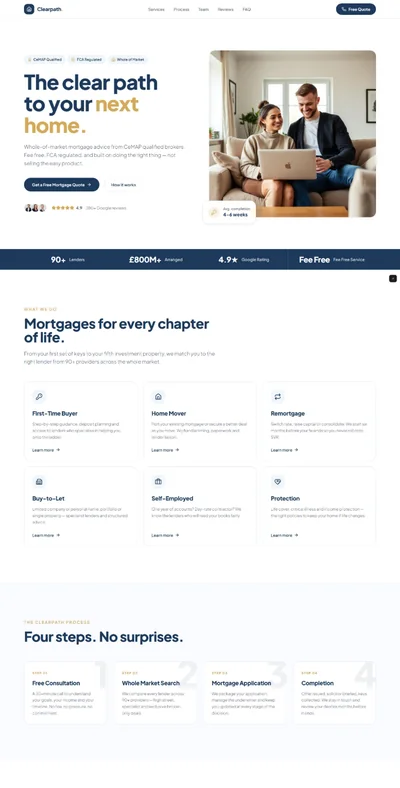
Home Inspector Website Prompt — Professional, Trust-First Design with Sample Report and Online Booking

A professional home inspector website prompt with certification trust signals, sample report preview, service area map, and online inspection booking form. Works in Lovable, Bolt, and v0.

Build a professional home inspection services website called "TrueView Home Inspections" in Atlanta, GA. Tech stack: React + Vite + TypeScript + Tailwind CSS + Framer Motion. Design: clean white background, deep forest green primary (#16593C), warm charcoal secondary (#2D2D2D), safety orange accent (#F97316), light green surface (#F0FDF4). Typography: bold confident Inter-style sans headings, large 64px forest green stat numerals, uppercase orange labels. Sections: white navbar with orange "Schedule Inspection" CTA, split hero (left: "Know Exactly What You're Buying" + 3 trust badges — Licensed & Insured, InterNACHI Certified, Same-Day Reports + 2 CTAs; right: home inspector on ladder inspecting roof photo), 4 service cards with forest green border (Standard Home Inspection, Pre-Listing Inspection, Radon Testing, Mold Assessment — each with duration + price range), "What Makes Our Reports Different" 4-column grid (200+ Point Checklist, HD Photo Documentation, Same-Day PDF Report, Thermal Imaging Included), mock inspection report preview section (organized sections: Roof, Foundation, Plumbing, Electrical, HVAC with photo callouts + "View Sample Report" button + "Same Day" orange badge), inspector about section (professional photo + credentials: Licensed, InterNACHI Certified, 15 Years, 2000+ Inspections), Atlanta service area visual map placeholder + 12 cities list, 3-step booking process (Schedule Online 2 min > We Inspect 2-4 hrs > Report Same Day), 4 testimonials (buyer and seller perspectives), full-width forest green online booking form (address, property type dropdown, sq footage, preferred date + time, name, email, phone, orange "Request Inspection" button), 3 blog post previews, footer. Animations: trust badge stagger, report section reveals, step process draws on scroll. Mobile: stacked hero, 2-col services, vertical steps, full-width booking form.

The generated results may vary

Categories

Categories

FAQ

What types of inspections does this home inspector prompt include?

Four services: Standard, Pre-Listing, Radon Testing, and Mold Assessment. To add commercial inspections or sewer scoping, add cards to the service grid. For a general home services format, see the electrician prompt.

Does this prompt include InterNACHI certification badges?

Yes — hero shows InterNACHI Certified badge and the bio references InterNACHI membership. If certified through ASHI, NAHI, or a state-specific program, replace InterNACHI references throughout. The footer certification logos section displays whichever associations you belong to.

Can I change the location from Atlanta to my service area?

Yes — swap Atlanta for your city, update the service area map description, the 12-city list, and footer. If you serve multiple metros, replace the single map with a list of service cities or a radius description.

Can I connect the booking form to an inspection scheduling system?

Use a follow-up Lovable prompt to embed your scheduling platform. Spectora and InspectionSupport are the most common inspection-specific scheduling tools; Calendly works as a simpler alternative.

Full home inspector website design: green hero, services, sample report preview, booking form

FAQ

What types of inspections does this home inspector prompt include?

Four services: Standard, Pre-Listing, Radon Testing, and Mold Assessment. To add commercial inspections or sewer scoping, add cards to the service grid. For a general home services format, see the electrician prompt.

Does this prompt include InterNACHI certification badges?

Yes — hero shows InterNACHI Certified badge and the bio references InterNACHI membership. If certified through ASHI, NAHI, or a state-specific program, replace InterNACHI references throughout. The footer certification logos section displays whichever associations you belong to.

Can I change the location from Atlanta to my service area?

Yes — swap Atlanta for your city, update the service area map description, the 12-city list, and footer. If you serve multiple metros, replace the single map with a list of service cities or a radius description.

Can I connect the booking form to an inspection scheduling system?

Use a follow-up Lovable prompt to embed your scheduling platform. Spectora and InspectionSupport are the most common inspection-specific scheduling tools; Calendly works as a simpler alternative.

Similar prompts

Frequently asked questions

What is websiteprompts.ai?

websiteprompts.ai is a free library of AI website prompts. Each prompt is a ready-to-use text instruction that generates a complete website design when used with an AI website builder like Lovable, Claude, Bolt, v0, or similar tools.

How do I use these prompts?

Copy any prompt from websiteprompts.ai, open your AI website builder of choice — Lovable, Bolt, v0, Claude, ChatGPT, or any other tool — paste the prompt, and let the AI generate your website. No coding or design experience needed.

Are the prompts free?

Yes — every prompt on websiteprompts.ai is completely free. Copy and use them as many times as you like, for personal or commercial projects.

Which AI tools do the prompts work with?

The prompts are designed primarily for Lovable and Bolt, but they work with any AI tool that can generate websites — including v0, Claude, ChatGPT, Cursor, Framer AI, and others.

How often are new prompts added?

New prompts are added every day. The library is constantly growing with prompts for different industries, website types, and design styles.

Do I need any technical skills to use these prompts?

No technical skills required. Copy the prompt, paste it into any AI website builder, and the AI handles the rest. websiteprompts.ai is built for anyone who wants a professional website without writing code.

Frequently asked questions

What is websiteprompts.ai?

websiteprompts.ai is a free library of AI website prompts. Each prompt is a ready-to-use text instruction that generates a complete website design when used with an AI website builder like Lovable, Claude, Bolt, v0, or similar tools.

How do I use these prompts?

Copy any prompt from websiteprompts.ai, open your AI website builder of choice — Lovable, Bolt, v0, Claude, ChatGPT, or any other tool — paste the prompt, and let the AI generate your website. No coding or design experience needed.

Are the prompts free?

Yes — every prompt on websiteprompts.ai is completely free. Copy and use them as many times as you like, for personal or commercial projects.

Which AI tools do the prompts work with?

The prompts are designed primarily for Lovable and Bolt, but they work with any AI tool that can generate websites — including v0, Claude, ChatGPT, Cursor, Framer AI, and others.

How often are new prompts added?

New prompts are added every day. The library is constantly growing with prompts for different industries, website types, and design styles.

Do I need any technical skills to use these prompts?

No technical skills required. Copy the prompt, paste it into any AI website builder, and the AI handles the rest. websiteprompts.ai is built for anyone who wants a professional website without writing code.

Frequently asked questions

What is websiteprompts.ai?

websiteprompts.ai is a free library of AI website prompts. Each prompt is a ready-to-use text instruction that generates a complete website design when used with an AI website builder like Lovable, Claude, Bolt, v0, or similar tools.

How do I use these prompts?

Copy any prompt from websiteprompts.ai, open your AI website builder of choice — Lovable, Bolt, v0, Claude, ChatGPT, or any other tool — paste the prompt, and let the AI generate your website. No coding or design experience needed.

Are the prompts free?

Yes — every prompt on websiteprompts.ai is completely free. Copy and use them as many times as you like, for personal or commercial projects.

Which AI tools do the prompts work with?

The prompts are designed primarily for Lovable and Bolt, but they work with any AI tool that can generate websites — including v0, Claude, ChatGPT, Cursor, Framer AI, and others.

How often are new prompts added?

New prompts are added every day. The library is constantly growing with prompts for different industries, website types, and design styles.

Do I need any technical skills to use these prompts?

No technical skills required. Copy the prompt, paste it into any AI website builder, and the AI handles the rest. websiteprompts.ai is built for anyone who wants a professional website without writing code.

Get new AI website prompts every week — straight to your inbox.

Every Friday we drop a fresh batch of AI website prompts and tips to help you build better websites faster.

Join 1,000+ AI enthusiasts

liquid metallic gradient

Get new AI website prompts every week — straight to your inbox.

Every Friday we drop a fresh batch of AI website prompts and tips to help you build better websites faster.

Join 1,000+ AI enthusiasts

liquid metallic gradient

Get new AI website prompts every week — straight to your inbox.

Every Friday we drop a fresh batch of AI website prompts and tips to help you build better websites faster.

Join 1,000+ AI enthusiasts