Butcher Shop Website Prompt — Dark Craft Provenance Design for Bolt, v0 & Lovable
Butcher shop website prompt for Bolt, v0 and Lovable — oxblood and bone on near-black, live dry-ageing day counters with brass arcs, marble inverted sections, full copy.
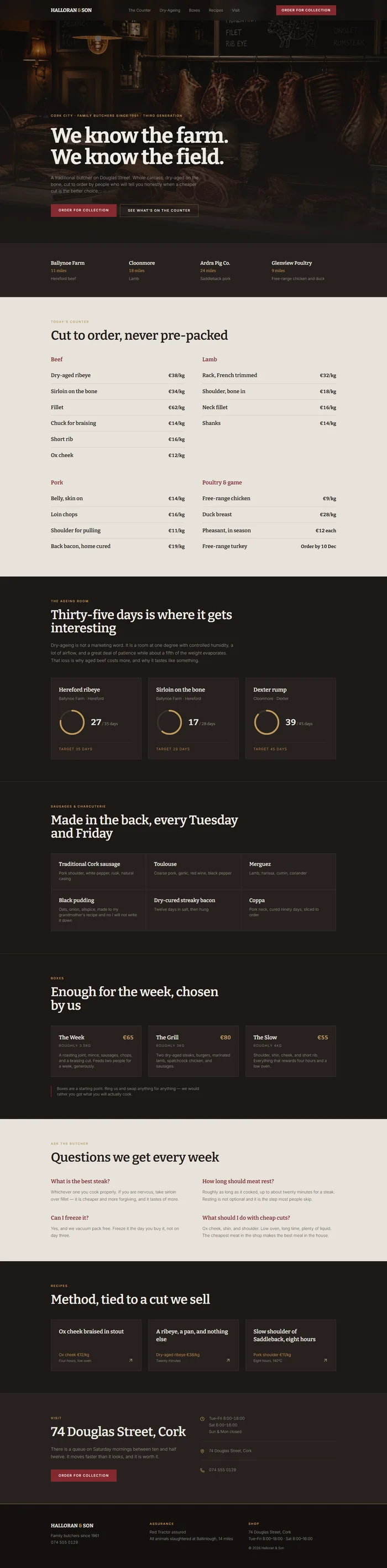
# Halloran & Son — Butcher Shop Website Prompt ## 1. Goal Statement Build a dark, craft-led traditional butcher website for **Halloran & Son**, defined by deep oxblood, bone white, and a heavy slab serif — a shop site that leads with provenance and dry-ageing rather than a price list. ## 2. Tech Stack ``` React + Vite + TypeScript + Tailwind CSS + Framer Motion (motion/react) + shadcn/ui + lucide-react ``` ## 3. Design System — Colors ```css :root { --background: hsl(20, 14%, 10%); /* #1d1815 near-black brown */ --foreground: hsl(36, 24%, 92%); /* #f0e9df bone */ --primary: hsl(356, 52%, 34%); /* #832a33 oxblood */ --primary-foreground: hsl(36, 24%, 95%); --muted-foreground: hsl(30, 8%, 58%); --border: hsl(20, 12%, 20%); --card: hsl(20, 13%, 14%); --marble: hsl(36, 20%, 88%); /* light inverted sections */ --accent-brass: hsl(38, 44%, 56%); } ``` ## 4. Typography ```html <link href="https://fonts.googleapis.com/css2?family=Bitter:wght@400;600;700&family=Inter:wght@300;400;500&display=swap" rel="stylesheet" /> ``` - **H1:** Bitter 700, clamp(40px, 5.4vw, 80px), letter-spacing -0.02em, line-height 1.02 - **H2:** Bitter 600, 32–46px - **H3 / cut names:** Bitter 600, 18–21px - **Body:** Inter 300–400, 16px, line-height 1.72 - **Eyebrows:** Inter 600, uppercase, letter-spacing 0.2em, 11px, brass - **Prices / ageing days:** Bitter 700, tabular-nums ## 5. Visual Effects **Effect 1 — Dry-ageing counter.** A card for each ageing chamber showing the cut, the farm, and a live day count that ticks up from a stored start date, with a brass progress arc showing progress toward the target ageing period. ```tsx const days = Math.floor((Date.now() - new Date(batch.start).getTime()) / 86400000); const pct = Math.min(days / batch.target, 1); <svg viewBox="0 0 100 100" className="h-24 w-24 -rotate-90"> <circle cx="50" cy="50" r="44" fill="none" stroke="var(--border)" strokeWidth="6" /> <motion.circle cx="50" cy="50" r="44" fill="none" stroke="var(--accent-brass)" strokeWidth="6" strokeLinecap="round" pathLength={1} initial={{ pathLength: 0 }} whileInView={{ pathLength: pct }} viewport={{ once: true }} transition={{ duration: 1.2, ease: 'easeOut' }} /> </svg> <span className="font-display text-3xl tabular-nums">{days}<span className="text-sm"> / {batch.target} days</span></span> ``` **Effect 2 — Marble inversion.** The counter and recipe sections invert to a light marble background, cutting the dark palette in two and mimicking the shop's marble counter. ## 6. Component Breakdown 1. **Navbar** — 74px, sticky, near-black with blur, brass 1px bottom border on scroll. Wordmark with an ampersand in brass, links centre, `Order for Collection` oxblood button right. 2. **Hero** — 88vh, full-bleed shop counter photograph with a heavy bottom gradient. Eyebrow, slab serif H1, subline, two CTAs. *Image: traditional butcher shop counter with hanging cuts and marble surfaces, warm low light, dark atmospheric interior, craft food photography.* 3. **Provenance strip** — dark band with four farm names, distance in miles, and what each supplies. 4. **The counter** — marble inverted section (Effect 2). Four categories with cuts and per-kilo prices: beef, lamb, pork, poultry and game. 5. **Dry-ageing room** — the signature section (Effect 1). Three ageing batches with live day counters, farm, breed, and target period. 6. **Sausages & charcuterie** — 2x3 grid of house-made items with a short ingredient line each. 7. **Boxes** — three subscription-style meat boxes with contents, weight, price, and a note on flexibility. 8. **Ask the butcher** — marble section with four short answers to practical questions about cooking and storage. 9. **Recipes** — three cards linking to method pages, each tied to a specific cut sold in the shop. 10. **Visit** — address, hours, an honest line about Saturday queues, and a collection ordering CTA. 11. **Footer** — darkest brown, brass top rule, three columns, Red Tractor and local abattoir references. ## 7. Animations - Hero: image scales `1.05 → 1` over 11s; H1 lines reveal with a clipPath wipe staggered 0.1s - Provenance strip: farm names fade in staggered 0.08s - Cut rows: fade in staggered 0.04s; hover tints the row and shifts the price 3px left - Ageing arcs: `pathLength 0 → pct`, 1.2s ease-out, staggered 0.15s - Marble sections: background colour cross-fades over 0.6s as the section enters view - Box cards: lift `-5px` with a brass 1px border on hover ## 8. Responsive - **Mobile (<768px):** hamburger; H1 clamps to 40px; provenance strip becomes a 2x2 grid; counter categories become an accordion so the page is not four hundred rows long; ageing cards 1-col with a smaller 64px arc; boxes stack; `Order for Collection` pinned as a sticky bottom bar. - **Tablet:** counter 2-col, ageing 3-col at reduced arc size, boxes 3-col. - **Desktop:** max width 1160px, `px-16`, `py-20`. ## 9. Full Copy **Brand:** HALLORAN & SON · Butchers since 1961 · Cork **Navbar:** The Counter · Dry-Ageing · Boxes · Recipes · Visit · [Button] Order for Collection **Hero** - Eyebrow: `CORK CITY · FAMILY BUTCHERS SINCE 1961 · THIRD GENERATION` - H1: `We know the farm. We know the field.` - Subline: `A traditional butcher on Douglas Street. Whole carcass, dry-aged on the bone, cut to order by people who will tell you honestly when a cheaper cut is the better choice.` - CTAs: `Order for Collection` · `See What's on the Counter` **Provenance** — `Ballynoe Farm` 11 miles · Hereford beef · `Cloonmore` 18 miles · Lamb · `Ardra Pig Co.` 24 miles · Saddleback pork · `Glenview Poultry` 9 miles · Free-range chicken and duck **The counter** — Eyebrow `TODAY'S COUNTER` — H2 `Cut to order, never pre-packed` *Beef* — Dry-aged ribeye €38/kg · Sirloin on the bone €34/kg · Fillet €62/kg · Chuck for braising €14/kg · Short rib €16/kg · Ox cheek €12/kg *Lamb* — Rack, French trimmed €32/kg · Shoulder, bone in €18/kg · Neck fillet €16/kg · Shanks €14/kg *Pork* — Belly, skin on €14/kg · Loin chops €16/kg · Shoulder for pulling €11/kg · Back bacon, home cured €19/kg *Poultry & game* — Free-range chicken €9/kg · Duck breast €28/kg · Pheasant, in season €12 each · Free-range turkey, order by 10 December **Dry-ageing room** — Eyebrow `THE AGEING ROOM` — H2 `Thirty-five days is where it gets interesting` `Dry-ageing is not a marketing word. It is a room at one degree with controlled humidity, a lot of airflow, and a great deal of patience while about a fifth of the weight evaporates. That loss is why aged beef costs more, and why it tastes like something.` - **Hereford ribeye** — Ballynoe Farm · Target 35 days - **Sirloin on the bone** — Ballynoe Farm · Target 28 days - **Dexter rump** — Cloonmore · Target 45 days **Sausages & charcuterie** — H2 `Made in the back, every Tuesday and Friday` - **Traditional Cork sausage** — Pork shoulder, white pepper, rusk, natural casing - **Toulouse** — Coarse pork, garlic, red wine, black pepper - **Merguez** — Lamb, harissa, cumin, coriander - **Black pudding** — Oats, onion, allspice, made to my grandmother's recipe and no I will not write it down - **Dry-cured streaky bacon** — Twelve days in salt, then hung - **Coppa** — Pork neck, cured ninety days, sliced to order **Boxes** - **The Week — €65** — Roughly 3.5kg. A roasting joint, mince, sausages, chops, and a braising cut. Feeds two people for a week, generously. - **The Grill — €80** — Roughly 3kg. Two dry-aged steaks, burgers, marinated lamb, spatchcock chicken, and sausages. - **The Slow — €55** — Roughly 4kg. Shoulder, shin, cheek, and short rib. Everything that rewards four hours and a low oven. Note: `Boxes are a starting point. Ring us and swap anything for anything — we would rather you got what you will actually cook.` **Ask the butcher** 1. **What is the best steak?** — Whichever one you cook properly. If you are nervous, take sirloin over fillet — it is cheaper and more forgiving, and it tastes of more. 2. **How long should meat rest?** — Roughly as long as it cooked, up to about twenty minutes for a steak. Resting is not optional and it is the step most people skip. 3. **Can I freeze it?** — Yes, and we vacuum pack free. Freeze it the day you buy it, not on day three. 4. **What should I do with cheap cuts?** — Ox cheek, shin, and shoulder. Low oven, long time, plenty of liquid. The cheapest meat in the shop makes the best meal in the house. **Recipes** — `Ox cheek braised in stout` · `A ribeye, a pan, and nothing else` · `Slow shoulder of Saddleback, eight hours` **Visit** — `74 Douglas Street, Cork` · Tue–Fri 8:00–18:00 · Sat 8:00–16:00 · Sun & Mon closed `There is a queue on Saturday mornings between ten and half twelve. It moves faster than it looks, and it is worth it.` **Footer** — HALLORAN & SON · `Family butchers since 1961` · `074 555 0129` · Red Tractor assured · All animals slaughtered at Ballinlough, 14 miles · © 2026 ## 10. Key Dependencies ```json { "motion": "^12.0.0", "lucide-react": "^0.460.0", "@radix-ui/react-accordion": "^1.2.0", "clsx": "^2.1.0", "tailwind-merge": "^2.5.0" } ```