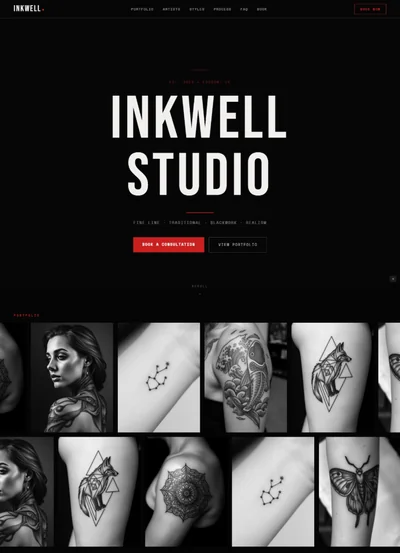
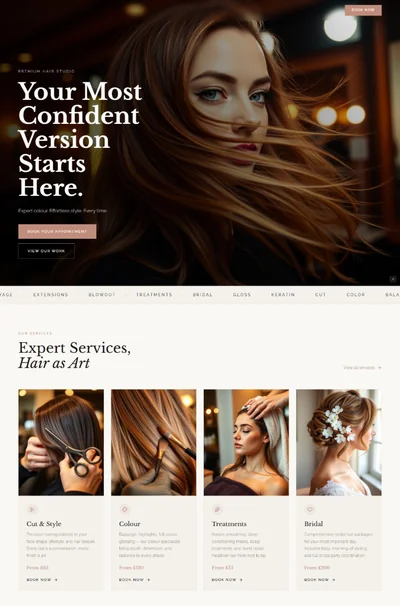
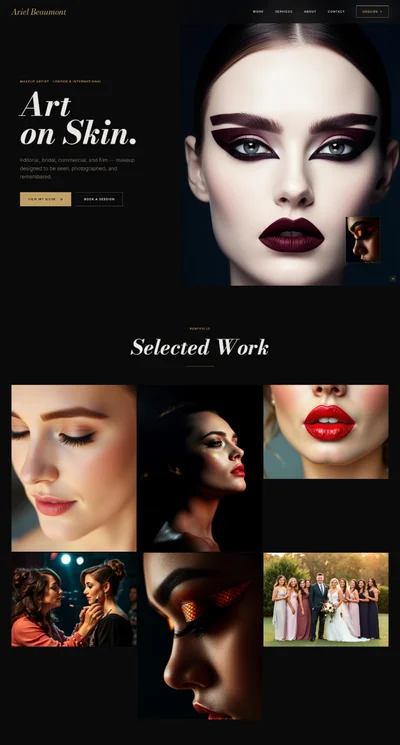
Barber Shop Website Prompt — Dark Navy Barber Shop & Traditional Barbershop Website Design for Lovable, Claude, Bolt and more
Barber shop website prompt — deep navy and barber pole red, animated CSS stripe divider, 6-service grid, 4 barber profiles, masonry gallery, live walk-in wait indicator, and full copy. Works in Lovable, Claude, Bolt and more. Paste and generate.
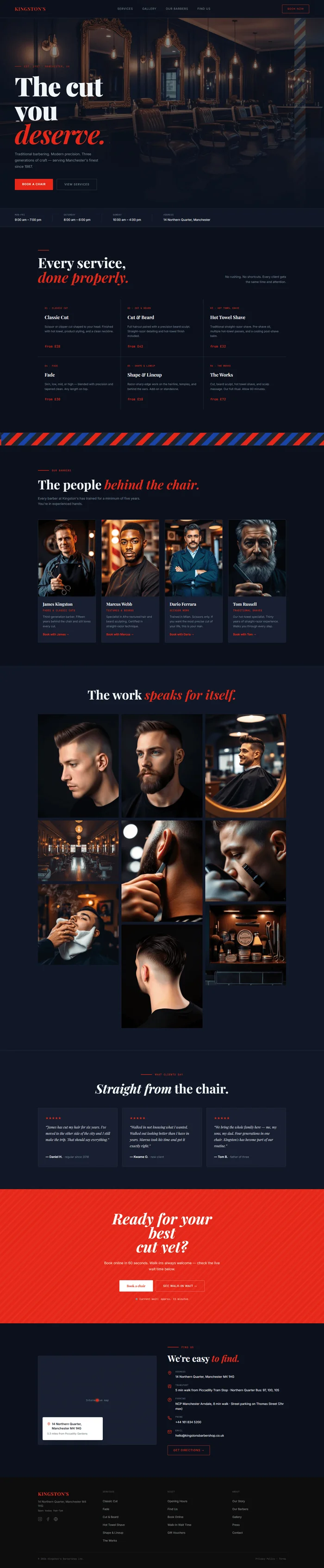
# Barber Shop Website Prompt # websiteprompts.ai --- Build a complete barbershop website for **Kingston's** — a classic, traditional barbershop. The design draws directly from the iconic barber pole: deep navy blue, bold red, and crisp white. Dark navy foundation, red as the primary accent, white for contrast and type. The mood is timeless craftsmanship — serious, proud, and precise. Think old-world barbershop signage meets modern editorial web design. --- ## Tech Stack ``` React + Vite + TypeScript + Tailwind CSS + Framer Motion (motion/react) + shadcn/ui + lucide-react ``` --- ## Design System ```css :root { --background: 222 42% 8%; /* #0c1220 deep navy dark */ --surface: 222 38% 11%; /* #111a2e surface layer */ --surface-raised: 222 34% 14%; /* #172138 card bg */ --border: 222 28% 20%; /* #243050 border */ --border-soft: 222 24% 26%; /* #2e3e62 secondary border */ --foreground: 210 40% 96%; /* #f0f4fc off-white */ --muted-foreground: 220 15% 55%; /* #7e8aa8 muted blue-grey */ --subtle: 220 12% 38%; /* #546080 very muted */ --primary: 4 80% 50%; /* #e8220a barber red */ --primary-foreground: 0 0% 100%; --primary-dark: 4 84% 40%; /* #c11a07 dark red hover */ --primary-light: 4 60% 14%; /* #291007 red tint bg */ --blue: 222 72% 38%; /* #1a3a9c medium blue */ --blue-light: 222 60% 24%; /* #162462 blue surface */ --white: 0 0% 100%; /* #ffffff pure white */ --stripe-red: 4 80% 50%; --stripe-blue: 222 72% 38%; } ``` --- ## Typography Import: `https://fonts.googleapis.com/css2?family=Playfair+Display:ital,wght@0,700;0,900;1,400;1,700&family=Inter:wght@300;400;500;600&family=JetBrains+Mono:wght@400&display=swap` - **Display / H1–H2**: Playfair Display 700–900, letter-spacing -0.01em, line-height 0.92 - **Italic accents**: Playfair Display italic 400–700, color `hsl(var(--primary))` - **UI / Body / Nav**: Inter 300–600 - **Labels / Badges / Prices**: JetBrains Mono 400 --- ## Visual Effects ### 1. Animated barber pole stripe — hero accent element A vertical animated barber pole stripe on the right edge of the hero, 48px wide: ```css .barber-pole { position: absolute; top: 0; right: 80px; bottom: 0; width: 48px; overflow: hidden; border-radius: 0; opacity: 0.25; } .barber-pole::before { content: ''; position: absolute; inset: -100%; background: repeating-linear-gradient( -45deg, hsl(var(--primary)) 0px, hsl(var(--primary)) 16px, hsl(var(--white)) 16px, hsl(var(--white)) 32px, hsl(var(--blue)) 32px, hsl(var(--blue)) 48px, hsl(var(--white)) 48px, hsl(var(--white)) 64px ); animation: pole-spin 4s linear infinite; } @keyframes pole-spin { from { transform: translateY(0); } to { transform: translateY(64px); } } ``` ### 2. Staggered entrance animations Every section fades in on scroll: ``` Each element: initial={{ opacity: 0, y: 28 }} animate={{ opacity: 1, y: 0 }} transition={{ duration: 0.55, ease: 'easeOut', delay: index * 0.09 }} Trigger: useInView with once: true, margin: '-60px' ``` ### 3. Hero headline clip reveal H1 lines animate in with clip-path on mount: ``` Each line wrapper: overflow: hidden Each text: initial={{ clipPath: 'inset(0 100% 0 0)' }} animate={{ clipPath: 'inset(0 0% 0 0)' }} transition={{ duration: 0.7, ease: [0.76, 0, 0.24, 1], delay: index * 0.12 }} ``` ### 4. Red line decorative element A 48px wide, 2px tall red horizontal rule animates in before each section heading: ``` initial={{ scaleX: 0, transformOrigin: 'left center' }} animate={{ scaleX: 1 }} transition={{ duration: 0.5, ease: 'easeOut' }} ``` ### 5. Card hover glow Service and barber cards on hover: ```css transition: transform 0.18s ease, box-shadow 0.18s ease, border-color 0.18s ease; &:hover { transform: translateY(-3px); border-color: hsl(var(--primary) / 0.4); box-shadow: 0 12px 40px rgba(232, 34, 10, 0.12); } ``` --- ## Section Breakdown ### Section 1 — Navbar (sticky) Fixed top, `background: hsl(var(--background) / 0.95)`, `backdrop-filter: blur(12px)`, `border-bottom: 1px solid hsl(var(--border))`. Padding 20px 64px. **Left**: Wordmark "Kingston's" in Playfair Display 700 20px, letter-spacing 0.06em, text-transform uppercase, color `hsl(var(--primary))`. **Center links**: Services · Gallery · Our Barbers · Find Us — Inter 12px, letter-spacing 0.10em, uppercase, color muted-foreground. On hover: foreground. **Right**: Single CTA "Book now" — `border: 1px solid hsl(var(--primary))`, color primary, background none, border-radius 2px, padding 9px 22px, font-size 11px, uppercase, letter-spacing 0.10em. On hover: `background: hsl(var(--primary))`, color white. Mobile: Hamburger (3 white lines) → full-screen overlay, dark navy bg, all links centered, large "Book now" button at bottom. --- ### Section 2 — Hero Full viewport height, `display: flex`, `flex-direction: column`, `justify-content: flex-end`, padding 0 64px 80px. Position relative, overflow hidden. **Background layers** (back to front): Layer 1 — photo: ``` {/* Image: classic barbershop interior, leather barber chairs in a row, vintage mirrors with ornate frames, Edison bulb pendant lights, dark wood paneling, warm moody atmosphere, dark navy and burgundy tones */} <img src="" alt="Classic barbershop interior with leather chairs and vintage mirrors" className="absolute inset-0 w-full h-full object-cover object-center z-0" /> ``` Layer 2 — gradient overlay (composition-independent): ```css background: linear-gradient( to bottom, rgba(12, 18, 32, 0.4) 0%, rgba(12, 18, 32, 0.55) 50%, rgba(12, 18, 32, 0.92) 80%, rgba(12, 18, 32, 1) 100% ); ``` Layer 3 — barber pole stripe element (absolute right edge, see Visual Effects). Layer 4 — hero content (z-10): - Location tag: red line (28px × 1px) + "Est. 1987 · Manchester, UK" in JetBrains Mono 10px, uppercase, letter-spacing 0.16em, color primary. Display flex, gap 12px, align-items center. Margin-bottom 24px. - H1 with clip reveal animation: 3 lines of Playfair Display 900, clamp(64px, 8vw, 120px), line-height 0.92, letter-spacing -0.02em. - Line 1: "The cut" — color foreground - Line 2: "you" — color foreground - Line 3: "*deserve.*" — Playfair italic, color `hsl(var(--primary))` - Sub (fade-up, 0.5s delay): "Traditional barbering. Modern precision. Three generations of craft — serving Manchester's finest since 1987." — Inter 15px, color muted-foreground, line-height 1.8, max-width 400px, margin-top 24px, margin-bottom 40px. - CTA row: Two buttons, gap 16px: - Primary: "Book a chair" — `background: hsl(var(--primary))`, color white, padding 14px 32px, font-size 12px, uppercase, letter-spacing 0.10em, border-radius 2px. On hover: `background: hsl(var(--primary-dark))`. - Ghost: "View services" — `border: 1px solid hsl(var(--border-soft))`, color muted-foreground, background none, same padding. On hover: border-color foreground, color foreground. --- ### Section 3 — Hours & Info strip Full-width strip, `background: hsl(var(--surface))`, `border-top: 1px solid hsl(var(--border))`, `border-bottom: 1px solid hsl(var(--border))`, padding 20px 64px. Flex row, gap 48px, align-items center. Four info items separated by 1px × 32px vertical dividers (`background: hsl(var(--border))`): 1. "Mon–Fri" / "9:00 am – 7:00 pm" 2. "Saturday" / "8:00 am – 6:00 pm" 3. "Sunday" / "10:00 am – 4:00 pm" 4. "Address" / "14 Northern Quarter, Manchester" Each item: label in JetBrains Mono 9px uppercase letter-spacing 0.10em color muted-foreground, value in Inter 13px foreground. Gap 4px between label and value. --- ### Section 4 — Services Max-width 1200px, centered, padding 100px 64px. **Header row**: flex, justify-between, align-items flex-end, margin-bottom 64px. - Left: H2 in Playfair Display 700, clamp(40px, 4.5vw, 60px), line-height 1.05: - "Every service," - "*done properly.*" (italic, color primary) - Right: "No rushing. No shortcuts. Every client gets the same time and attention." — Inter 13px color muted-foreground, max-width 280px, line-height 1.7, text-align right. **Services grid**: 3×2 grid (3 columns, gap 1px), container `background: hsl(var(--border))`, overflow hidden, border-radius 0. Each cell has `background: hsl(var(--background))`. 6 service cards (see hover glow effect): 1. **01 · Classic Cut** — "Scissor or clipper cut shaped to your head. Finished with hot towel, product styling, and a clean neckline." / from £28 2. **02 · Cut & Beard** — "Full haircut paired with a precision beard sculpt. Straight-razor detailing and hot-towel finish included." / from £42 3. **03 · Hot Towel Shave** — "Traditional straight-razor shave. Pre-shave oil, multiple hot-towel passes, and a cooling post-shave balm." / from £32 4. **04 · Fade** — "Skin, low, mid, or high — blended with precision and tapered clean. Any length on top." / from £30 5. **05 · Shape & Lineup** — "Razor-sharp edge work on the hairline, temples, and behind the ears. Add-on or standalone." / from £18 6. **06 · The Works** — "Cut, beard sculpt, hot towel shave, and scalp massage. Our full ritual. Allow 80 minutes." / from £72 Each card structure (padding 32px 28px, flex column, gap 16px): - Number: JetBrains Mono 9px, uppercase, letter-spacing 0.10em, color primary - Name: Playfair Display 700 20px, color foreground - Description: Inter 12px, color muted-foreground, line-height 1.7 - Price: JetBrains Mono 14px, color primary, margin-top auto --- ### Section 5 — Barber pole divider (decorative full-bleed stripe) Full-width stripe, 56px tall, `overflow: hidden`. Animated repeating diagonal stripe using CSS: ```css background: repeating-linear-gradient( -45deg, hsl(var(--primary)) 0px 20px, hsl(var(--white) / 0.08) 20px 40px, hsl(var(--blue)) 40px 60px, hsl(var(--white) / 0.08) 60px 80px ); animation: stripe-scroll 3s linear infinite; @keyframes stripe-scroll { from { background-position: 0 0; } to { background-position: 80px 0; } } ``` Above and below: 1px border `hsl(var(--border))`. --- ### Section 6 — Our Barbers Max-width 1200px, centered, padding 100px 64px. **Header**: Red line + "Our Barbers" tag (JetBrains Mono 10px uppercase red). Below: H2 "The people *behind the chair.*" — Playfair Display 700, clamp(38px, 4vw, 54px), italic red on "behind the chair." Below H2: Inter 14px muted "Every barber at Kingston's has trained for a minimum of five years. You're in experienced hands." max-width 480px. **Barbers grid**: 4 columns, gap 24px. Staggered fade-up on scroll. Each barber card (`background: hsl(var(--surface-raised))`, border, border-radius 4px, hover glow): Barber photo (aspect-ratio 3/4, object-cover object-center, border-radius 2px): ``` [Barber 1] {/* Image: professional male barber portrait, classic barbershop setting, confident expression, holding scissors or comb, dark background, natural warm side lighting */} [Barber 2] {/* Image: young male barber in dark apron, looking at camera, barbershop backdrop, candid professional portrait */} [Barber 3] {/* Image: experienced male barber in shop coat, crossed arms, proud confident pose, barbershop interior */} [Barber 4] {/* Image: bearded male barber portrait, holding straight razor, focused expression, moody studio-style lighting */} ``` Card body (padding 20px 20px 24px): - Name: Playfair Display 700 18px, color foreground - Specialty: JetBrains Mono 10px uppercase letter-spacing 0.10em color primary, margin-top 6px - Bio: Inter 12px muted line-height 1.7, 2 short sentences, margin-top 10px - "Book with [Name] →" text link: Inter 12px color primary, margin-top 16px, font-weight 600 Four barbers: 1. **James Kingston** · "Fades & Classic Cuts" · "Third-generation barber. Fifteen years behind the chair and still loves every cut." 2. **Marcus Webb** · "Textures & Beards" · "Specialist in Afro-textured hair and beard sculpting. Certified in straight-razor technique." 3. **Dario Ferrara** · "Scissor Work" · "Trained in Milan. Scissors only. If you want the most precise cut of your life, this is your man." 4. **Tom Russell** · "Traditional Shaves" · "Our hot-towel specialist. Thirty years of straight-razor experience. Walks you through every step." --- ### Section 7 — Gallery (photo grid) Full-width, background surface, padding 96px 64px. Max-width 1200px centered. Header: H2 "The work *speaks for itself.*" — Playfair Display 700, clamp(38px, 4vw, 54px), centered. Masonry-style grid (CSS columns: 3, gap 12px). 9 images total. On hover: slight brightness dim (0.85) + scale(1.01) transition. Photography briefs for each: ``` [1] {/* Image: close-up of a perfect high fade haircut, sharp temple line, soft gradient blend, dark background, side studio lighting */} [2] {/* Image: barber hands applying hot towel to client's face, steaming white towel, warm amber lighting, barbershop setting */} [3] {/* Image: finished beard sculpt result, perfectly edged jawline and cheek line, groomed and defined */} [4] {/* Image: barber using straight razor on client's neckline, focused precise movement, dark barbershop lighting */} [5] {/* Image: classic slick-back haircut with side part, product-styled, wet look, portrait orientation */} [6] {/* Image: barbershop interior wide shot, row of barber chairs, mirrors, warm Edison bulbs, empty shop morning atmosphere */} [7] {/* Image: close-up of clippers creating a skin fade, extreme precision, macro photography */} [8] {/* Image: man in barber chair mid-haircut, draped in black cape, looking in mirror, satisfied expression */} [9] {/* Image: barbershop shelf with vintage pomade tins, brushes, straight razors, and scissors arranged neatly */} ``` --- ### Section 8 — Testimonials Background: `hsl(var(--surface))`, padding 96px 64px. Max-width 1200px centered. Header (center): Red line + "What clients say" tag. H2: "*Straight from* the chair." — Playfair Display 700 italic for "Straight from", rest normal, clamp(38px, 4vw, 54px). Three testimonial cards in a 3-column grid, gap 20px. Staggered entrance. Each card (`background: hsl(var(--surface-raised))`, border, border-radius 4px, padding 32px): - 5 red stars (★★★★★) — font-size 14px, letter-spacing 2px, color primary, margin-bottom 16px - Quote in Playfair Display italic 400 15px, color `hsl(var(--foreground) / 0.85)`, line-height 1.8, margin-bottom 24px - Client line: `—` + name in Inter 13px weight 600 foreground + role/note in 12px muted Three quotes: 1. **Daniel H., regular since 2018** — "James has cut my hair for six years. I've moved to the other side of the city and I still make the trip. That should say everything." 2. **Kwame O., new client** — "Walked in not knowing what I wanted. Walked out looking better than I have in years. Marcus took his time and got it exactly right." 3. **Tom B., father of three** — "We bring the whole family here — me, my sons, my dad. Four generations in one chair. Kingston's has become part of our routine." --- ### Section 9 — Booking CTA Full-width, `background: hsl(var(--primary))`, padding 80px 64px. No max-width. Background detail: subtle repeating diagonal stripe at 3% opacity (white on red): ```css background-image: repeating-linear-gradient( -45deg, rgba(255,255,255,0.03) 0px 8px, transparent 8px 20px ); ``` Centered content, max-width 640px: - H2: "Ready for your best cut yet?" — Playfair Display 900 italic, clamp(40px, 5vw, 64px), line-height 0.95, color white - Subtext: "Book online in 60 seconds. Walk-ins always welcome — check the live wait time below." — Inter 15px `rgba(255,255,255,0.75)`, margin-bottom 36px - Two buttons, centered, gap 12px: - "Book a chair" — white bg, color primary, Playfair Display 700 14px, padding 14px 32px, border-radius 2px. On hover: background `hsl(var(--foreground))`. - "See walk-in wait →" — border 1px `rgba(255,255,255,0.35)`, color white, background transparent, same padding. - Live wait indicator below buttons (margin-top 24px): green dot animation + "Current wait: approx. 15 minutes" — JetBrains Mono 11px `rgba(255,255,255,0.6)`. Green dot pulse: `@keyframes pulse { 0%,100% { opacity:1 } 50% { opacity:0.4 } } animation: pulse 2s ease-in-out infinite`. --- ### Section 10 — Find Us Two-column grid (1fr 1fr), max-width 1200px, padding 96px 64px. Background dark. **Left — Map placeholder:** `background: hsl(var(--surface-raised))`, border, border-radius 4px, aspect-ratio 4/3, display flex, align-items center, justify-content center. Inner text: "Interactive map" in JetBrains Mono 11px muted. Wrap in `<div>` with `aria-label="Map showing Kingston's Barbershop location"`. Overlay card (absolute bottom-left, padding 20px, margin 20px): - White bg, border-radius 4px, box-shadow - "📍 14 Northern Quarter, Manchester M4 1HG" — 13px weight 600 - "0.3 miles from Piccadilly Gardens" — 11px muted **Right — contact + directions info (flex column, gap 28px, justify-content center):** Red line + "Find Us" tag (JetBrains Mono 10px uppercase red). H2: "We're easy *to find.*" — Playfair Display 700, 38px. Info rows (gap 20px), each with icon + label + value: - 📍 Address · 14 Northern Quarter, Manchester M4 1HG - 🚇 Transport · 5 min walk from Piccadilly Tram Stop · Northern Quarter Bus: 97, 100, 105 - 🅿 Parking · NCP Manchester Arndale, 8 min walk · Street parking on Thomas Street (2hr max) - 📞 Phone · +44 161 834 5200 - ✉ Email · hello@kingstonsbarbershop.co.uk "Get directions →" link button — border 1px primary, color primary, padding 11px 24px, border-radius 2px, font-size 12px uppercase. --- ### Section 11 — Footer Background: `hsl(0 0% 5%)` (near-pure black). Padding 56px 64px 32px. **Top grid**: 4 columns, gap 48px. Column 1 (Brand): - "Kingston's" in Playfair Display 700 20px, letter-spacing 0.06em, uppercase, color `hsl(var(--primary))` - "14 Northern Quarter, Manchester M4 1HG" — 12px `rgba(240,244,252,0.4)`, margin-top 10px - "Open today 9am–7pm" — JetBrains Mono 10px `rgba(240,244,252,0.35)`, margin-top 4px - Social icons row: Instagram · Facebook · Google — 18px, color `rgba(240,244,252,0.3)`, gap 16px, margin-top 20px Column 2 (Services): - Header: "Services" — JetBrains Mono 9px uppercase letter-spacing 0.10em `rgba(240,244,252,0.3)` - Links (12px `rgba(240,244,252,0.5)`, gap 10px): Classic Cut · Fade · Cut & Beard · Hot Towel Shave · Shape & Lineup · The Works Column 3 (Visit): - Header: "Visit" - Links: Opening Hours · Find Us · Book Online · Walk-In Wait Time · Gift Vouchers Column 4 (About): - Header: "About" - Links: Our Story · Our Barbers · Gallery · Press · Contact **Bottom bar** (margin-top 40px, padding-top 20px, `border-top: 1px solid rgba(240,244,252,0.08)`): - Left: "© 2026 Kingston's Barbershop Ltd." - Right: "Privacy Policy · Terms" Both: JetBrains Mono 10px `rgba(240,244,252,0.25)`. --- ## Animations Summary | Element | Animation | Trigger | |---|---|---| | Hero H1 lines | Clip-path reveal left→right | On mount, stagger 0.12s | | Hero sub + CTA | Fade-up y:28 | On mount, 0.45s delay | | Barber pole stripe | Continuous diagonal scroll | Always on (CSS) | | Section divider stripe | Continuous scroll | Always on (CSS) | | Section headings | Fade-up + red line scale | IntersectionObserver | | Service cards | Stagger fade-up | Scroll inView | | Gallery images | Stagger fade-in | Scroll inView | | Barber cards | Stagger fade-up y:20 | Scroll inView | | Testimonial cards | Stagger fade-up | Scroll inView | | CTA headline | Clip-path reveal | Scroll inView | | Live wait dot | Pulse opacity loop | Always on (CSS) | --- ## Responsive **Mobile (< 768px):** - Nav: hamburger → full-screen dark overlay, "Kingston's" red wordmark top left, all links stacked centered, "Book now" full-width red button at bottom - Hero: stack content, H1 clamp(52px, 12vw, 80px), barber pole hidden on mobile - Hours strip: 2×2 grid - Services: single column cards - Barbers: 2-column grid, photos 1:1 aspect-ratio - Gallery: 2 columns - Testimonials: horizontal scroll snap - CTA: single column - Footer: 2-column link grid **Tablet (768px–1024px):** - Services: 2-column grid - Barbers: 2-column grid - Gallery: 2 columns --- ## Key Dependencies ```json { "motion": "^12.x", "lucide-react": "^0.400.x", "@radix-ui/react-accordion": "^1.2.x" } ``` --- ## Quick notes - The barber pole stripe and section divider are pure CSS — no image required. They animate continuously using `background-position` keyframes and will render in any AI tool. - The live walk-in wait indicator in the CTA is a static UI element — wire it to a real API or CMS field after generation if needed. - Brand name "Kingston's" and all copy (addresses, phone, staff names) are placeholder — swap for real details before launch.