What 154 AI-Built Websites Actually Weigh
We measured page weight, request count and LCP on 154 websites built from prompts. The median transfers 1.15 MB and paints in 1.1 seconds. Images are almost all of it.

7
min read
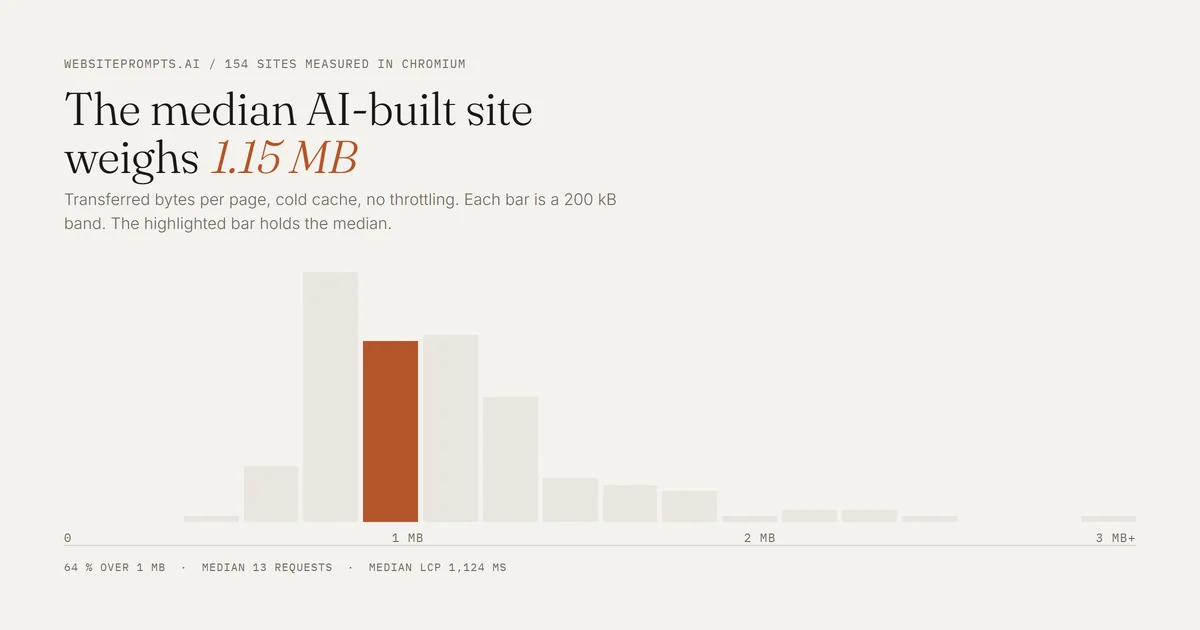
Table of Contents
AI-built sites are not slow by default. They are heavy, and almost all of the weight is images nobody asked to be that size.
The median website in our library transfers 1.15 MB and reaches Largest Contentful Paint in 1.1 seconds. That is faster than most hand-built small business sites, and it is the opposite of what people assume about AI-generated code.
We measured 154 of them. Each site was built from a single prompt in our library, published on Lovable, then loaded in a real Chromium browser at 1366 by 900 with every response recorded until the network went idle. Nothing here is estimated by a tool. These are the bytes the browser actually received.
The numbers
Median transferred: 1,180 kB. The mean is 1,268 kB, so the distribution is only mildly skewed.
Ninetieth percentile: 1,903 kB. The heaviest single site transferred 3,491 kB.
Over 1 MB: 98 of 154 sites, which is 64 per cent. Eleven sites went over 2 MB.
Requests: median 13, maximum 26.
Largest Contentful Paint: median 1,124 ms, seventy fifth percentile 1,804 ms.
LCP over 2.5 seconds: 23 sites, which is 15 per cent.
Thirteen requests is a genuinely good number. A small business site on a typical page builder will make sixty to ninety. These builds produce one JavaScript bundle, one stylesheet and the images, with no plugin chain and no tag manager behind them.
So the request count is not the problem. The bytes are.
Images are roughly 72 per cent of the weight
Broken down by file type across the library, images account for about 72 per cent of transferred bytes, JavaScript for 24 per cent and CSS for 2 per cent.
That single ratio explains the whole distribution. The lightest site we measured, an SEO agency page, transfers 423 kB because it is almost entirely type and rules with one small photograph. The heaviest, a vacation rental page, transfers 3.4 MB because it carries a full bleed hero, a gallery and a set of interior shots, none of them resized.
The four heaviest sites in the library are all photography led: a vacation rental at 3.4 MB, a personal brand page at 2.9 MB, a travel blog at 2.6 MB and an interior design studio at 2.6 MB. The four lightest are all text led. There is no third category.
The JavaScript is not the villain
A quarter of the bytes is JavaScript, and it is close to a fixed cost. Every one of these sites ships React, a router and an animation library whether the page animates much or not. That baseline lands at roughly 250 to 350 kB transferred.
You can argue that a brochure site does not need React at all, and you would be right. But it is not what makes any particular site heavy, because it is the same on the lightest page and on the heaviest. If you want a lighter site, the lever is the photographs.
Three lines that fix most of it
All three belong in the prompt rather than in a clean up afterwards.
Name the image dimensions. Hero images no wider than 1600 px, thumbnails no wider than 600 px. Left alone, the model takes whatever the image source hands it, which is often 2400 px or more.
Ask for lazy loading below the fold explicitly. It already appears on 86 per cent of images in our library, which means roughly one image in seven still loads immediately when it does not need to.
Cap the number of photographs per section. A twelve image gallery is the most reliable way to push a page past 2 MB. Six reads the same and halves the weight.
None of this asks you to understand the build. It asks you to decide the sizes yourself instead of leaving the decision to the model, which is the same principle that governs colour, type and layout.
The honest limits of this measurement
These are single page sites, measured once each, on a fast connection, with a cold cache and no throttling. A visitor on a weak mobile connection will see very different LCP numbers, and the 15 per cent of sites that already exceed 2.5 seconds here will be considerably worse there.
We also measured each page as built, before anyone swapped the generated images for photographs of a real business. In practice that swap usually makes the page heavier, because real photographs arrive straight off a phone at full resolution. If you take one thing from this, take that: the moment you put your own pictures in, resize them.
