Swim Coach Website Prompt — Ultra Minimal Swimming Coach Website Design for Lovable, Claude, Bolt and more
Swimming coach website prompt for Lovable, Claude, Bolt and more — ultra minimal design, oversized Syne hero, 10 sections, animated stat table, full copy. Paste and publish.
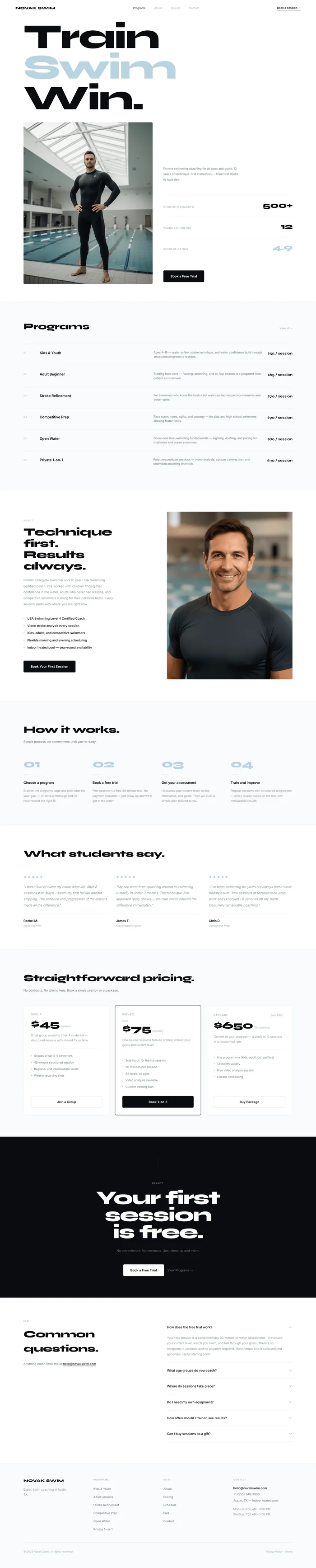
Build a complete, production-ready swimming coach website for **NOVAK SWIM**, a private swim coaching practice. The design is ultra-minimal white — pure white backgrounds, near-black type (#080B0F), and a single soft desaturated blue (#B8D8E8) used as a near-invisible accent. Syne 800 for all display headings, Inter 300–500 for everything else. Maximum negative space, zero decoration, zero clutter. This looks like a luxury personal training brand, not a local sports club. --- ## Tech Stack ``` React + Vite + TypeScript + Tailwind CSS + Framer Motion (motion/react) + shadcn/ui + lucide-react ``` --- ## Design System — Colors ```css :root { --background: 0 0% 100%; /* #FFFFFF — pure white */ --surface: 220 17% 98%; /* #F7F8FA — section alt bg */ --foreground: 222 25% 5%; /* #080B0F — near black */ --foreground-muted: 210 12% 48%; /* #6B7A88 — body text */ --foreground-dim: 210 15% 70%; /* #B0B8C1 — labels, placeholders */ --accent: 200 40% 80%; /* #B8D8E8 — soft blue, used sparingly */ --border: 210 15% 93%; /* #EAECEE — dividers */ --border-strong: 210 15% 87%; /* #D8DCE2 — stronger dividers */ } ``` **Accent usage rule:** `--accent` appears only on: the second word of the hero H1, numbered row labels (01, 02…), the stats "rating" row number, and thin accent lines. Nowhere else. --- ## Typography ``` Google Fonts: Syne: wght 400;500;600;700;800 Inter: wght 300;400;500;600 URL: https://fonts.googleapis.com/css2?family=Syne:wght@400;500;600;700;800&family=Inter:wght@300;400;500;600&display=swap Display / H1: Syne 800, letter-spacing -0.04em, line-height 0.88 Section headings (H2): Syne 800, letter-spacing -0.025em Subheadings (H3): Inter 600, letter-spacing -0.01em Body: Inter 300–400, line-height 1.85 Labels/numbers: Inter 500, letter-spacing 0.1em, UPPERCASE UI text / prices: Syne 700–800 ``` --- ## Global Layout Rule — Centering **Every section uses `max-w-[1200px] mx-auto w-full` on its inner wrapper.** Outer sections use `px-16` on desktop, `px-6` on mobile. Never let content bleed to screen edge. --- ## Button System ```tsx // Primary — dark fill <button className="inline-flex items-center justify-center gap-2 shrink-0 whitespace-nowrap h-[52px] px-8 rounded-[4px] bg-[hsl(var(--foreground))] text-white text-sm font-semibold tracking-wide hover:opacity-85 transition-opacity"> Book a Free Trial </button> // Ghost — outlined <button className="inline-flex items-center justify-center gap-2 shrink-0 whitespace-nowrap h-[52px] px-8 rounded-[4px] bg-transparent text-[hsl(var(--foreground))] text-sm font-medium border border-[hsl(var(--border-strong))] hover:bg-[hsl(var(--surface))] transition-colors"> See Programs </button> // Text link with underline — used in nav and inline CTAs <a className="text-sm font-semibold text-[hsl(var(--foreground))] no-underline border-b border-[hsl(var(--foreground))] pb-[2px] hover:opacity-60 transition-opacity tracking-wide"> Book a session → </a> ``` --- ## Visual Effects ### Scroll Fade-Up Every section content animates on viewport entry: ```tsx <motion.div initial={{ opacity: 0, y: 24 }} whileInView={{ opacity: 1, y: 0 }} viewport={{ once: true, margin: '-60px' }} transition={{ duration: 0.55, ease: [0.22, 1, 0.36, 1] }} > ``` ### Stagger on lists / rows Program rows, process steps, testimonials — stagger by index: ```tsx transition={{ duration: 0.5, ease: [0.22, 1, 0.36, 1], delay: index * 0.06 }} ``` ### Stat counter animation requestAnimationFrame counter from 0 → target on scroll entry, duration 1400ms, cubic-bezier ease-out: ```tsx const useCountUp = (target: number, duration = 1400) => { const [count, setCount] = useState(0); const ref = useRef<HTMLDivElement>(null); useEffect(() => { const observer = new IntersectionObserver(([e]) => { if (!e.isIntersecting) return; let start = 0; const step = (ts: number) => { if (!start) start = ts; const p = Math.min((ts - start) / duration, 1); const ease = 1 - Math.pow(1 - p, 3); setCount(Math.floor(ease * target)); if (p < 1) requestAnimationFrame(step); }; requestAnimationFrame(step); observer.disconnect(); }, { threshold: 0.4 }); if (ref.current) observer.observe(ref.current); return () => observer.disconnect(); }, [target, duration]); return { count, ref }; }; ``` ### Hero word entrance H1 words fade-blur in one by one: ```tsx {['Train', 'Swim', 'Win.'].map((word, i) => ( <motion.span key={word} initial={{ opacity: 0, y: 16, filter: 'blur(6px)' }} animate={{ opacity: 1, y: 0, filter: 'blur(0px)' }} transition={{ duration: 0.5, ease: 'easeOut', delay: i * 0.1 }} className={`block ${word === 'Swim' ? 'text-[hsl(var(--accent))]' : ''}`} > {word} </motion.span> ))} ``` --- ## Section 1 — Navbar ``` Height: 72px Padding: px-16 Background: white Layout: flex justify-between items-center No border-bottom — bleeds into hero naturally Left: "NOVAK SWIM" font-family Syne, font-size 1rem, font-weight 800, letter-spacing -0.01em color hsl(var(--foreground)) Center: nav links (flex gap-10) Programs / About / Results / Contact font-size 0.75rem, font-weight 400 Active (Programs): color hsl(var(--foreground)) Inactive: color hsl(var(--foreground-dim)) No hover underline — just opacity 0.5 on hover Right: "Book a session →" text-link font-size 0.75rem, font-weight 600 border-b 1.5px solid hsl(var(--foreground)), pb-[2px] hover opacity-60 Scroll behavior: On scroll past hero: navbar sticks with subtle border-bottom 1px border-[hsl(var(--border))] useScrollY — motionValue, border appears at scrollY > 80 ``` --- ## Section 2 — Hero ``` Padding: pt-10 px-16 pb-20 Min-height: calc(100vh - 72px) Background: white Display: flex flex-col justify-between Inner wrapper: max-w-[1200px] mx-auto w-full ── TOP: Oversized headline ── H1 (Syne 800): font-size clamp(5rem, 11vw, 11rem) font-weight 800, line-height 0.88, letter-spacing -0.04em color hsl(var(--foreground)) Three words stacked: "Train" — hsl(var(--foreground)) "Swim" — hsl(var(--accent)) "Win." — hsl(var(--foreground)) Animate: word-by-word blur+fade entrance (see Visual Effects) ── BOTTOM: 2-column grid ── grid-cols-2, gap-12, align-items end margin-top 10 (after headline) LEFT — Coach photo: aspect-ratio 4/5 border-radius 4px (barely rounded — almost square crop) overflow hidden [Media brief: image | swim coach at poolside — professional, athletic, confident posture, indoor pool environment, natural light, clean modern facility | gradient overlay: linear-gradient(to top, rgba(8,11,15,0.2) 0%, transparent 40%)] object-fit cover, object-position center RIGHT — Description + Stats table + CTA: padding-bottom 8px flex flex-col, justify-content flex-end Body text: font-size 0.82rem, font-weight 400 color hsl(var(--foreground-muted)) line-height 1.85, max-width 340px margin-bottom 56px "Private swimming coaching for all ages and goals. 12 years of technique-first instruction — from first stroke to race day." Stats table (border-top 1px hsl(var(--border)), margin-bottom 56px): 3 rows, each: flex justify-between items-baseline padding: py-5, border-bottom 1px hsl(var(--border)) (last row: no border) Label: font-size 0.7rem, font-weight 500 color hsl(var(--foreground-dim)), letter-spacing 0.1em, UPPERCASE Number: font-family Syne, font-size 2.2rem, font-weight 800 letter-spacing -0.03em Use useCountUp hook — animate on entry Row 1: "Students coached" → 500 (display "500+") Row 2: "Years experience" → 12 (display "12") Row 3: "Average rating" → display "4.9" (no countup, static) Number color: hsl(var(--accent)) ← only row with accent CTA button: Primary dark button "Book a Free Trial" ``` --- ## Section 3 — Programs ``` Background: hsl(var(--surface)) Border-top: 1px solid hsl(var(--border)) Padding: py-20 px-16 Header row (flex justify-between items-baseline, mb-12): H2: "Programs" — Syne 800, clamp(1.6rem, 3vw, 2.4rem), letter-spacing -0.025em "View all →" text-link: 0.75rem, hsl(var(--foreground-dim)), hover opacity-60 Table rows (flex flex-col, border-top 1px hsl(var(--border))): Each row: grid grid-cols-[48px_1fr_1fr_auto] gap-6 Padding: py-7 Border-bottom: 1px solid hsl(var(--border)) (last row: none) Hover: bg-white transition-colors (subtle row highlight) Number: font-size 0.65rem, font-weight 600 color hsl(var(--accent)), letter-spacing 0.1em Title: font-size 0.98rem, font-weight 600, hsl(var(--foreground)) Description: font-size 0.8rem, font-weight 400, hsl(var(--foreground-muted)), line-height 1.5 Price: Syne font-size 1rem, font-weight 700, hsl(var(--foreground)), white-space nowrap Animate: rows stagger on viewport entry, delay index * 0.06 THE 6 PROGRAMS: 01 | Kids & Youth | Ages 4–15 — water safety, stroke technique, and water confidence built through structured progressive lessons. | $55 / session 02 | Adult Beginner | Starting from zero — floating, breathing, and all four strokes in a judgment-free, patient environment. | $65 / session 03 | Stroke Refinement | For swimmers who know the basics but want real technique improvements and better splits. | $70 / session 04 | Competitive Prep | Race starts, turns, splits, and strategy — for club and high school swimmers chasing faster times. | $90 / session 05 | Open Water | Ocean and lake swimming fundamentals — sighting, drafting, and pacing for triathletes and ocean swimmers. | $80 / session 06 | Private 1-on-1 | Fully personalized sessions — video analysis, custom training plan, and undivided coaching attention. | $110 / session ``` --- ## Section 4 — About the Coach ``` Background: white Padding: py-24 px-16 2-column grid (grid-cols-2, gap-20, align-items center): ── LEFT: Text ── Small label: "About" — Inter 500, 0.62rem, letter-spacing 0.18em, UPPERCASE hsl(var(--foreground-dim)), mb-5 H2: "Technique first.\nResults always." Syne 800, clamp(2rem, 3.5vw, 3rem), letter-spacing -0.03em hsl(var(--foreground)), line-height 1.05, mb-6 Body: "Former collegiate swimmer and 12-year USA Swimming certified coach. I've worked with children finding their confidence in the water, adults who never had lessons, and competitive swimmers training for their personal bests. Every session starts with where you are right now." Inter 300, 0.88rem, hsl(var(--foreground-muted)), line-height 1.9, max-width 420px, mb-10 Checklist (flex flex-col gap-3, mb-12): 5 items: flex items-center gap-3 Dot: w-[5px] h-[5px] rounded-full bg-[hsl(var(--accent))] Text: Inter 500, 0.85rem, hsl(var(--foreground)) Items: • USA Swimming Level 4 Certified Coach • Video stroke analysis every session • Kids, adults, and competitive swimmers • Flexible morning and evening scheduling • Indoor heated pool — year-round availability CTA: Primary button "Book Your First Session" ── RIGHT: Photo ── aspect-ratio 3/4, border-radius 4px, overflow hidden [Media brief: image | swimming coach portrait — professional, warm expression, poolside or pool deck, athletic wear, natural or studio light, clean background | composition-neutral, gradient overlay not needed] object-fit cover, object-position center ``` --- ## Section 5 — Process ``` Background: hsl(var(--surface)) Border-top: 1px solid hsl(var(--border)) Padding: py-24 px-16 Header (mb-16): H2: "How it works." — Syne 800, clamp(1.8rem, 3vw, 2.8rem), letter-spacing -0.025em Subtext: "Simple process, no commitment until you're ready." Inter 400, 0.85rem, hsl(var(--foreground-muted)), mt-3 4-column grid (grid-cols-4, gap-8): Each step: Step number: Syne 800, font-size 3rem, letter-spacing -0.04em color hsl(var(--accent)), line-height 1, mb-6 (01, 02, 03, 04) Thin divider: w-8 h-[1px] bg-[hsl(var(--border-strong))] mb-6 Title: Inter 600, 0.95rem, hsl(var(--foreground)), mb-3 Body: Inter 300, 0.82rem, hsl(var(--foreground-muted)), line-height 1.75 Step 01 — "Choose a program" "Browse the programs page and pick what fits your goal — or send a message and I'll recommend the right fit." Step 02 — "Book a free trial" "First session is a free 30-minute trial. No payment required — just show up and we'll get in the water." Step 03 — "Get your assessment" "I'll assess your current level, stroke mechanics, and goals. Then we build a simple plan tailored to you." Step 04 — "Train and improve" "Regular sessions with structured progression — every lesson builds on the last, with measurable results." ``` --- ## Section 6 — Testimonials ``` Background: white Border-top: 1px solid hsl(var(--border)) Padding: py-24 px-16 Header (mb-16): H2: "What students say." — Syne 800, clamp(1.8rem, 3vw, 2.8rem), letter-spacing -0.025em 3-column grid (grid-cols-3, gap-10): Each testimonial — NO card background, NO border Just: star row + quote + divider + name Stars: 5 × lucide Star (fill hsl(var(--accent)), stroke none, size 14), flex gap-1, mb-6 Quote: Inter 300, 0.92rem, hsl(var(--foreground-muted)), line-height 1.85, mb-6, font-style italic Thin divider: 1px hsl(var(--border)), mb-5 Name: Inter 600, 0.85rem, hsl(var(--foreground)) Detail: Inter 400, 0.72rem, hsl(var(--foreground-dim)), mt-1 TESTIMONIALS: "I had a fear of water my entire adult life. After 8 sessions with Maya, I swam my first full lap without stopping. The patience and progression of the lessons made all the difference." — Rachel M. / Adult Beginner "My son went from splashing around to swimming butterfly in under 3 months. The technique-first approach really shows — his club coach noticed the difference immediately." — James T. / Kids Program Parent "I've been swimming for years but always had a weak freestyle turn. Two sessions of focused race-prep work and I knocked 1.8 seconds off my 100m. Genuinely remarkable coaching." — Chris D. / Competitive Prep ``` --- ## Section 7 — Pricing ``` Background: hsl(var(--surface)) Border-top: 1px solid hsl(var(--border)) Padding: py-24 px-16 Header (mb-14): H2: "Straightforward pricing." — Syne 800, clamp(1.8rem, 3vw, 2.8rem) Subtext: "No contracts. No joining fees. Book a single session or a package." Inter 400, 0.85rem, hsl(var(--foreground-muted)), mt-3 3 pricing cards (grid-cols-3, gap-6): Card structure: Background: white Border: 1px solid hsl(var(--border)) Border-radius: 8px Padding: p-8 No shadow on default — shadow-sm on hover Plan name: Inter 600, 0.7rem, letter-spacing 0.14em, UPPERCASE, hsl(var(--foreground-dim)), mb-3 Price: Syne 800, font-size 2.8rem, letter-spacing -0.04em, hsl(var(--foreground)), line-height 1 "/session" suffix: Inter 400, 0.78rem, hsl(var(--foreground-dim)), ml-1 Description: Inter 300, 0.82rem, hsl(var(--foreground-muted)), line-height 1.7, mt-4, mb-6 Divider: 1px hsl(var(--border)), mb-6 Features list (flex flex-col gap-2.5): Each: flex items-start gap-2.5 Dot: w-[4px] h-[4px] rounded-full bg-[hsl(var(--accent))] mt-[7px] flex-shrink-0 Text: Inter 400, 0.8rem, hsl(var(--foreground-muted)) CTA button: full-width at bottom, mt-8 PRICING CARDS: Card 1 — GROUP Price: $45 Desc: "Small group sessions (max 4 students) — structured lessons with shared focus time." Features: • Groups of up to 4 swimmers • 45-minute structured session • Beginner and intermediate levels • Weekly recurring slots CTA: "Join a Group" — Ghost button Card 2 — PRIVATE [Featured — border 1.5px hsl(var(--foreground)), shadow-md] Price: $75 (avg between 55–110, shown as starting) "from" prefix above price: Inter 400, 0.7rem, hsl(var(--foreground-dim)) Desc: "One-to-one sessions tailored entirely around your goals and current level." Features: • Sole focus for the full session • 60 minutes per session • All levels, all ages • Video analysis available • Custom training plan CTA: "Book 1-on-1" — Primary dark button Card 3 — PACKAGE (10 sessions) Price: $650 "/10 sessions" suffix (saves $100+ vs individual) Small savings tag: "Save $100+" — tiny pill hsl(var(--surface)), text hsl(var(--foreground-dim)), font-size 0.62rem Desc: "Commit to your progress — a block of 10 sessions at a discounted rate." Features: • Any program mix (kids, adult, competitive) • 12-month validity • Free video analysis session • Flexible scheduling CTA: "Buy Package" — Ghost button ``` --- ## Section 8 — Photo CTA Banner ``` Background: hsl(var(--foreground)) — near black (#080B0F) Padding: py-24 px-16 Position: relative, overflow hidden [No photo — keep it purely typographic for the premium minimal feel] Decorative: barely visible accent line top center 1px h-[40px] bg-[hsl(var(--accent)/0.15)] mx-auto mb-16 Content (text-center, max-w-[600px] mx-auto): Small label: "Ready?" — Inter 500, 0.62rem, letter-spacing 0.22em, UPPERCASE color hsl(var(--accent) / 0.6), mb-5 H2: "Your first session\nis free." Syne 800, clamp(3rem, 6vw, 5.5rem), letter-spacing -0.04em color white, line-height 0.9, mb-8 Subtext: "No commitment. No contracts. Just show up and swim." Inter 300, 0.9rem, color rgba(255,255,255,0.4), line-height 1.8, mb-12 Two buttons (flex justify-center gap-4): 1. "Book a Free Trial" — height 52px, bg white, text hsl(var(--foreground)), rounded-[4px], font-weight 600 2. "View Programs →" — text-only, color rgba(255,255,255,0.4), font-size 0.85rem, hover opacity-80 ``` --- ## Section 9 — FAQ ``` Background: white Border-top: 1px solid hsl(var(--border)) Padding: py-24 px-16 2-column grid (grid-cols-2, gap-20): LEFT (sticky top-24): Label: "FAQ" — Inter 500, 0.62rem, letter-spacing 0.18em, UPPERCASE, hsl(var(--foreground-dim)), mb-5 H2: "Common questions." — Syne 800, clamp(1.8rem, 3vw, 2.8rem), letter-spacing -0.025em, mb-6 Body: "Anything else? Email me at hello@novakswim.com" Inter 400, 0.85rem, hsl(var(--foreground-muted)), line-height 1.8 RIGHT — Accordion (6 questions): Each item: border-bottom 1px hsl(var(--border)) Question row: flex justify-between items-center, py-6, cursor-pointer Q text: Inter 500, 0.9rem, hsl(var(--foreground)) ChevronDown icon: hsl(var(--foreground-dim)), size 18, rotate 0→180 when open Answer: AnimatePresence + motion.div initial: height 0, opacity 0 animate: height 'auto', opacity 1 transition: duration 0.22, ease 'easeInOut' Text: Inter 300, 0.85rem, hsl(var(--foreground-muted)), line-height 1.8, pb-6 QUESTIONS: Q1: How does the free trial work? A: Your first session is a complimentary 30-minute in-water assessment. I'll evaluate your current level, watch you swim, and talk through your goals. There's no obligation to continue and no payment required. Most people find it a relaxed and genuinely useful starting point. Q2: What age groups do you coach? A: I work with swimmers from age 4 through adult. Kids' lessons run in a structured but relaxed format. Adult sessions are patient and judgment-free — it's never too late to learn to swim or improve. Competitive coaching is available for junior and masters swimmers of any level. Q3: Where do sessions take place? A: Sessions are held at a heated indoor 25-metre pool in central Austin, TX. The facility is available year-round with morning and evening time slots. Exact address is shared after booking. Q4: Do I need my own equipment? A: No — all equipment (pull buoys, kick boards, fins, and paddles) is provided. You just need a swimsuit, goggles, and a towel. I'll recommend any personal equipment worth investing in once I've assessed your swimming. Q5: How often should I train to see results? A: Most students see clear improvement with 1–2 sessions per week. For competitive swimmers preparing for a race or season, 2–3 sessions is more effective. We'll agree a realistic schedule during your trial session. Q6: Can I buy sessions as a gift? A: Yes — gift sessions and packages are available. Send an email to hello@novakswim.com with the recipient's details and I'll arrange a gift voucher with any custom message you'd like. ``` --- ## Section 10 — Footer ``` Background: hsl(var(--surface)) Border-top: 1px solid hsl(var(--border)) Padding: py-16 px-16 Grid (grid-cols-4, gap-12, mb-12): Col 1 — Brand: "NOVAK SWIM" — Syne 800, 1rem, hsl(var(--foreground)) Tagline: "Expert swim coaching in Austin, TX." Inter 300, 0.82rem, hsl(var(--foreground-muted)), mt-4, max-w-[200px], line-height 1.7 Col 2 — Programs: Label: "PROGRAMS" — Inter 500, 0.62rem, letter-spacing 0.16em, hsl(var(--foreground-dim)), mb-5 Links (flex flex-col gap-3, Inter 400, 0.82rem, hsl(var(--foreground-muted)) hover hsl(var(--foreground))): Kids & Youth · Adult Lessons · Stroke Refinement · Competitive Prep · Open Water · Private 1-on-1 Col 3 — Info: Label: "INFO" Links: About · Pricing · Schedule · FAQ · Contact Col 4 — Contact: Label: "CONTACT" Email: hello@novakswim.com — Inter 500, 0.85rem, hsl(var(--foreground)) Phone: +1 (555) 248-3900 Location: Austin, TX — indoor heated pool Hours (mt-4, Inter 300, 0.78rem, hsl(var(--foreground-muted)), line-height 1.9): Mon–Fri: 6:00 AM – 8:00 PM Sat–Sun: 7:00 AM – 5:00 PM Bottom bar (border-top 1px hsl(var(--border)), pt-8, flex justify-between items-center): "© 2025 Novak Swim. All rights reserved." — Inter 400, 0.72rem, hsl(var(--foreground-dim)) "Privacy Policy · Terms" — same style ``` --- ## Animations Summary ``` Navbar: - Border-bottom appears on scroll (opacity 0→1, threshold 80px) - On mobile: slide-down from top after mount Hero: - H1 words: stagger blur+fade, 0.1s per word, starting 0.1s delay - Photo: fade-in + scale 0.97→1, duration 0.7s, delay 0.2s - Stats table rows: stagger 0.06s per row, delay after photo - CTA button: fade up, delay 0.8s All sections: - motion.div whileInView once:true - opacity 0→1, y 24→0, duration 0.55, cubic-bezier [0.22, 1, 0.36, 1] - Program rows: stagger delay index * 0.06 - Process steps: stagger delay index * 0.08 FAQ: - AnimatePresence height animation, 0.22s easeInOut - Chevron rotate transition-transform 0.22s ``` --- ## Responsive — Mobile Breakpoints ``` Navbar (< md): - Logo + hamburger icon only - Menu slides down on open (full-width, bg white) Hero (< md): - flex-col: headline → photo → stats table → CTA (stacked) - H1 font-size: clamp(3.5rem, 12vw, 5rem) - Photo: aspect-ratio 3/2 (landscape), full width - Stats table: stays as rows, smaller number (1.6rem) Programs (< md): - grid-cols-[32px_1fr_auto] (hide description column) - Program rows: show only number + title + price About (< md): - grid-cols-1: photo first, text below - Photo: aspect-ratio 3/2 Process (< md): - grid-cols-2 Testimonials (< md): - grid-cols-1 Pricing (< md): - grid-cols-1 Photo CTA (< md): - H2 font-size: 2.8rem FAQ (< md): - grid-cols-1 (header above accordion) Footer (< md): - grid-cols-2 then grid-cols-1 below sm ``` --- ## Key Dependencies ```json { "framer-motion": "^12.x", "lucide-react": "^0.400.x", "@radix-ui/react-accordion": "latest", "tailwindcss": "^3.x" } ``` Icons used: ChevronDown, Star, Check, ArrowRight, Menu, X --- ## Quick Notes - Brand name is **NOVAK SWIM** — replace with coach's name before publishing. - Email **hello@novakswim.com** and phone **(555) 248-3900** are placeholders. - The `--accent` color (#B8D8E8) should feel almost invisible — a whisper of blue, not a statement. If it looks too prominent, reduce opacity further. - The Hero CTA section (Section 8) is intentionally photo-free — the bold black-on-white typographic contrast is stronger than any pool image there.