Car Detailing Website Prompt — Free AI Prompt for Auto Detailing & Car Care Websites
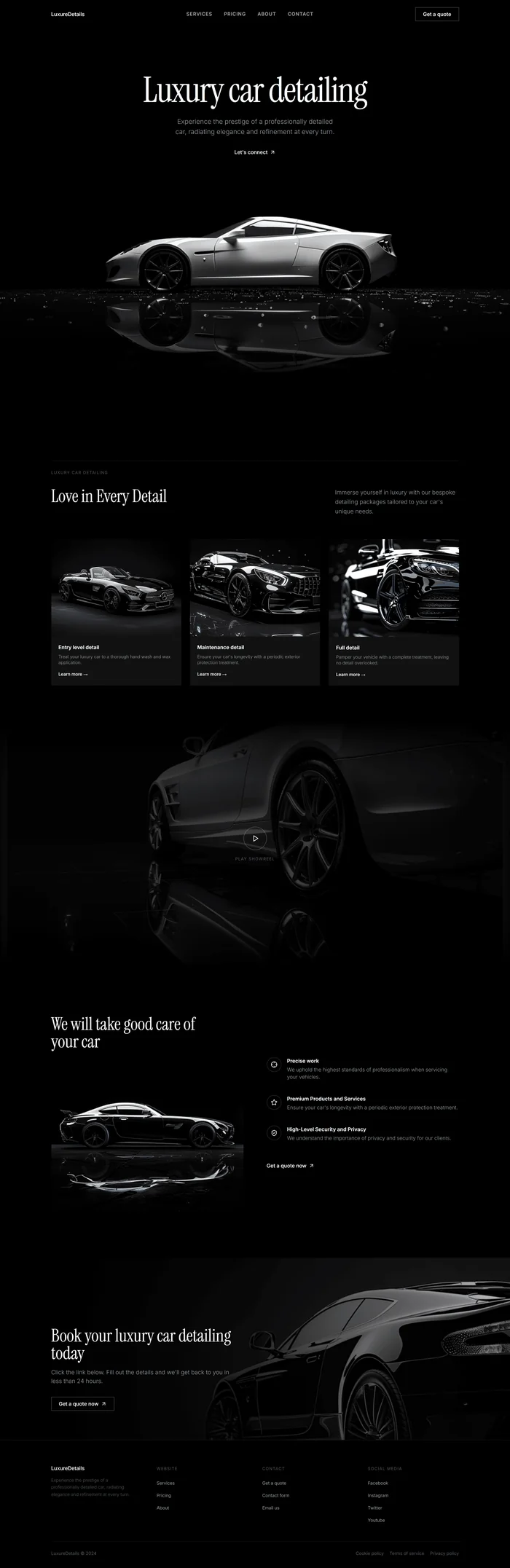
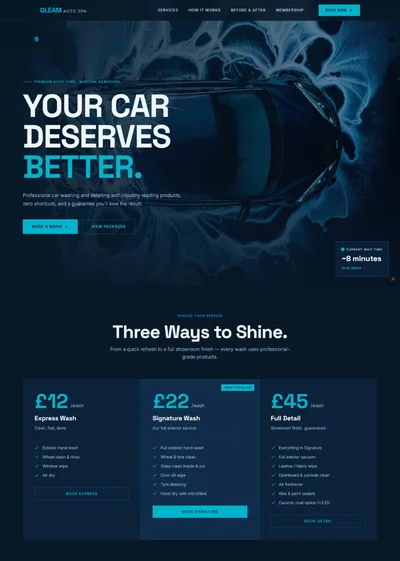
Free AI prompt for a dark, cinematic car detailing website design — paste into Bolt, Lovable or v0. Monochrome, editorial, Instrument Serif typography.
Build a dark, luxury single-page landing page for a premium car detailing service called **"LuxureDetails"** using React + Vite + TypeScript + Tailwind CSS + Framer Motion (motion/react) + lucide-react. The aesthetic is editorial monochrome — pure black backgrounds, white typography, cinematic car photography, zero color distraction. **Tech Stack:** React + Vite + TypeScript + Tailwind CSS + Framer Motion (motion/react) + lucide-react --- ## Design System — Colors ```css :root { --background: 0 0% 0%; --background-soft: 0 0% 5%; --foreground: 0 0% 100%; --foreground-muted: 0 0% 60%; --foreground-faint: 0 0% 35%; --border: 0 0% 15%; --card: 0 0% 7%; } ``` No accent color. Pure monochrome throughout. The only visual variety comes from the car photography. --- ## Typography ```html <link href="https://fonts.googleapis.com/css2?family=Instrument+Serif:ital@0;1&family=Inter:wght@300;400;500;600&display=swap" rel="stylesheet"> ``` - Display headings (H1, H2): Instrument Serif, regular, large tracking — editorial feel - Body / UI: Inter, weights 300–500 - Nav links: Inter 500, 13px, uppercase, letter-spacing 0.08em - Labels / captions: Inter 400, 11px, uppercase, letter-spacing 0.12em, `--foreground-faint` --- ## Texture Overlay ```css .grain { position: fixed; inset: 0; z-index: 50; pointer-events: none; background-image: url('/texture.png'); background-size: 200px 200px; mix-blend-mode: overlay; opacity: 0.35; } ``` --- ## Global Layout Rule Every section's inner content must be wrapped in `max-w-[1120px] mx-auto w-full px-6` (or `px-8` on desktop). Apply this consistently to navbar, hero content, all body sections, and footer. --- ## Section 1 — Navbar Layout: `fixed top-0 left-0 right-0 z-40`, full-width, `py-5`. Inner wrapper: `max-w-[1120px] mx-auto w-full px-6 flex items-center justify-between`. Background: `bg-black/80 backdrop-blur-sm` Left: `"LuxureDetails"` — Inter 500, 14px, white. Center (desktop): Nav links — `"Services" · "Pricing" · "About" · "Contact"` — Inter 500, 13px, uppercase, letter-spacing 0.08em, text-white/70 hover:text-white transition-colors. Right: `"Get a quote"` — white outlined button, `border border-white/30 rounded-sm px-5 py-2 text-sm hover:bg-white hover:text-black transition-all duration-300`. Mobile: Hamburger → full-screen black overlay with stacked links. --- ## Section 2 — Hero Container: `min-h-screen relative overflow-hidden flex flex-col bg-black` Inner content wrapper: `max-w-[1120px] mx-auto w-full px-6` Hero content container class: ```jsx ``` Inside: **H1:** `"Luxury car detailing"` — Instrument Serif, `text-5xl md:text-7xl lg:text-8xl`, white, `leading-[0.95] tracking-[-2px]`, max-width 700px, centered. **Subtext:** `"Experience the prestige of a professionally detailed car, radiating elegance and refinement at every turn."` — Inter 300, `text-base md:text-lg text-white/60`, max-width 440px, centered, leading-relaxed. **CTA:** `"Let's connect ↗"` — Inter 500, 14px, white, inline with `ArrowUpRight` icon from lucide-react, `hover:opacity-70 transition-opacity`. **Hero image — full width, centered, below text:** ```jsx ``` Bottom fade over image: `absolute bottom-0 left-0 right-0 h-48 bg-gradient-to-t from-black to-transparent z-10` **Animations (Framer Motion):** - H1: `initial={{ opacity: 0, y: 40 }} animate={{ opacity: 1, y: 0 }} transition={{ duration: 0.9, ease: [0.16, 1, 0.3, 1] }}` - Subtext: same, `delay: 0.2` - CTA: same, `delay: 0.4` - Hero image: `initial={{ opacity: 0, y: 30 }} animate={{ opacity: 1, y: 0 }} transition={{ duration: 1.1, delay: 0.5, ease: 'easeOut' }}` --- ## Section 3 — Services Background: `bg-black pt-32 pb-24`. Inner: `max-w-[1120px] mx-auto w-full px-6`. Top label: `"Luxury car detailing"` — Inter 400, 11px, uppercase, letter-spacing 0.12em, text-white/40, `border-t border-white/10 pt-6 mb-8`. Section header (2-column desktop, `grid grid-cols-1 md:grid-cols-2 gap-8`): - Left: H2 `"Love in Every Detail"` — Instrument Serif, `text-4xl md:text-5xl`, white. - Right: `"Immerse yourself in luxury with our bespoke detailing packages tailored to your car's unique needs."` — Inter 300, text-white/60, text-base, leading-relaxed, max-width 340px. 3-column service card grid (`grid grid-cols-1 md:grid-cols-3 gap-6 mt-16`). Each card: `bg-[var(--card)] rounded-sm overflow-hidden group cursor-pointer`. Card image: `aspect-[3/2] overflow-hidden`. Image: `w-full h-full object-cover object-center transition-transform duration-500 group-hover:scale-[1.02]`. **Card 1 — Entry level detail** ```jsx ``` Title: `"Entry level detail"` — Inter 600, 14px, white. Body: `"Treat your luxury car to a thorough hand wash and wax application."` — Inter 300, 12px, text-white/50. Link: `"Learn more →"` — Inter 500, 12px, white, group-hover:underline. **Card 2 — Maintenance detail** ```jsx ``` Title: `"Maintenance detail"`. Body: `"Ensure your car's longevity with a periodic exterior protection treatment."`. Link: `"Learn more →"`. **Card 3 — Full detail** ```jsx ``` Title: `"Full detail"`. Body: `"Pamper your vehicle with a complete treatment, leaving no detail overlooked."`. Link: `"Learn more →"`. Animations: Cards stagger on scroll — `initial={{ opacity: 0, y: 50 }} whileInView={{ opacity: 1, y: 0 }} transition={{ delay: index * 0.15, duration: 0.7 }} viewport={{ once: true }}`. --- ## Section 4 — Showreel The entire section is a link to YouTube. No video element — uses a poster image with a play button overlay: ```jsx {/* Poster image */} {/* Dark overlay */} {/* Top/bottom fades */} {/* Play button */} Play showreel ``` --- ## Section 5 — Why Us / Features Layout: `grid grid-cols-1 lg:grid-cols-2 gap-16 items-center py-32`. Inner: `max-w-[1120px] mx-auto w-full px-6`. **Left column:** H2: `"We will take good care of your car"` — Instrument Serif, `text-4xl md:text-5xl`, white, max-width 420px. ```jsx ``` **Right column — 3 feature items** (`flex flex-col gap-10`): Icon circle: `w-10 h-10 rounded-full border border-white/20 flex items-center justify-center`. - `Crosshair` icon — **"Precise work"** — `"We uphold the highest standards of professionalism when servicing your vehicles."` - `Star` icon — **"Premium Products and Services"** — `"Ensure your car's longevity with a periodic exterior protection treatment."` - `ShieldCheck` icon — **"High-Level Security and Privacy"** — `"We understand the importance of privacy and security for our clients."` CTA: `"Get a quote now ↗"` — `ArrowUpRight` from lucide-react, Inter 500, 14px, white, `hover:opacity-60 transition-opacity`, below features. Feature items stagger on scroll: `delay: index * 0.2`. --- ## Section 6 — CTA / Booking Container: `relative overflow-hidden min-h-[500px] flex items-end pb-20`. Inner content: `max-w-[1120px] mx-auto w-full px-6 relative z-20`. ```jsx ``` Content (max-width 520px): - H2: `"Book your luxury car detailing today"` — Instrument Serif, `text-4xl md:text-5xl`, white. - Body: `"Click the link below. Fill out the details and we'll get back to you in less than 24 hours."` — Inter 300, text-white/60, mt-4. - CTA: `"Get a quote now ↗"` — white outlined button, same style as navbar CTA, mt-8. --- ## Section 7 — Footer Layout: `bg-black border-t border-white/10 py-16`. Inner: `max-w-[1120px] mx-auto w-full px-6`. Top row: `grid grid-cols-1 md:grid-cols-4 gap-10`. **Column 1 — Brand:** `"LuxureDetails"` — Inter 500, 14px, white. `"Experience the prestige of a professionally detailed car, radiating elegance and refinement at every turn."` — Inter 300, 12px, text-white/40, max-width 220px, mt-3. **Column 2 — Website:** Label: `"Website"`. Links: Services · Pricing · About. **Column 3 — Contact:** Label: `"Contact"`. Links: Get a quote · Contact form · Email us. **Column 4 — Social Media:** Label: `"Social Media"`. Links: Facebook · Instagram · Twitter · Youtube. Bottom bar (`border-t border-white/10 mt-12 pt-6 flex justify-between`): - Left: `"LuxureDetails © 2024"` — text-white/30 text-xs. - Right: `"Cookie policy · Terms of service · Privacy policy"` — text-white/30 text-xs. --- ## Animations Summary | Element | Animation | Trigger | |---|---|---| | H1 hero | Fade up + opacity, 0.9s | On mount | | Hero image | Fade up y:30→0, 1.1s, delay 0.5s | On mount | | Service cards | Stagger fade-up, 0.15s delay each | On scroll | | Features list | Stagger fade-up, 0.2s delay each | On scroll | | Section headings | Fade up, 0.7s | On scroll (once) | --- ## Responsive - Mobile (<768px): Single column throughout, `px-6`, hero H1 `text-5xl`, nav → hamburger fullscreen overlay. - Desktop (≥1024px): 2-col features, 3-col cards, hero H1 `text-8xl`. --- ## Key Dependencies ```json { "motion": "^12.x", "lucide-react": "^0.462.0" } ``` Icons used: `ArrowUpRight`, `Play`, `Crosshair`, `Star`, `ShieldCheck`